
Save 20 Minutes: When to Read a YouTube Summary or Watch
Save 20 Minutes: When to Read a YouTube Summary or Watch

A summary works fine for triage: figuring out if a video is worth your time, pulling key points from a lecture, or scanning news coverage before you commit twenty minutes. Watch the full video when you need visuals (a repair demo, a recipe technique), exact quotes, or numbers you plan to cite. Either way, verify anything specific against the transcript and timestamps before you repeat it as fact. The fastest paths to a summary right now: a paste-URL web tool, a browser extension, or copying the transcript into ChatGPT yourself.
TL;DR:
- Paste-URL summarizers are the fastest for quick triage, delivering a TL;DR within a minute, but may struggle with captionless videos.
- Using transcripts with ChatGPT offers the most control, but requires splitting long videos and verifying claims against timestamps.
- Summaries can misstate details due to garbled captions or hallucinations, so always confirm key points directly from the transcript or video segments.
- Building a library of saved summaries and timestamps helps streamline recurring research or content analysis workflows.
- Video summaries primarily aid decision-making and broad understanding, but cannot replace visual, tonal, or detailed contextual comprehension.
Table of Contents
- Fast Ways to Get a YouTube Summary Right Now
- Should You Read a Summary or Watch the Whole Thing?
- How to Turn Any YouTube Video Into a Reliable Summary
- Why Summaries Sometimes Get It Wrong
- Where a Purpose-Built Summarizer Fits
- What Summaries Mean for Creators and Viewer Engagement
- Copyright and Fair Use Questions Around AI Summaries
- A Practical Way to Actually Use These Tools
- Try Baitless: Get Your First Summaries Free
- Where to Verify These Details Yourself
- Sources
- FAQ
Fast Ways to Get a YouTube Summary Right Now
Four practical routes exist, and all trades speed for control differently.
Paste-URL web apps are the quickest option. Drop a link into a summarizer and you typically get a TL;DR, key points, and a timestamped breakdown in under 60 to 90 seconds. Most of these tools pull the existing caption track first; if a video has no captions, only some tools fall back to transcribing the audio directly, so check that before trusting the result on a caption-free upload.
Browser extensions generate a summary right inside the YouTube page, one click, no tab switching. The catch is they’re desktop-only in most cases, and installing one means granting permissions to read page content, which is worth knowing before you add a dozen extensions to your browser.
Transcript into ChatGPT gives you the most control. Copy the transcript, paste it with a prompt asking for a TL;DR, key points, or a specific format like an outline or bullet summary. It’s slower than a one-click tool, and long videos (over an hour) often need to be split into chunks since transcript length can exceed what a single prompt handles cleanly.
YouTube’s own built-in AI, rolled out through 2026, offers a convenient zero-setup summary for some videos. Coverage is uneven. It depends on your region, your account status, and the type of video, so it’s not yet a universal button every viewer sees.
- Paste-URL tools: fastest, best for quick triage
- Extensions: convenient but desktop-bound
- Transcript to ChatGPT: most flexible, slowest
- YouTube’s built-in AI: free when available, but limited rollout means it’s not consistent across accounts
Saving and exporting summaries matters more than most people expect; tools like Adwize from EVOLVE Commerce illustrate how content-format trade-offs can affect discovery and engagement. Dedicated tools often let you build a library you can search later; copy-paste-into-ChatGPT sessions usually don’t persist unless you save them yourself.
Should You Read a Summary or Watch the Whole Thing?
Summaries win on structure. They compress lengthy rambling into a few key points that actually matter, which is exactly what you need when you’re deciding whether a video is worth a full watch. Watching wins when the content is inherently visual (a plumbing repair, a knife skill, a dance tutorial) or when the argument’s nuance depends on tone, hesitation, or exact phrasing that a summary flattens out.
Run through this quick checklist before choosing:
- Triage — deciding if a video is worth your time? Summary.
- Research scan — gathering a broad view across many videos on a topic? Summary.
- Citation need — planning to quote a number or a direct statement? Watch, or at minimum verify the transcript line.
- Demo replication — following a physical or visual process? Watch.
- Exam or deep study — need full comprehension, not just highlights? Watch, then use the summary as a review tool afterward.
Pro Tip: Summarize first to decide if a video earns your attention, then jump straight to the timestamps that matter instead of watching from the start. You get the triage speed of a summary and the fidelity of watching, without sitting through the filler in between.
How to Turn Any YouTube Video Into a Reliable Summary
The fast route: paste the link into a summarizer, get a TL;DR and key points back, then use the generated timestamps to jump straight to the segments you actually need. This works for most standard uploads with existing captions.
The custom route takes more effort but gives you more control:
- Open the video’s transcript panel and copy the full text.
- Paste it into ChatGPT with a specific prompt: “Summarize this into a TL;DR, five key points, and a chapter breakdown.”
- For videos over roughly 40 to 50 minutes, split the transcript into two or three chunks and summarize each separately, then merge the results, since long transcripts can exceed what a single prompt processes well.
Before you rely on any specific fact from either route, open the transcript and click through to the exact timestamp the summary cites. Confirm the number, quote, or claim actually appears there.
Shorts need a different approach entirely, since there’s rarely a meaningful summary to generate for a 30 second clip; treat them as quick-watch content instead. Long-form videos (podcasts, lectures, panel discussions) benefit most from chapter-style summaries broken into topic segments rather than one flat TL;DR.
Why Summaries Sometimes Get It Wrong
The biggest failure mode isn’t the AI itself. It’s the input. Auto-generated captions on videos with heavy accents, background noise, or fast crosstalk produce garbled text, and a summarizer built on garbled captions produces a garbled summary. Tools that transcribe audio directly when captions are missing or poor tend to hold up better here than ones that depend entirely on YouTube’s caption track.
AI hallucination is the second risk. Summarizers can misstate a number, get a date wrong, or strip a quote of the context that changed its meaning. This happens more often on long, dense videos where the model has to compress heavily.
Run a quick verification pass before trusting a specific claim:
- Click the timestamp the summary points to.
- Read a few lines before and after it in the transcript, not just the exact quoted line.
- If the claim depends on something visual (a chart, a demonstration), confirm it by watching that segment, not just reading the transcript.
Retention data backs up why this matters. YouTube’s own retention reports show which segments of a video actually hold viewer attention, and those tend to be the same segments worth double-checking when a summary makes a specific claim. A summary is only as reliable as the transcript it’s built on.
Where a Purpose-Built Summarizer Fits
A one-off summary from a general chatbot works fine occasionally. A purpose-built tool starts to matter once you’re doing this daily or weekly.
Baitless generates concise summaries with clear watch-or-skip recommendations, built into a Chrome extension so you don’t have to leave the video page or juggle a separate transcript window. The interface breaks a video into what to focus on and what’s safe to skip, which is a different job than a generic chat summary that just compresses text.
A purpose-built tool tends to make more sense once you notice:
- You’re summarizing several videos a week, not just one occasionally.
- You want a saved library of past summaries instead of re-pasting transcripts every time.
- You rely on clickable timestamps to jump straight to a specific moment.
- You need export options to pull summaries into notes or research documents.
Some summarizers offer a free tier with a limited number of summary credits to test the workflow before deciding whether to subscribe.
Pro Tip: If you’re a student or researcher tracking a dozen videos on the same topic, saving each summary in one place beats re-running the same prompt in a chat window every time.
What Summaries Mean for Creators and Viewer Engagement
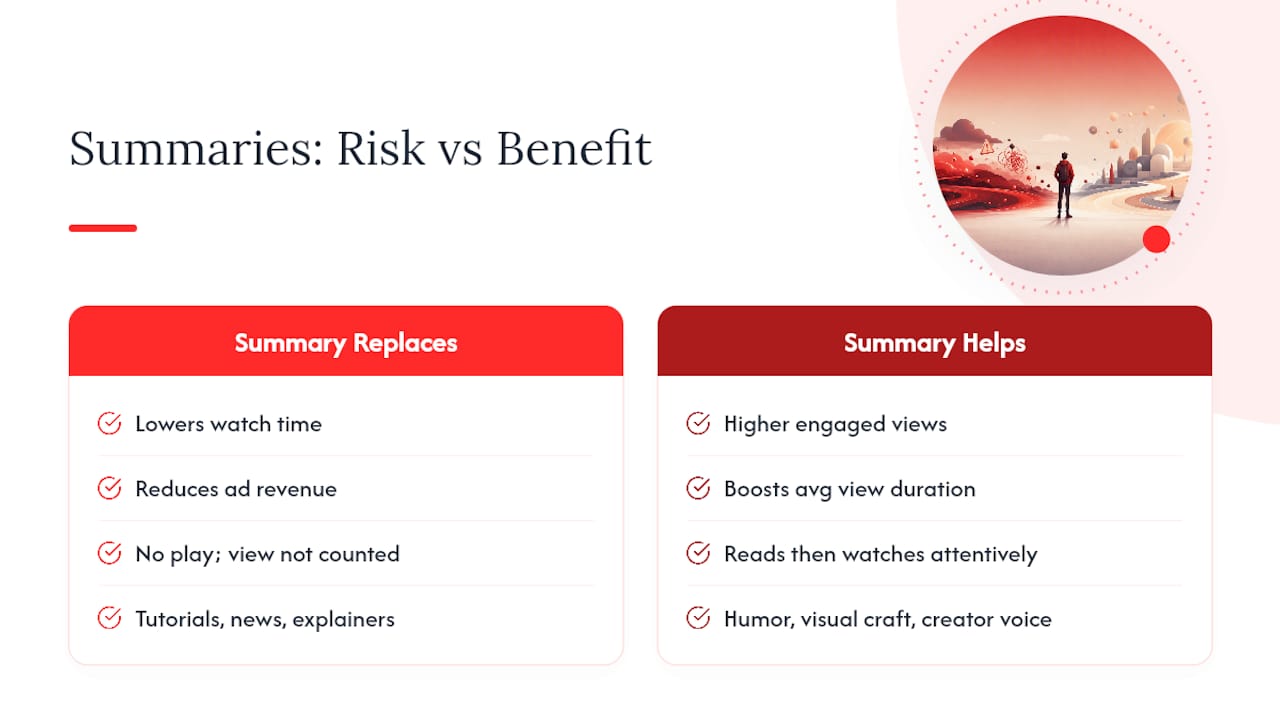
Creators have mixed feelings about summarization tools, and the concern is fair. If a viewer gets everything they need from a TL;DR, they never click play, and that view never counts toward watch time or ad revenue. A 20-minute video reduced to five bullet points can genuinely cannibalize the exact engagement metric that determines a channel’s earnings and algorithmic reach.
But the picture isn’t one-sided. A good summary often works as a discovery filter rather than a replacement. Someone who reads a summary and decides the topic is exactly what they need is far more likely to watch the full video attentively than someone who clicked in blind and bounced after ninety seconds. YouTube’s own engagement metrics, including average view duration and engaged views, reward the second kind of viewer far more than the first.
The videos most vulnerable to summarization are ones built almost entirely around information delivery, tutorials, news recaps, explainer content, where the value lives in the facts, not the presentation. Videos built around personality, humor, visual craft, or a creator’s specific voice hold up better, because a text summary simply can’t replicate what made someone want to watch in the first place. Creators who lean into that distinction, building content that rewards actual viewing rather than just informational extraction, tend to be more resistant to summarization eating into their numbers.
Copyright and Fair Use Questions Around AI Summaries
Summarizing a video is generally treated differently than rehosting or redistributing its content. A text summary that extracts key points and ideas, without reproducing large verbatim chunks of dialogue or the video itself, tends to fall closer to commentary or fair use territory than outright infringement. The legal line gets blurrier the more a “summary” starts to look like a near-complete transcript republished elsewhere, especially if it’s monetized independently of the original creator.
Quoting short passages for context or citation is standard practice and low risk. Publishing a full transcript as a standalone product without permission is a different matter entirely, since that comes closer to reproducing the copyrighted work itself rather than commenting on it.
None of this is a substitute for actual legal advice, and copyright rules vary by jurisdiction. If you’re building anything commercial around bulk-summarizing other people’s videos, rather than using summaries for personal research or casual viewing decisions, it’s worth getting real legal input specific to where you operate rather than relying on general assumptions about fair use.
A Practical Way to Actually Use These Tools
Treat a summary as a filter, not a final answer. Summarize first to decide if a video earns your full attention, then watch only the timestamped segments that matter for your actual goal. Export the summary as a note if you’ll need it again later.
Whatever you do, verify before you act. If a number, quote, or claim from a summary is going into an email, a report, or a decision, check it against the transcript first. Summaries save time. They don’t replace judgment.
— Sergio
Try Baitless: Get Your First Summaries Free
Baitless is the direct alternative to piecing together transcripts and chat prompts yourself. It’s a Chrome extension that hands you a TL;DR, key moments, and clear watch-or-skip guidance the moment you land on a video, with no transcript copying and no separate chat window.

Getting started takes about two minutes. Install the extension, open any YouTube video, and you’ll see a summary with watch/skip recommendations and clickable timestamps appear right on the page. The Free plan includes 25 summary credits, enough to test the workflow across a real week of videos before deciding if it’s worth keeping.
If you need to watch videos daily or want a saved library of past summaries instead of starting from scratch every time, some subscription plans unlock higher credit limits for that kind of regular use. Check the Baitless pricing page to see current plan details and pick the option that matches how often you actually summarize.
Where to Verify These Details Yourself
For a deeper look at how YouTube measures engagement and retention, YouTube Studio’s analytics documentation covers watch time, impressions, and audience reports directly. For technical explainers on summarization workflows and chunking strategies, browse Baitless’s articles on AI-powered YouTube summaries.
FAQ
What Is a YouTube Summary?
A YouTube summary is a condensed version of a video’s content, usually a TL;DR, a list of key points, and timestamps linking back to specific moments. It’s built from the video’s transcript rather than the video itself, so its accuracy depends entirely on transcript quality.
How Do You Convert a YouTube Video Into a Summary?
The fastest way is pasting the video’s URL into a summarizer like Baitless, which returns a TL;DR and timestamped key points in under a couple minutes. For more control, open the transcript, copy it, and paste it into ChatGPT with a prompt requesting a specific summary format.
Can ChatGPT Summarize YouTube Videos?
ChatGPT can summarize a YouTube video, but only if you provide it the transcript text yourself, it can’t pull the video or transcript directly on its own. Copy the transcript from YouTube’s transcript panel, paste it in with a clear prompt, and split long transcripts into chunks if they exceed what one prompt handles well.
How Do You Write a Good Summary of a YouTube Video?
Start with the transcript, not your memory of watching it, since that keeps the summary anchored to what was actually said. Structure it as a short TL;DR followed by three to five key points, and attach timestamps to any specific claim so readers (or you, later) can verify it against the source.
Is a Video Summary Actually Helpful, or Just Faster?
It’s genuinely helpful for triage and research scanning, letting you cover more ground than watching everything start to finish. It’s not a full substitute when you need exact quotes, visual demonstrations, or nuanced context, those still call for watching the actual segment.