
Under a Minute: Summarize YouTube Videos Using AI
Under a Minute: Summarize YouTube Videos Using AI

Yes: you can get a reliable, timestamped summary of almost any YouTube video by pulling its transcript and running it through an LLM. For most busy users, the fastest route is a browser extension or URL-to-summary tool like Baitless, which reads captions and returns a formatted breakdown with clickable timestamps. If the video has no clean captions, the more accurate route is transcribing the audio first with Whisper, then summarizing. Either way, you skip the scrubbing and skimming.
TL;DR:
- Automated YouTube video summaries rely on extracting transcripts, with high-quality ASR like Whisper enhancing accuracy when captions are poor.
- For quick cases, copying a video’s URL into a caption-reading tool provides a fast summary and timestamped highlights in under a minute.
- Longer, more complex content benefits from chunking transcripts into segments of 20 to 30 minutes, then summarizing each to preserve argument structure.
- Visual-only content remains unprocessed by AI summaries unless supplemented with additional scene recognition tools to capture non-verbal information.
- Using summaries responsibly involves disclosing their AI origin, avoiding reproduction as original work, and verifying key points against actual video clips.
Table of Contents
- How AI Video Summarization Actually Works
- How to Get a YouTube Summary Fast (and a More Accurate One When It Counts)
- How Do You Verify an AI Summary Is Actually Accurate?
- Practical Options: Why Baitless Fits the Busy User’s Workflow
- Getting AI Summaries Into Your Actual Workflow
- What Are the Ethical Considerations of AI-Generated YouTube Summaries?
- Is It Legal to Generate AI Transcripts and Summaries of YouTube Videos?
- Can AI Improve Your YouTube Video Metadata Too?
- Where Has AI Summarization Actually Paid Off?
- When a Summary Is Enough, and When You Should Actually Watch
- Try Baitless Free and Reclaim Your Watch Time
- Sources
How AI Video Summarization Actually Works
Every AI summarizer, no matter how polished the interface looks, runs the same three-stage pipeline: pull a transcript, feed it to a language model, and format the output into something scannable. The differences between tools come down to how well they execute each stage, not whether they use some proprietary magic.
Stage one is transcript extraction. Most tools default to YouTube’s own auto-generated captions because they’re instant and free to pull. When captions are missing, muted, or garbled, a better fallback is automatic speech recognition (ASR) like Whisper, which transcribes directly from audio and tends to handle accents and background noise more gracefully than YouTube’s built-in captioning.
Stage two is the LLM doing the actual summarizing, and this is where most of the latency and cost live. Transcript pulls happen in milliseconds, but running a transcript through a model to extract meaning takes real processing time and compute cost. Long transcripts also bump against context window limits, which is why longer videos need to be split into chunks before summarizing.
Stage three is formatting. A good pipeline can render one transcript into multiple formats:
- A short paragraph overview for a fast gut check
- Bulleted key takeaways for skimming
- A timestamped timeline that mirrors the video’s structure
Timestamps matter more than they sound like they should. Without them, you’re trusting the summary blind. With them, you can jump to the exact second a claim was made and verify it in ten seconds.
How to Get a YouTube Summary Fast (and a More Accurate One When It Counts)
You have two realistic paths here: a fast one for most videos, and a slower, more rigorous one for anything where accuracy actually matters, like a lecture you’ll be tested on or a research talk you might cite.
The fast path works for the vast majority of everyday viewing:
- Copy the YouTube video URL.
- Paste it into an extension or web tool that reads the video’s captions automatically.
- Review the generated bullets, paragraph summary, or timestamped outline.
- Click any timestamp that looks important to jump straight to that moment and confirm it in context.
This takes under a minute and works well when the video already has clean, accurate captions.
The accurate path is worth the extra effort for high-stakes content:
- Extract the audio from the video.
- Transcribe it with a high-quality ASR tool like Whisper rather than relying on auto-captions.
- Split long transcripts into chunks, roughly 20 to 30 minutes of content per chunk depending on the model’s context window.
- Summarize each chunk individually, then generate a meta-summary that stitches the chunk summaries into one coherent overview.
If you’re writing your own prompts, structure matters more than wording. For an executive summary, ask for “a two-sentence overview, then five bullet takeaways, then a timestamped list of key moments.” For a factual review, add the instruction “only use information from the transcript; do not infer or add outside context.”
Pro Tip: Set the model’s temperature low (near 0) when summarizing factual content. Lower temperature settings reduce the model’s tendency to improvise or paraphrase loosely, which cuts down on hallucinated details in the summary.
How Do You Verify an AI Summary Is Actually Accurate?
Trusting a summary blindly defeats the purpose of using one. A few habits catch most errors before they cost you anything.
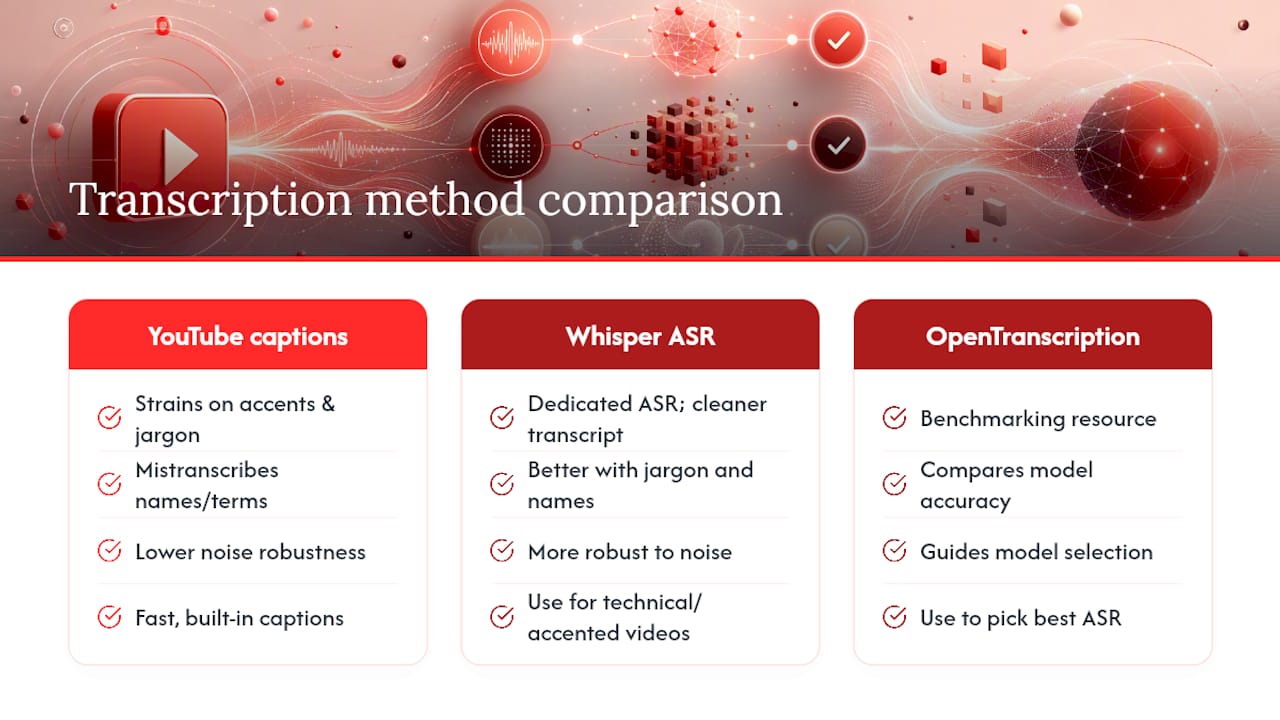
Match your transcription method to the content. Videos packed with proper nouns, technical jargon, or heavy accents strain YouTube’s auto-captions, and a mistranscribed name or term propagates straight into the summary. In those cases, a dedicated ASR model, or comparing model performance through a resource like OpenTranscription’s benchmarking, gives you a meaningfully cleaner starting transcript.
For long videos, stick to a consistent chunking rule; segments of 20 to 30 minutes each, summarized individually and then combined into one meta-summary, preserve arguments that get lost when a single pass tries to compress two hours at once.
Watch for the biggest blind spot in the entire process: visual-only content. If a presenter shows a chart, a slide, or a demo without narrating it aloud, there’s no text for the transcript to capture, and the AI simply has nothing to summarize from that moment. One evaluation of video language models found this spatial and temporal reasoning gap shows up consistently, though feeding the model outputs from action recognition or scene-detection tools measurably improves results in those cases.
Your fastest quality check: play the actual 10 to 20 second clip at any timestamp the summary flags as important. If the summary and the clip don’t line up, treat the rest of that section with suspicion.
Practical Options: Why Baitless Fits the Busy User’s Workflow
Building your own Whisper-plus-chunking pipeline makes sense if you’re a developer. It’s overkill if you just want to know whether a 90-minute video is worth your lunch break. That’s the gap Baitless is built to close.

Baitless is a Chrome extension that generates concise, AI-powered summaries directly from YouTube, and it’s built around the exact decision busy viewers make dozens of times a week: watch, skip, or save for later. Instead of forcing you to guess from a thumbnail and title, it gives you a breakdown of what to focus on and what to skip before you commit any time.
The feature set maps directly onto the workflow already covered:
- Key-moment highlights that surface what actually matters in a video, cutting past filler and intros.
- Watch-or-skip guidance that turns a vague “maybe I’ll watch this” into a fast decision.
- Timestamped summaries with jump links, so you can verify any claim in seconds rather than rewatching.
- A free tier with 25 summary credits, enough to test the tool properly before deciding if it earns a spot in your daily routine.
- A subscription option for people who summarize videos every day and burn through free credits fast.
Because Baitless reads captions directly and structures its output with timestamps baked in, it lines up with both the fast path and the verification habits covered above. You get the speed of an extension with enough structure to spot-check anything that matters.
Getting AI Summaries Into Your Actual Workflow
A summary sitting in a browser tab you’ll forget about by tomorrow isn’t saving you any time. The payoff comes from where the summary ends up next.
Exporting to a place you already check regularly makes the habit stick. Dropping summaries into Notion or Evernote builds a searchable archive you can query later; pasting one into Slack keeps a team looped in without anyone watching the source video; forwarding one by email works well for async updates with people outside your immediate tools.
Clickable timestamps do double duty here. Instead of writing “at some point they discuss the Q3 numbers,” you link directly to the moment, which turns meeting prep from a vague summary into a set of verifiable checkpoints anyone can click through in seconds.
A few lightweight automations compound the time savings:
- Save the summary, then auto-create a follow-up task if the video mentions an action item.
- Attach a timestamp snippet to a calendar invite when a video is prep material for a meeting.
- Route summaries by topic into different folders or channels automatically.
None of this requires custom engineering. It just requires deciding, once, where your summaries should land.
What Are the Ethical Considerations of AI-Generated YouTube Summaries?
Using AI to summarize a video for your own reference is a different act than publishing that summary as though it were your own original analysis. The ethical line sits mostly at that publishing boundary.
If a summary is for personal use, screening a video before you invest 40 minutes in it, the stakes are low. The risk shows up when someone takes an AI-generated summary and reposts it as independent commentary without disclosing that a model did the heavy lifting. That’s a misrepresentation of effort and, depending on how closely the summary mirrors the original creator’s structure and phrasing, potentially a fairness issue toward the creator whose work generated the underlying value.
There’s also a quieter risk: over-trusting a summary that misses nuance. A model can compress an eight-minute nuanced argument into three flat bullet points that erase the original’s tone, caveats, or intent. Sharing that flattened version with others as if it captured the full picture can spread a distorted impression of what the original creator actually said, especially on topics involving personal opinion, humor, or contested claims.
Good practice is straightforward: use AI summaries as your own research shortcut, disclose it when you share a summary publicly, and always link back to the original video so your audience can check the source themselves. Treat the summary as a map, not the territory. It tells you where to look. It doesn’t replace looking.
Is It Legal to Generate AI Transcripts and Summaries of YouTube Videos?
Generating a transcript or summary of a YouTube video for personal use, research, or note-taking generally falls into low-risk territory, since you’re processing content you already have lawful access to, in the same way a person is free to take their own notes while watching. The legal questions get sharper the moment a summary is republished, monetized, or distributed at scale.
Two issues matter most. First, copyright: a video’s script, narration, and creative structure are the creator’s protected work, and reproducing large verbatim chunks of a transcript, or a summary so detailed it substitutes for watching the original, can raise copyright concerns depending on the jurisdiction and how much of the original’s expression gets copied. A short, transformative summary that adds analysis is on much safer ground than a near-complete transcript republished wholesale.
Second, platform terms of service: YouTube’s own terms govern how its API and content can be used at scale, and any tool or workflow pulling captions or video data programmatically should operate within those terms rather than scraping around them.
None of this is legal advice, and copyright rules vary by country. If you’re building a product or publishing summaries commercially rather than using them for personal reference, it’s worth having a lawyer familiar with your jurisdiction’s fair use or fair dealing standards review your specific use case before you scale it.
Can AI Improve Your YouTube Video Metadata Too?
Metadata optimization sits on the other side of the AI-for-YouTube conversation. It is worth a quick mention because the two use cases (summarizing videos you watch, and optimizing videos you publish) get lumped together in search results constantly, and it’s useful to know where the line is.
If you’re a creator, AI tools can help draft titles, descriptions, and tags by analyzing what phrasing tends to perform well for similar content, and some can suggest chapter markers based on a transcript’s natural topic shifts. That’s a legitimate and increasingly common use of AI in YouTube production.
That said, it’s a separate discipline from what this guide covers. Everything above is about using AI to consume and navigate video content faster as a viewer, researcher, or professional, not about producing or marketing videos as a creator. If metadata optimization is what you’re after, look for guidance specifically framed around channel growth and SEO for creators; the tools, prompts, and workflows involved are genuinely different from summarization.
Where Has AI Summarization Actually Paid Off?
The clearest wins show up wherever someone has to process a lot of long-form video on a deadline. A graduate student prepping for a comprehensive exam can run a stack of two-hour lecture recordings through a summarizer, get a timestamped outline of each one, and decide within minutes which lectures need a full rewatch versus which ones just need a five-minute refresher at the timestamps flagged as dense.
Journalists and researchers monitoring press conferences or earnings calls use the same logic in reverse: scan the summary first, then jump straight to the two or three timestamps where a notable claim or number appears, rather than sitting through 90 minutes of preamble. That pattern shows up constantly in the practical guides on building these pipelines, where transcript extraction is treated as the cheap, fast step and the summarization step is where the real value gets extracted.
For students specifically, the workflow overlaps closely with how AI already gets used for academic lecture notes: pull the transcript, structure it, and turn passive listening into an active, searchable reference. The pattern is the same whether the source is a recorded lecture or a two-hour YouTube deep dive: extract, structure, verify the parts that matter, and only spend full attention on the sections that earn it.
When a Summary Is Enough, and When You Should Actually Watch
A summary is the right tool for screening: deciding whether a video deserves your time at all, or confirming a fact you half remember from something you already watched. It’s also enough for a quick knowledge check before a meeting or a study session, where you need the gist and a couple of specifics, not the full experience.
Watch the whole video when the value is in the demonstration itself: a tutorial where hand movements matter, a talk where tone and delivery carry the argument, or an analysis with a lot of visual data a transcript can’t capture. Use the summary as your triage step: if it flags something dense or contentious, schedule the full watch; if it confirms the video is peripheral, skip it or save the clip and move on. The discipline isn’t choosing AI over your own judgment. It’s using AI to decide where your judgment is actually needed.
— Sergio
Try Baitless Free and Reclaim Your Watch Time
Baitless turns any long YouTube video into a scannable breakdown before you’ve committed a single minute to watching it. Instead of guessing from a thumbnail whether a 90-minute upload is worth your lunch break, you get key-moment highlights and clear watch-or-skip guidance right in your browser.

The extension installs in seconds and comes with 25 free summary credits, enough to run it against a real week of videos before deciding whether it earns a permanent spot in your toolbar. If you end up summarizing daily, whether for research, coursework, or keeping up with a dozen channels, the subscription tier keeps you from ever hitting a wall on credits. Head to the Baitless landing page to install the extension and claim your free credits, or check the quick-start resources there if you want a walkthrough before you dive in.