
Decide Fast: AI Drafts and a Human Check to Summarize YouTube Webinars
Decide Fast: AI Drafts and a Human Check to Summarize YouTube Webinars

Yes, AI tools can turn a typical-length YouTube webinar into an accurate summary in well under a minute for most recordings. The pipeline reads the transcript, runs it through a summarization model, and returns bullets, timestamps, and action items. Baitless does this directly inside Chrome, with a free tier allowing multiple summary credits so you can test the output before deciding whether to skim, watch, or skip entirely.
TL;DR:
- Transcript accuracy is crucial, especially for multi-speaker discussions with cross-talk, noise, or technical jargon that can distort the summary.
- Human review and manual verification of key data points, timestamps, and claims remain essential to ensure reliability, especially for regulated or complex content.
- AI-generated summaries are best used as quick first drafts; refining them manually significantly reduces risks of errors in nuanced or technical topics.
- Public webinar summaries should credit the original source, avoid large verbatim clips, and remove personal details in public or shared notes to comply with copyright.
- Video transcripts from platform captions or controlled speech-to-text tools tend to be more accurate, improving summary quality before AI processing.
Table of Contents
- How AI webinar summarizers actually work
- How do you convert a YouTube webinar into usable notes now?
- What’s the best practice for reliable webinar summaries?
- What can you actually do with a webinar summary?
- Getting a clean transcript before you summarize
- Where AI summaries fall short on webinar content
- Is it legal to summarize someone else’s webinar?
- Author perspective: when a summary is enough, and when it isn’t
- Try Baitless before you watch another full webinar
- Sources
How AI webinar summarizers actually work
Every summary starts with a transcript, not the video itself. The model never “watches” the webinar. It reads text that came from YouTube’s own captions or from a speech-to-text engine, and the summary is only as good as that text. This is why providers push hard on transcription accuracy, with some claiming 99% speech-to-text accuracy on clear audio before any summarization even begins.
Once the transcript exists, the summarization stage runs one of two ways. Extractive summarization pulls the actual sentences a speaker said and ranks them by importance. Abstractive summarization rewrites the content in new language, closer to how a colleague would recap a meeting for you. Most modern tools default to abstractive, since it reads cleaner, but it also carries more risk of small factual drift.
Watch for these common failure points before trusting an output:
- Overlapping speakers or crosstalk that garbles the transcript
- Heavy background noise, music, or a poor microphone during Q&A
- Acronyms and product names the speech engine mishears
- Long silences or slide transitions that confuse timestamp alignment
Most tools return one of a few formats: short bullet points, a paragraph-style abstract, or timestamped chapters that mirror how the speaker actually moved through the material.
How do you convert a YouTube webinar into usable notes now?
Getting from a raw recording to something you can act on takes four steps, and the whole process usually finishes before your coffee gets cold.
- Paste the link or upload the file. Drop the YouTube URL into your summarizer of choice, or upload a downloaded recording, and request a transcript.
- Pick your summary style and length. Choose brief bullets for a quick scan, an executive brief for a manager, or a full action list if you’re running a team meeting off it. Many tools let you configure the output format before generating.
- Spot-check the transcript. Skim for garbled names, misheard numbers, and mangled acronyms. This takes two minutes and saves you from repeating a wrong figure in a client email.
- Turn takeaways into action items and export. Add owner names next to tasks, keep the timestamps attached to each point, and export to Markdown, CSV, or PDF depending on where the notes need to live.
Pro Tip: Keep every timestamp attached to its bullet point. When a stakeholder questions a claim, you jump straight to that minute mark in the recording instead of rewatching the whole thing to find the receipt.
For a deeper walkthrough of tool-specific settings, Baitless has a full breakdown on using ChatGPT to summarize YouTube content that covers prompt structure in more detail.
What’s the best practice for reliable webinar summaries?
The reliable approach isn’t picking the “best” AI model. It’s running a hybrid workflow: let AI produce the first draft fast, then a human refines it for the parts that actually carry risk. Product teams and workflow guides consistently recommend generating a preliminary AI summary and then refining it manually for nuance and action items the model tends to flatten.
Before you circulate a summary as fact, run it through a short checklist:
- Spot-check the transcript against a few minutes of the actual audio
- Verify timestamps line up with the claims they’re attached to
- Confirm any number, date, or statistic mentioned against the source slide or speaker quote
- Flag anything that sounds like a legal, financial, or compliance claim for manual review
That last point matters more than people think. A webinar on general marketing trends can tolerate a slightly loose AI summary. A webinar covering tax law changes or clinical trial results cannot. When the topic is regulated or technical, escalate to a full read or watch before you act on the summary alone.
Time savings, in practice: teams using AI-first summarization on recorded webinars report turning a 60-minute session into structured notes, chapters, and action items in under a minute of processing time, versus the 20 to 30 minutes it typically takes to skim a recording manually for the same information.
What can you actually do with a webinar summary?
The right output format depends entirely on who’s reading it and what they’re deciding.
- Executive brief: one to three bullets plus a single top recommendation, built for someone who has 30 seconds and needs a yes or no.
- Team action list: timestamped tasks with an owner’s name next to each one, so a project lead can drop it straight into a task tracker.
- Research or literature review: an extended summary paired with timestamps and a short transcript snippet, useful when you’re citing a claim later and need to trace it back to the exact minute.
- Content repurposing: turning summary bullets into social posts, show notes, or a blog draft outline. A tool like Creator Guard’s analytics approach shows how turning long sessions into structured notes feeds directly into growth reporting.
Extracting action items and keeping them timestamped is what separates a summary that gets read once from one that actually drives follow-up work across a team.
Getting a clean transcript before you summarize
Audio quality decides more of your summary’s accuracy than the AI model does. A webinar recorded through a laptop mic with a barking dog in the background will produce garbled text no matter how good the summarization engine is downstream.
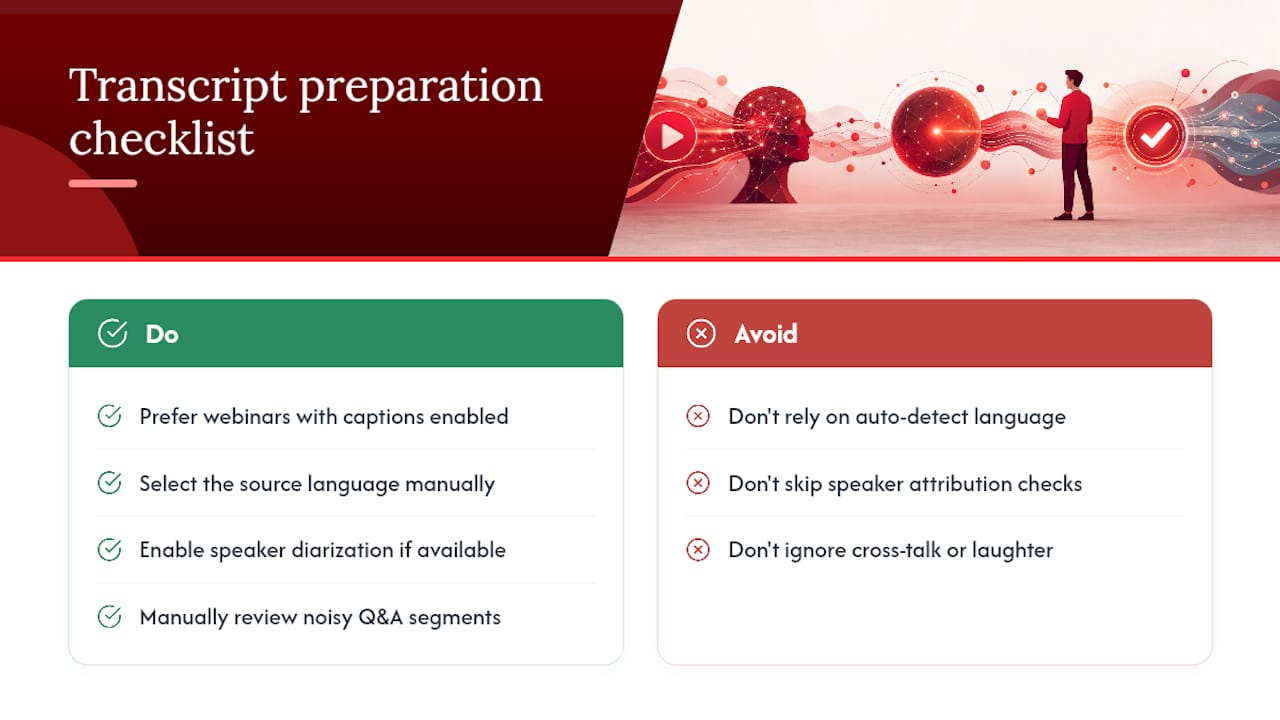
A few things consistently improve transcript quality. Prioritize webinars with YouTube’s auto-generated or creator-uploaded captions already enabled. They tend to outperform fresh speech-to-text runs on noisy recordings, since platform captioning has usually been trained on a huge volume of speech patterns already. If captions aren’t available, choose a summarizer that lets you select the source language explicitly rather than relying on auto-detect, especially for webinars with accented English or technical jargon.
Speaker identification is the other weak spot. Panel discussions and Q&A sessions with three or four voices confuse most transcription engines, which often merge two speakers into one continuous block of text or mislabel who said what. If your summarizer supports speaker diarization (labeling who spoke when), turn it on before generating anything. If it doesn’t, expect to manually tag a few key quotes yourself, particularly around moments where attribution matters, like a specific expert making a specific claim.
Cross-talk, laughter, and slide-noise interruptions during live Q&A are the moments most likely to produce a transcription error, so give those sections a manual read regardless of how clean the rest of the transcript looks.
Where AI summaries fall short on webinar content
AI summarization handles a clean, single-speaker webinar well. It struggles the moment real-world complexity shows up.
Jargon-heavy sessions are the first failure point. A webinar full of industry-specific acronyms or niche technical terms can get summarized confidently and incorrectly, because the model fills gaps with the most statistically likely phrase rather than admitting it doesn’t recognize a term. Multi-speaker panels compound this. When four people are debating a point and interrupting each other, an abstractive summary tends to flatten the disagreement into a single, tidy conclusion that never actually happened on the call.
Context loss is the subtler problem. A speaker might reference “the chart from slide 12” or “what we discussed earlier in the intro,” and the model has no access to slides or earlier framing beyond the raw transcript text. That reference gets summarized as a vague, disconnected point, or dropped entirely.
Long webinars also test the limits of context windows in some models, meaning the back half of a two-hour session sometimes gets thinner treatment than the front half. And sarcasm, humor, or hedged language (“we’re cautiously optimistic, though nothing’s confirmed”) frequently gets summarized as a flat, confident statement, stripping out the uncertainty the speaker intended.
None of this means AI summarization is unreliable. It means treating the output as a strong first draft rather than a transcript of record, especially for anything with multiple speakers or specialized vocabulary.
Is it legal to summarize someone else’s webinar?
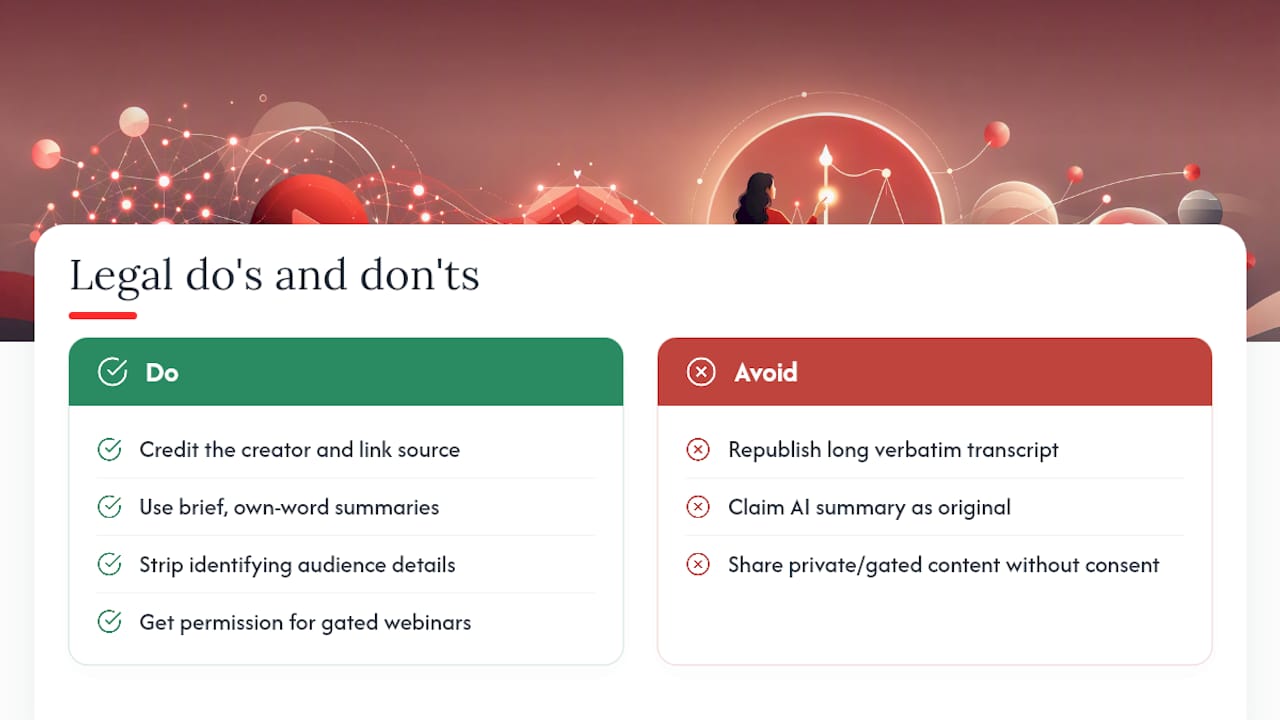
Summarizing a publicly available YouTube webinar for personal use or internal team notes is standard practice and low risk. The line moves once you start republishing large verbatim chunks of someone else’s transcript or presenting an AI summary as your own original analysis without attribution to the source webinar.
A few habits keep this clean. Always credit the original creator and link back to the source video when you share a summary publicly, especially if you’re repurposing it into a blog post or social content. Avoid summarizing private, paywalled, or members-only webinars unless you have explicit permission. A public YouTube upload and a gated webinar behind a registration wall carry very different expectations around redistribution, even if both are technically viewable.
Privacy gets trickier with Q&A sections. Live audience questions sometimes include names, company details, or personal situations a viewer didn’t expect to end up in a searchable summary document. If you’re circulating notes beyond your immediate team, strip out identifying details from audience questions unless the speaker explicitly agreed to have that discussion made public.
Copyright protects the creator’s specific expression, not the underlying facts or ideas discussed in the webinar. A brief summary that captures the main points in your own condensed language is generally fine. Reproducing a speaker’s exact phrasing at length, or clipping and republishing large transcript sections, moves into territory where the original creator’s rights are the ones that matter, not your summarizer’s terms of service.
Author perspective: when a summary is enough, and when it isn’t
A one-paragraph summary is enough when the decision at stake is low stakes: should you watch this, skip it, or forward it to a colleague. It stops being enough the moment a number, quote, or claim from that webinar is going into a client deck or a public post. At that point, open the transcript and check the sentence yourself.
The teams that get the most value treat every summary as a shared, searchable note rather than a one-off convenience. Drop it into whatever tool holds your team’s institutional knowledge, and it compounds. Baitless was built around that exact habit: fast enough to use on everything, honest enough to flag what to verify.
— Sergio
Try Baitless before you watch another full webinar
Baitless is the fastest way to decide whether a two-hour recording is worth your afternoon or worth skipping entirely. It’s a Chrome extension, not a separate app or upload portal, so you generate a summary while you’re already watching or scrolling YouTube, with highlights on the moments that matter and a clear flag for what to skip.

The free tier gives you summary credits with no commitment, which covers a solid number of webinars before you’d ever need to upgrade. Once you’re summarizing daily, a subscription unlocks higher volume without the friction of managing credits one at a time. Getting started takes three steps: install the extension, paste or open the webinar link, and generate your summary with export to Markdown ready when you need it in your notes app. For more on getting the most out of AI-generated YouTube summaries, browse the guides tagged for summarizing YouTube with AI. Head to Baitless and run your first summary in the next five minutes.
Sources
- Convert Webinar to Notes | AI Webinar Summarizer — DistillNote
- YouTube Video Summarizer - AI Video Summary Free — Happy Scribe
- How to Summarize a Webinar with AI Step by Step in 2026 — Lynote
- How to Extract Key Points and Action Items From Recorded Webinars – VidNotes Blog