
How to Summarize TED Talks Without Watching the Whole Thing
How to Summarize TED Talks Without Watching the Whole Thing

The fastest way to summarize TED talks is to paste the talk’s URL into an AI summarizer that returns timestamped, source-grounded output, or install a Chrome extension like Baitless that does it automatically as you browse. Either route gets you the speaker’s core argument, three to five key takeaways, and often the exact quotes and timestamps that back them up, in under a minute.
A solid TED talk summary should include the main argument stated in one sentence, the supporting points the speaker actually makes, and enough timestamps or quotes that you can verify any claim without rewatching 18 minutes of video.
Here’s what to do right now:
- Copy the TED.com or YouTube link for the talk you want to skip
- Paste it into your summarizer or click the Baitless extension
- Pick a summary length (quick bullets or a longer executive brief)
- Generate, then scan the timestamps before you trust a quote
Key Takeaways
Reliable TED talk summaries depend on timestamped, source-grounded output that lets you verify the speaker’s actual one-sentence argument instead of trusting a paraphrase.
| Point | Details |
|---|---|
| Paste the URL first | Feed a TED.com or YouTube link, uploaded video, or transcript into a summarizer to start. |
| Match format to need | Choose bullets, narrative, or executive brief depending on how you’ll use the summary. |
| Timestamps are the real check | Verify any quoted claim against its timecode before citing or repeating it. |
| Export for reuse | Use Markdown or TXT for notes, SRT for subtitle-style timestamped excerpts. |
| Baitless handles it automatically | The Chrome extension summarizes TED talks on YouTube instantly, with 25 free credits to start. |
Table of Contents
- Step-by-Step Workflow to Generate and Verify a Summary
- Which Summarizer Features Actually Matter?
- How Do You Confirm a Summary Is Accurate?
- Turning a Summary Into Notes, Slides, or Subtitles
- Why Baitless Is a Fast, Trustworthy Way to Summarize TED Talks
- Where to Verify Talks and Find More to Summarize
- What Most Advice on Summarizing TED Talks Gets Wrong
- Get TED Talk Summaries Without Leaving Your Browser
- Frequently Asked Questions
- Sources
Step-by-Step Workflow to Generate and Verify a Summary
Getting a summary you can actually trust takes three moves: feed the tool the right input, tell it what you want, then check its work.
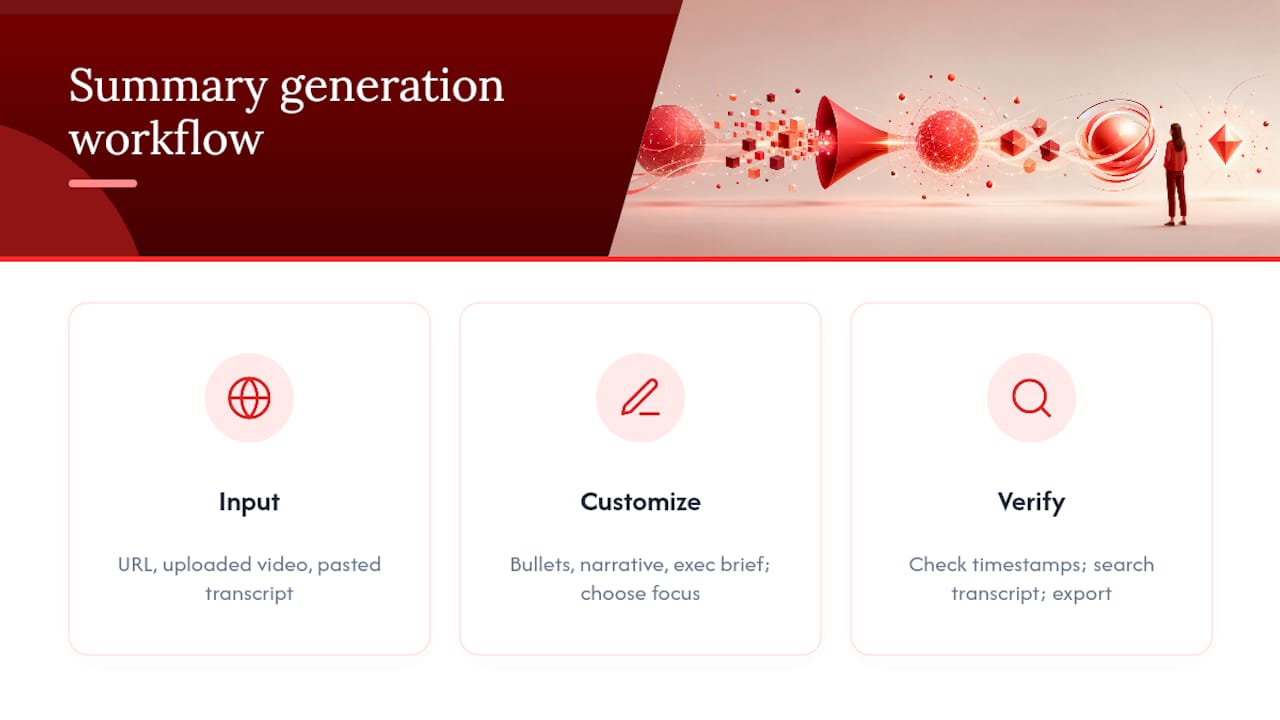
1. Input the talk. Most AI summarizers accept a TED.com or YouTube URL, an uploaded video file (MP4, AVI, MOV), or a transcript you copy and paste directly. The URL route is fastest for a single talk. Uploading works if you have a downloaded file or a talk that isn’t indexed on TED’s site yet. Pasting a transcript is the most reliable option when a tool struggles to pull captions automatically, since it removes a step where errors creep in.
2. Customize the output. Choose a format that matches your reason for reading. Short bullets work for a quick scan before a meeting. A narrative summary reads more like an article and suits people who want context, not just a list. An executive brief compresses everything into a paragraph or two for someone who needs the gist in fifteen seconds. Some tools also let you set a focus, such as the speaker’s core argument, their supporting research, standout quotes, or how to apply the idea practically.
3. Generate and verify. Once the summary appears, check that timestamps line up with real moments in the talk, and use transcript search to find the speaker’s explicit one-sentence argument rather than accepting the tool’s paraphrase at face value. Export the result in whatever format you’ll actually use again.
Pro Tip: Search the transcript for phrases like “the point is” or “what I want to argue” before you trust a summary’s framing of the main idea. Speakers usually flag their own thesis directly, and finding that line yourself takes ten seconds.
Which Summarizer Features Actually Matter?
Not every AI summarizer is built the same way, and the differences show up exactly when you need to trust the output. A handful of features separate a genuinely useful tool from one that just paraphrases confidently and hopes you don’t check.
- Custom length and style. The ability to toggle between bullet points, a narrative summary, and an executive brief means you’re not stuck with a one-size-fits-all output that’s too short for research or too long for a quick check before a meeting.
- Timestamped citations and speaker labels. This is the feature that turns a summary from “trust me” into something you can verify in seconds. Tools built for this, like WayinVideo’s TED talk summarizer, pair timestamps with speaker labels specifically so claims can be checked against the source moment.
- Multilanguage support and mind maps. Useful if you’re summarizing talks delivered in a language other than your own, or if you process information better visually than through text blocks.
- Export options. TXT and Markdown exports slot straight into note apps. SRT export matters if you’re pulling subtitle-style excerpts for a presentation or a video clip.
Public tool pages describe roughly the same core feature set as standard practice for summarizer interfaces: adjustable length, speaker context, and timestamp references. If a tool is missing timestamps entirely, treat its summary as a starting point, not a citation-ready source.
How Do You Confirm a Summary Is Accurate?
The strongest check for any AI-generated summary is whether it gives you a timestamp and a near-verbatim quote you can match against the source. A summary that only offers paraphrased claims with no way to trace them back to a specific moment in the talk is asking for blind trust, and AI models still hallucinate details often enough that blind trust is a bad habit.
A few checks take less than a minute:
- Search the transcript for the speaker’s own framing of their thesis. Most TED speakers state their central claim explicitly, often near the start or right before their closing call to action, and editorial guidance on structuring talks points to the opening 90 seconds and the closing minute as the two windows where that thesis usually surfaces.
- Watch for hallucination patterns: a stat that sounds oddly specific, a quote attributed to the wrong context, or a claim that contradicts the talk’s actual argument. Ask the tool to produce the exact quote it’s summarizing, then check that quote against the transcript.
- If a claim matters for a citation or a research note, rewatch just the flagged clip instead of trusting the summary outright. Ninety seconds of verification beats a wrong citation.
Pro Tip: When a summary makes a claim you plan to quote or cite elsewhere, treat the timestamp as mandatory, not optional. No timestamp means no way to check it, and that’s the difference between a shortcut and a guess.
Turning a Summary Into Notes, Slides, or Subtitles
What you export depends on what you’re building next. Markdown or plain TXT files drop cleanly into note systems like Notion or Obsidian, which makes them the right call for research notes or a personal knowledge base you’ll search later. SRT format matters when you need subtitle-style, timestamped excerpts, useful for pulling a short clip into a presentation or quoting a specific moment with its exact timecode attached.
For quick reuse, copy the three to five key takeaways straight into a slide when you’re prepping a talk of your own, or drop a timestamped quote into a research note so you can jump back to the source in seconds. A summary you can’t easily paste somewhere useful isn’t saving you much time no matter how accurate it is.
Why Baitless Is a Fast, Trustworthy Way to Summarize TED Talks
Baitless is built as a Chrome extension, which means you get a summary the moment you land on a TED talk on YouTube instead of copying links into a separate tool. It highlights the moments worth your attention and flags what to skip, so you can decide in seconds whether the full 18 minutes is worth your time.
The free tier gives you 25 summary credits, enough to test the tool across a handful of talks before deciding whether a subscription earns its keep. Daily users who summarize videos regularly get more value from the paid plan, since it removes the credit ceiling entirely.
The core job isn’t replacing the talk. It’s helping you decide, in under a minute, whether that talk deserves eighteen more of them.
What this looks like in practice:
- Install the extension once, and summaries generate automatically on TED talks you open on YouTube
- Use free credits to test the format before committing to a subscription
- Scale up to daily use once the free tier runs out, if TED talks are a regular part of your routine
Where to Verify Talks and Find More to Summarize
For the original source, TED’s own talks page hosts every talk alongside short editor-written summaries, the best starting point when you want to confirm a claim against the speaker’s own words.
If you’re looking for well-known talks to test a summarizer against, TED’s playlist of the most popular talks of all time collects the talks most widely cited and shared. For browsing at scale, an independent archive of 500-plus TED talks with short summaries works well as a navigation shortcut when you’re not sure which talk you want yet.
What Most Advice on Summarizing TED Talks Gets Wrong
Most guides treat summarization as a speed problem: get the gist faster, skip the boring parts, move on. That’s half the picture. The real gap is trust, not speed. A summary that saves you fifteen minutes but hands you a fabricated quote or a misread argument has cost you more than it saved, especially if you repeat that claim in a meeting or cite it in your own work.
The habit worth building is checking the summary’s sourcing before checking the summary’s speed. Does it give you a timestamp? Does it quote the speaker directly instead of paraphrasing loosely? Those two questions matter more than whether the tool produced five bullets or fifty words. Conventional advice skips this because “just summarize it” sounds simpler than “summarize it, then verify the parts you’ll actually use.”
What I’d prioritize first: pick a tool that treats timestamps as a feature, not an afterthought, and build the ten-second verification habit before you build the summarizing habit. Speed without a way to check your work isn’t really saving you time. It’s just moving the risk downstream.
Get TED Talk Summaries Without Leaving Your Browser
Baitless turns any TED talk on YouTube into a summary the moment you click it, no copying links into a separate tab or waiting on a web app to load. You get the highlights, what to watch versus skip, and enough context to decide fast, all from a Chrome extension that runs where you already are.

For anyone summarizing TED talks regularly, whether you’re a student pulling research notes, a professional prepping for a meeting, or just someone tired of eighteen-minute commitments that turn out to be five minutes of substance, Baitless fits directly into that workflow instead of adding a new one. The free tier includes 25 summary credits, enough to test it across a real batch of talks before deciding if a subscription makes sense for daily use.
Install the Baitless extension and generate your first summary on the next TED talk that shows up in your feed.

Frequently Asked Questions
Can AI accurately summarize TED talks?
AI tools can summarize TED talks accurately when the summary includes timestamps and near-verbatim quotes you can check against the source. Summaries without that sourcing carry a higher risk of hallucinated details, so treat unsourced paraphrasing with more caution.
What’s the difference between a TED talk recap and a full transcript summary?
A recap usually condenses the talk into three to five key takeaways and a one-sentence argument, built for a fast decision on whether to watch. A full transcript summary preserves more context and supporting detail, useful when you need the talk for research or citation rather than a quick skim.
How long should a good TED talk summary be?
It depends on your purpose. A quick decision on whether to watch needs only bullet points and the core argument. Research or citation work benefits from a longer executive brief that includes timestamps and direct quotes you can verify.
Do I need to watch the full talk if I have a summary?
Not for most casual purposes. For anything you plan to cite or repeat as fact, rewatch the specific clip flagged by the summary’s timestamp rather than trusting the paraphrase outright.
Which TED talks are best for testing a summarizer?
Talks from TED’s most popular playlist work well since they’re widely watched and easy to fact check against other summaries and reviews.
Sources
- The most popular TED Talks of all time | TED Playlist