
Save Hours: Summarize Podcast Videos in Seconds for Busy Professionals
Save Hours: Summarize Podcast Videos in Seconds for Busy Professionals

A Chrome extension can turn a two-hour YouTube podcast into a timestamped executive summary quickly, provided the video has a transcript or auto-captions available. Open the video, let it play for a few seconds so captions load, then click summarize. Baitless does exactly this, and it’s the fastest route from “I don’t have time to watch this” to “here’s what I need to know.”
TL;DR:
- Summaries rely heavily on transcript quality, with caption issues being the main cause of errors or blank results.
- Short videos under 20 minutes only need a brief executive summary, while longer content benefits from chapter-style breakdowns and clip selection.
- Voice overlap and multiple speakers pose challenges for accurate speaker attribution and chapter segmentation in conversational podcasts.
- Verifying summaries by checking timestamps and quotes ensures reliability, especially when transcripts or captions are imperfect.
- Paid plans typically increase volume and convenience, but free tiers are sufficient for casual users summarizing a few videos weekly.
Table of Contents
- How to Summarize a Podcast Video Using a Browser Extension
- How Does AI Actually Build a Podcast Video Summary?
- How Do You Know If a Podcast Summary Is Accurate?
- Best Practices for Faster, More Reliable Summaries
- Free vs. Paid Podcast Summary Extensions: What Actually Changes
- Handling Long Lectures, Short Clips, and Everything in Between
- Getting Summaries Into Your Notes Without Losing Context
- Why Conversational Podcasts Are Harder to Summarize Than Lectures
- My Micro-Workflow for Research and Meeting Prep
- Try Baitless for Instant, Timestamped Podcast Summaries
- Sources
How to Summarize a Podcast Video Using a Browser Extension
The whole point of an extension-first workflow is that you never leave the YouTube tab. No copying URLs into a separate web app, no waiting for a page to process a file upload. Here’s the sequence that works almost every time:
- Open the YouTube video and let it play for 3 to 5 seconds. This forces the browser to load the caption or timedtext data the AI needs to read.
- Click the Baitless icon in your toolbar to open the extension panel.
- Pick your output language and preferred summary length (short brief versus detailed chapter breakdown).
- Click Summarize and wait a few seconds while it processes the transcript.
What comes back typically includes:
- An executive summary (three to five sentences covering the core argument or takeaway)
- Chapter-style breakdowns of major topic shifts
- Clickable timestamps that jump straight to that moment in the video
- Notable quotes pulled directly from the conversation
From there, you can click any timestamp to jump into the original audio and confirm context, copy the summary text into a notes app, or save the video to a highlight reel if it’s worth a full watch later. Over a week of research or interview prep, that habit alone can save hours.
Pro Tip: If the summarize button returns an error or a mostly-blank result, it’s almost always a caption problem, not an AI problem. Refresh the tab, play the video for a few seconds, and try again before assuming the tool is broken.
How Does AI Actually Build a Podcast Video Summary?
Most modern summarizers, including the pipeline Baitless runs on, follow a transcript-first approach rather than trying to “watch” the video visually. Speech gets converted to text first, and everything downstream works off that transcript.
The general pipeline looks like this:
- Speech-to-text converts the spoken audio into a raw transcript.
- Clip selection identifies the most relevant segments, often reconstructing a comprehensive summary from only a small fraction of the total runtime. One study on multimodal summarization found that clip-selection methods can rebuild a useful summary using roughly 6 percent of a video’s content.
- A large language model scores those segments for importance and produces either an extractive summary (pulling exact lines) or an abstractive one (rewriting the gist in plain language), attaching timestamps as it goes.
This matters because it explains why transcript quality is the single biggest variable in summary quality. Research on LLM-based video summarization shows that captioning frames and scoring them with local-to-global context beats older visual-saliency methods that just guess at “interesting” frames based on motion or scene changes. A podcast is mostly two people talking in front of a static background. Visual-only summarization has almost nothing to work with there. Language-first summarization does.
A separate pipeline built for long-form video summarization uses Whisper transcription followed by timestamp-preserving LLM prompts, which is close to what a well-built extension does behind the scenes when it hands you clickable timestamps instead of a wall of undated text.
How Do You Know If a Podcast Summary Is Accurate?
Trust the summary, but check it fast. A minute of verification beats an hour of acting on a wrong takeaway.
- Click two or three of the timestamps tied to direct quotes and confirm the speaker actually said something close to what’s shown.
- Watch for summaries that feel oddly generic or repeat the video title back to you. That’s usually a sign the transcript was thin or the captions failed to load.
- If a quote sounds too polished or too perfectly stated, treat it as a paraphrase rather than a verbatim line until you confirm it at the timestamp.
- When transcription quality is poor (heavy accents, overlapping speakers, background music), turn on YouTube’s auto-captions manually first, or paste a transcript you already have into the extension before re-running the summary.
On privacy, extensions typically need permission to read page data on the sites you visit and to access caption or timedtext APIs so they can pull the transcript. That’s a normal requirement for this category of tool, but it’s worth reviewing what an extension can see and limiting site access to only what you actually use it on.
Pro Tip: If a summary references something that never comes up when you scrub to that timestamp, that’s a hallucination. It’s rare with transcript-first tools, but it happens most often on videos with poor audio quality where the speech-to-text step guessed wrong.
Best Practices for Faster, More Reliable Summaries
A few habits separate people who get clean summaries every time from people who fight the tool constantly.
- Always let the video play for a few seconds before hitting summarize. This one habit fixes the majority of failed or empty summaries because it gives the browser time to load subtitle data.
- Match summary length to content type. A dense academic lecture usually needs the detailed chapter mode; a casual two-person interview does fine with a short executive brief.
- Close unused tabs and disable other heavy extensions if summaries feel slow. Extensions compete for the same browser resources, and a dozen open tabs will slow anything down.
- For multilingual videos, choose the output language explicitly rather than trusting auto-detection, and spot-check one or two timestamps against the audio to confirm the translation holds up semantically.
None of this is complicated, but skipping step one is the single most common reason people think an extension “doesn’t work” when really the captions just hadn’t loaded yet.
Free vs. Paid Podcast Summary Extensions: What Actually Changes
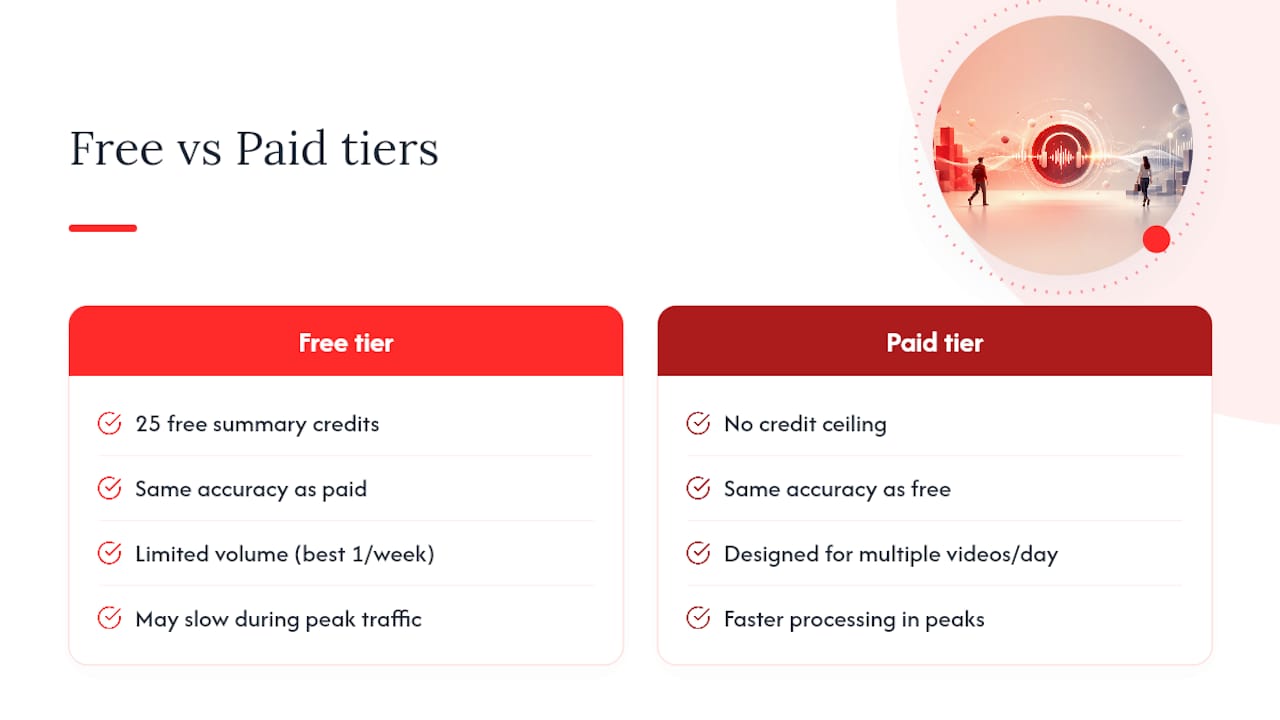
Free tiers on most summarization extensions are built around a credit system: you get a fixed number of summaries, then you either wait, upgrade, or stop. Baitless follows that model with 25 free summary credits, which is plenty to test the workflow on a handful of long videos before deciding if it fits your routine.
The real difference between free and paid isn’t usually accuracy. The underlying transcript-and-LLM pipeline runs the same either way. What changes is volume and convenience: paid tiers remove the credit ceiling for people summarizing multiple videos a day, and they often add longer summary modes or faster processing during high-traffic periods.
For a casual user who summarizes one podcast a week to decide whether it’s worth a full watch, the free tier covers it easily. For a student cross-referencing a dozen lecture recordings before an exam, or a researcher scanning through a backlog of interview footage, the math flips fast. Burning through 25 credits in a few days makes a low monthly subscription the obvious move, since the alternative is paying with your time instead of your wallet. The right tier really comes down to volume, not whether the summaries themselves are “better” on one plan versus another.
Handling Long Lectures, Short Clips, and Everything in Between
A 10-minute clip and a three-hour panel discussion need different handling, even though the underlying summarization pipeline is the same for both.
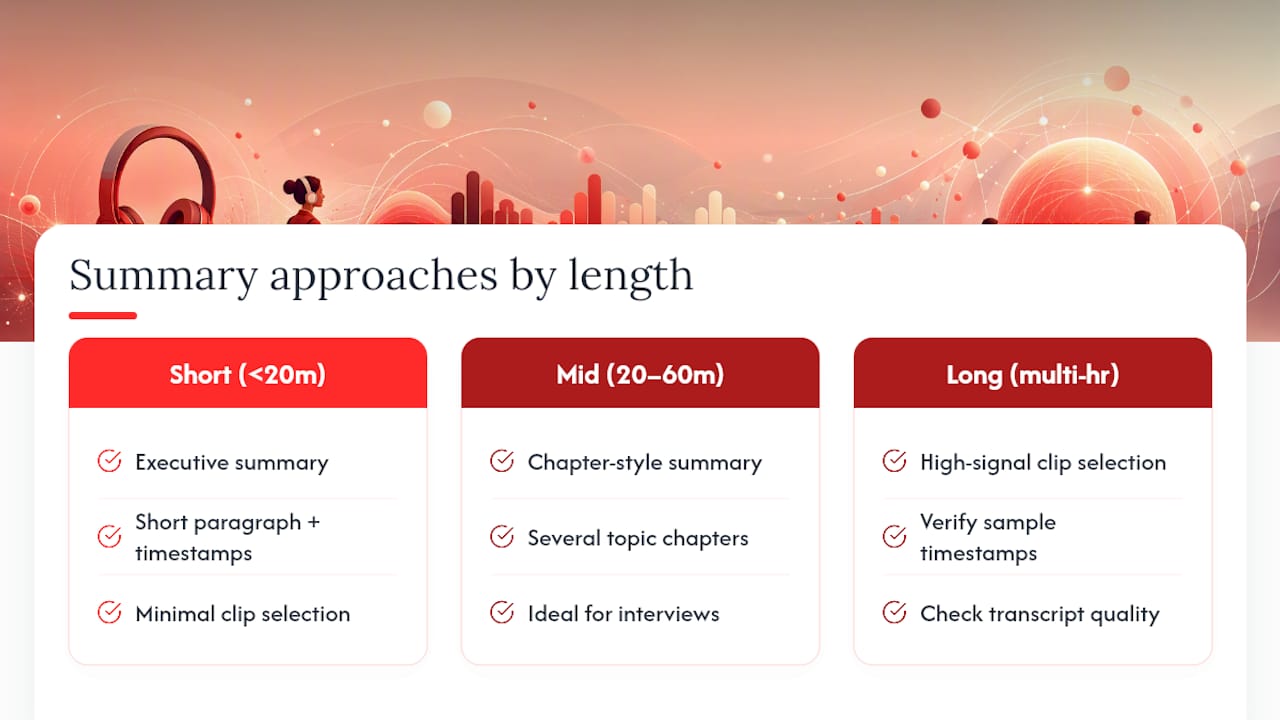
For short videos (under 20 minutes), a single executive summary is usually enough. There’s not much to compress, so a short paragraph plus a couple of timestamps covers the whole thing.
For mid-length podcasts (20 minutes to an hour), chapter-style summaries earn their keep. This is the sweet spot for most interview-format podcasts, where a handful of topic shifts map neatly to a handful of chapters.
For long-form content (multi-hour panels, extended lectures, marathon interviews), expect the summary to lean harder on the clip-selection step described earlier, pulling the highest-signal segments out of hours of talk. This is also where transcript quality matters most, since more runtime means more chances for a name, acronym, or technical term to get mangled by speech-to-text. If a three-hour video comes back with a summary that feels thin, that’s often the signal to check two or three sample timestamps before trusting the rest.
Format matters too. Multi-speaker panels are harder to summarize cleanly than one-on-one interviews, because attributing a quote to the right speaker depends entirely on how well the source captions distinguish voices.
Getting Summaries Into Your Notes Without Losing Context
A summary that stays trapped inside a browser popup isn’t much more useful than the two-hour video it replaced. The value shows up once it lands somewhere you’ll actually see it again.
The simplest move is copying the executive summary and key timestamps straight into whatever you already use for notes. If you work in Google Docs, tools like FinalDraft’s add-on roundup cover a few ways to keep an editable, timestamped record of what you pulled from a video, which works well for research logs where you want a paper trail. If your workflow is closer to meeting prep than academic research, a note-organizing tool like Minuted gives you a place to file highlights by project or topic instead of losing them in a scroll of browser history.
Whatever destination you pick, keep the timestamp link attached to every quote you save. A quote without its source timestamp becomes unverifiable a week later, and unverifiable quotes are useless in research or professional writing. Baitless preserves those links in every summary, which makes copy-and-paste into a notes app close to friction-free.
Why Conversational Podcasts Are Harder to Summarize Than Lectures
A single speaker giving a structured talk is the easiest case for any summarization pipeline. A podcast conversation is the opposite: two or more people talking over each other, changing topics mid-sentence, riffing on tangents that never quite resolve.
The biggest challenge is topic drift. A 90-minute interview might touch a dozen loosely related ideas without ever signaling a clean transition, which makes chapter segmentation harder than it looks. If your summary comes back with chapters that feel arbitrary or oddly split, that’s usually the transcript reflecting genuinely messy conversation structure rather than an error in the tool itself.
Speaker attribution is the second common failure point. When captions don’t distinguish who’s talking, a quote can get attributed to the wrong person, especially in fast back-and-forth exchanges. The fix is the same verification habit from earlier: click the timestamp and confirm the voice.
Cross-talk and interruptions confuse speech-to-text more than almost anything else, since overlapping audio forces the transcription engine to guess which words belong to which speaker. If a section of a podcast gets heated or people talk over each other, expect that stretch of the summary to be less reliable than the calmer parts. When that happens, treat the summary as a rough map rather than a transcript substitute, and go straight to the timestamp for anything you plan to quote directly.
My Micro-Workflow for Research and Meeting Prep
Before committing an hour to any long-form video, I run a three-step check: summarize first, jump to two or three flagged timestamps to confirm the tone matches the summary, then save any quote worth keeping with its timestamp attached.
That sequence answers one question fast: does this video earn a full watch, a quick clip for notes, or a skip entirely? Most of the time it’s a skip, or a partial watch focused on one segment the summary flagged as the actual substance. When a summary flags a sharp quote or an unexpected claim at the 40-minute mark, that’s usually the only part of a two-hour interview worth watching in full. Everything else, the summary has already done the work of telling me I didn’t need it.
What surprised me most using this regularly is how often the “skip” decision is the right one. A podcast title promises depth that the actual conversation doesn’t always deliver, and a transcript-based summary has no incentive to oversell a slow section the way a thumbnail or title might.
— Sergio
Try Baitless for Instant, Timestamped Podcast Summaries
This tool gives you what a full rewatch can’t: a fast read on whether a video is worth your time, with an executive overview, chapter-style breakdowns, and clickable timestamps built in from the first summary you run. It offers a free start to test the workflow on real videos before you decide whether the volume calls for a paid tier.

For many users scanning interviews, working through lecture backlogs, or sifting through hours of panel footage, a free tier often helps to decide whether a video is worth a full watch. Once credits run out, a monthly subscription removes the ceiling entirely for daily use. If you want faster reads on the videos already piling up in your watch-later list, try Baitless and run your first summary on the next long video you were dreading opening.
Sources
Technical claims here draw on LLM-based video summarization research, a long-form summarization pipeline study, and clip-selection methods for multimodal summaries. For more on transcript-based workflows, browse Baitless’s posts on summarizing YouTube with AI.
- Large-scale long-form video summarization pipeline — arXiv
- Clip selection for multimodal summarization — IWSDS 2026