
Triage Faster: Summarize Medical Lectures for Clinicians in 3–5 Minutes
Triage Faster: Summarize Medical Lectures for Clinicians in 3–5 Minutes

An AI summary can tell you in three to five minutes whether a 60-minute lecture is worth your time, but it cannot replace your judgment on clinical claims. Treat the summary as a triage tool, watch the flagged clips it points you to, and verify anything you plan to use in practice against a guideline or primary source. Baitless is built for exactly that first step.
TL;DR:
- Summaries that include specific timestamps, backed claims, and clear structure enable quick navigation and confident verification.
- Prioritize verifying high-impact claims like drug doses and guideline recommendations against primary sources before acting.
- Use AI summaries primarily as triage tools, not substitutes for thorough review, due to their inability to capture context and caveats.
- Note-taking methods like Cornell notes and mind maps enhance memory retention when combined with AI summaries and targeted review.
- Sharing summaries requires attribution, consent, and caution with patient information to adhere to ethical standards.
Table of Contents
- What Makes a Summary Trustworthy for Medical Content?
- How Do You Triage a Medical Lecture Before Watching It?
- How Do You Verify Clinical Accuracy From a Video Summary?
- Note-Taking Methods That Still Beat AI Alone
- Do Different Specialties Need Different Summary Structures?
- What Other Tools Help You Summarize Lectures Beyond AI?
- How Do You Retain What You Learned After Summarizing?
- Is It Ethical to Summarize and Share Lecture Content?
- Where AI Summaries Fall Short, and How to Use Them Safely
- How Baitless Puts Summarize-First Triage Into Practice
- A Practical Note on Making This Habit Stick
- Sources
What Makes a Summary Trustworthy for Medical Content?
A summary is only useful if it tells you what the speaker actually claimed, when they said it, and whether that claim has backing. Weak summaries give you vague bullet points. Strong ones give you a structure you can act on.
Look for a summary that opens with a one-line thesis of the lecture, follows with numbered takeaways, and attaches timestamps or jump-links to each one. That structure lets you skip straight to minute 34 instead of guessing where the useful content lives. Timestamps matter more in medical lectures than almost any other video category, because a single slide with a dosing table or a treatment algorithm can be worth ten minutes of throat-clearing before it.
The second thing to check is whether the summary separates evidence from opinion. A lecturer saying “in my experience” is different from a lecturer citing a randomized trial, and a summary that flattens both into the same bullet is hiding information you need. Good tools flag which claims are backed by a cited study, a named guideline, or a slide reference, and which are the speaker’s personal take.
A few practical signals tell you whether the underlying transcript held up:
- The summary references specific numbers (doses, percentages, thresholds) rather than vague language like “significant improvement.”
- Slide text appears to have been read correctly. Garbled drug names or transposed numbers signal an optical character recognition failure worth double-checking.
- The summary flags uncertainty rather than smoothing over it. A tool that says “the speaker did not cite a source for this claim” is more useful than one that presents everything with equal confidence.
Recent work on context-aware, diagnosis-driven summarization shows that grouping frames or segments into clinical context, rather than picking isolated keyframes, produces more clinically relevant output. The same principle applies to lecture summaries: a tool that understands a lecture is building toward a treatment recommendation will summarize differently than one that just extracts the loudest sentences.
How Do You Triage a Medical Lecture Before Watching It?
The workflow below assumes you are deciding whether a lecture deserves your full attention, not skipping verification altogether. It works whether you’re clearing a backlog of grand rounds recordings or scanning a conference talk before a meeting.
- Generate the summary first. Run the lecture through a summarizer and read the full output end to end before touching the video. This takes two to four minutes and gives you the thesis, the major claims, and a map of where they occur.
- Mark the sections worth watching. Flag roughly 10 to 20 percent of the runtime, typically the parts with data, dosing specifics, algorithms, or claims that contradict what you already believe. Skip the introductions, disclosures, and case-history buildup unless your specialty specifically needs that context.
- Watch flagged clips at 1.5x to 2x speed. Annotate directly on your pasted summary as you go, adding the speaker’s exact phrasing for anything you might quote later and noting the timestamp for provenance.
- Verify before you act on it. Anything you plan to bring into practice, whether it’s a dosing change or a diagnostic criterion, gets checked against a specialty guideline or the primary literature the speaker cited.
Time budgets scale roughly the same way regardless of lecture length. A 30-minute talk usually needs 3 minutes for the summary, 5 to 8 minutes of flagged viewing, and a few minutes of verification if anything stands out. A 60 minute lecture runs closer to 5 minutes for the summary and 10 to 15 minutes of targeted watching. A 90-minute grand rounds session can often be triaged in 20 to 25 minutes total, a fraction of the full runtime. Practitioner write-ups describing this exact summarize-first workflow report similar time savings on long-form video.
Pro Tip: Paste the AI summary directly into your note-taking app before you start watching, then annotate underneath each bullet as you review flagged clips. You end up with one document that has the AI’s structure plus your own verification notes, instead of two disconnected files you have to reconcile later.

How Do You Verify Clinical Accuracy From a Video Summary?
Verification is where most people cut corners, and it’s the step that actually protects you. Not every claim in a lecture carries the same risk, so triage your verification effort the same way you triaged the video itself.
Prioritize anything with a direct clinical consequence: drug doses, lab thresholds, diagnostic cutoffs, and specific guideline recommendations. These get checked against the actual specialty guideline or a systematic review before you rely on them, no exceptions. Lower-stakes claims, like a speaker’s general framing of disease prevalence, can usually be trusted at face value or noted as “unverified but plausible.”
A scoping review of YouTube use in medical education found that popularity metrics like views and likes did not reliably correlate with content accuracy, across the studies it examined. A lecture with 200,000 views is not automatically more accurate than one with 3,000. Treat view count as a discovery signal, never as a trust signal.
Your verification checklist should include:
- Cross-check high-impact statements (doses, thresholds, guideline changes) against a current specialty guideline or a systematic review, not just the lecture slide.
- Give extra weight to lectures tied to a named academic institution or a clinician with a visible publication record and cited sources, a pattern reviews of YouTube in medical education consistently associate with higher trust.
- If a claim in the summary has no attached reference, label it “unverified” in your notes and hold off on using it to change practice.
- Record the verification source and the timestamp of the original claim together, so you or a colleague can retrace your reasoning later.
That last habit sounds tedious until you need it, usually during a journal club discussion or when a colleague asks where a number came from six months later.
Note-Taking Methods That Still Beat AI Alone
AI handles the triage. Your own note structure is what makes the material stick, and this is where a lot of learners skip a step that actually matters more than the summary itself.
Cornell notes work particularly well with AI-generated summaries because the format already splits into a narrow cue column and a wide notes column, with a summary strip at the bottom. Paste the AI’s key takeaways into the notes column, then use the cue column to write the question each point answers (“What’s the first-line agent for X?”). The bottom strip becomes your own two-sentence synthesis, written in your words, which is the part that actually builds recall.
Mind mapping suits lectures that present a branching decision tree, like a differential diagnosis workup or a treatment algorithm with multiple pathways. Put the central diagnosis or question in the middle, then branch out to tests, findings, and management options exactly as the lecturer presented them. This format tends to outperform linear notes for anything with an “if this, then that” structure, because it mirrors how the clinical reasoning actually branches.
Outline notes, the classic indented bullet structure, still work best for straightforward didactic content: pharmacology mechanisms, anatomy reviews, epidemiology stats. Don’t force a mind map onto material that’s naturally linear. Match the format to the shape of the content, not the other way around.
Do Different Specialties Need Different Summary Structures?
A pharmacology lecture and a surgical technique video need to be summarized differently, and treating them the same way is a common mistake.
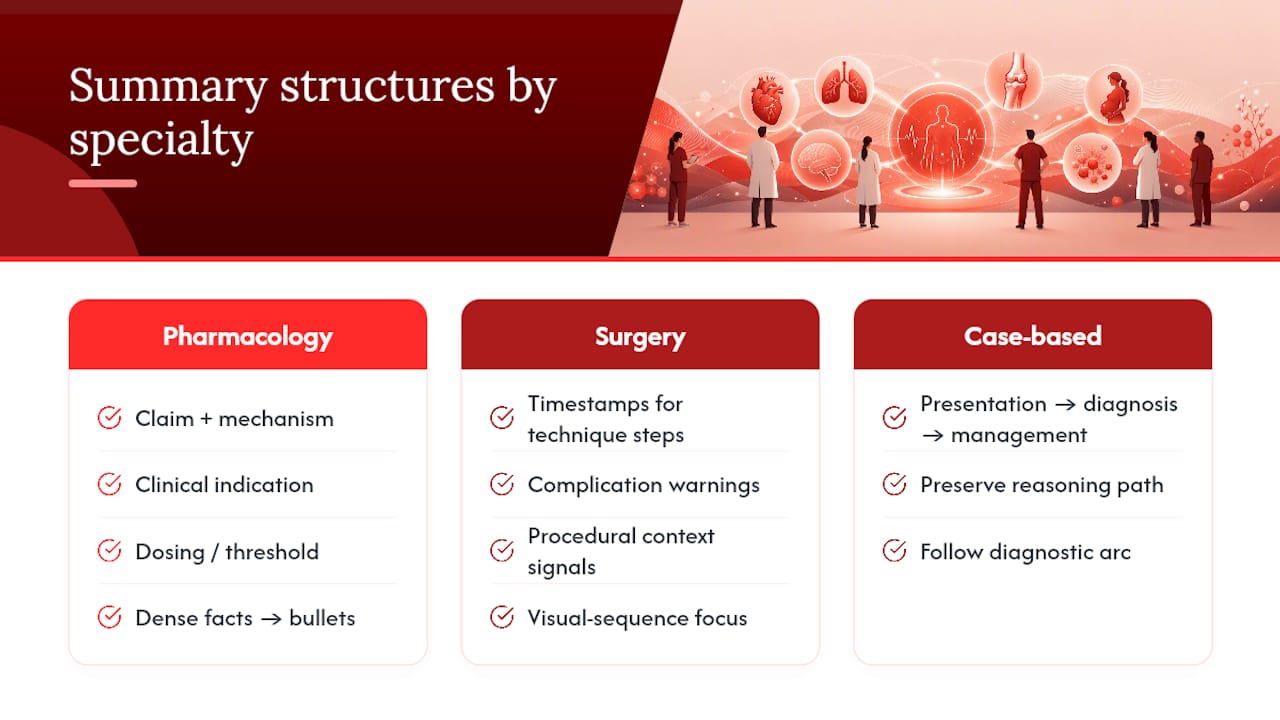
For pharmacology, physiology, and internal medicine lectures, the summary structure that works best is claim-and-mechanism: what’s the drug or process, what’s the mechanism, what’s the clinical indication, and what’s the dosing or threshold. These lectures are dense with facts that map cleanly onto bullet points.
Surgical and procedural lectures need a different frame entirely, because the value is often in the visual sequence, not the spoken claims. A summary should flag the timestamps for each technique step and any complication warnings, rather than trying to compress hand movements into text. Domain-specific research on ultrasound video summarization has shown that models tuned to modality-specific signals, rather than generic keyframe extraction, produce far more clinically usable output. The same logic applies to surgical video: a generic summarizer misses the moment that matters, while one built around procedural context catches it.
Case-based and grand rounds lectures usually follow a presentation-to-diagnosis-to-management arc. A useful summary preserves that arc rather than flattening it into a flat list, so you can follow the reasoning path the presenter used to reach their conclusion.
What Other Tools Help You Summarize Lectures Beyond AI?
AI summarization handles the first pass, but a few non-AI tools consistently show up in how clinicians and students process lecture content afterward.
Spaced-repetition flashcard software like Anki remains the standard for converting lecture facts into long-term recall, and it pairs naturally with an AI summary: turn each verified takeaway into a card rather than trying to memorize the whole lecture. Reference managers such as Zotero or EndNote matter more than people expect here, because once you start verifying claims against primary literature, you need a system to track which source backed which fact.
Voice-to-text transcription apps still have a place for lectures where no summary tool is available, particularly niche specialty talks with small audiences. A raw transcript is not a summary, but it’s searchable, which beats scrubbing through video looking for a phrase you half remember.
For collaborative note-taking, shared documents in Notion or OneNote let a study group or residency cohort divide up a long conference schedule, with each person summarizing and verifying a different session and posting notes to a shared space. This scales the summarize-first approach across a group instead of one person doing it alone, and it catches errors a solo reviewer might miss.
How Do You Retain What You Learned After Summarizing?
A summary gets you through the material quickly, but speed and retention are different problems, and skipping this step is the most common way people waste the time they just saved.
Active recall is the mechanism that actually builds memory, and it means testing yourself on the material rather than rereading your notes. After you verify a claim from a lecture, write a question for it instead of just filing the fact away. “What’s the threshold for starting anticoagulation in this scenario?” forces retrieval in a way that rereading a bullet point never does.
Spaced repetition schedules that retrieval over time instead of cramming it into one sitting. Review a verified summary point the next day, then again a few days later, then again after a week or two. The spacing is what moves it from short-term to long-term memory, and it’s why flashcard software built around spaced intervals outperforms passive note review for most learners.
Interleaving different lecture topics rather than reviewing one subject for a long block also tends to improve retention, particularly for material where you need to distinguish between similar-sounding conditions or drugs. Mixing your review of a cardiology lecture with a pulmonology one forces your brain to discriminate between them, rather than pattern-matching within a single narrow context.
Is It Ethical to Summarize and Share Lecture Content?
Summarizing a lecture for your own use is uncontroversial. Sharing that summary, or the underlying video, raises questions worth thinking through before you post it anywhere.
Check whether the lecture was recorded and posted with the speaker’s consent for public distribution, particularly for grand rounds or internal CME sessions that sometimes get uploaded without clear permission. A summary built from that content inherits the same distribution questions as the original video.
Attribution matters more than people treat it. If you’re sharing a summary with a study group or posting notes publicly, credit the original speaker and link back to the source video rather than presenting the synthesis as if it came from nowhere. This also protects you: if a claim in the summary turns out to be wrong, the trail back to the original source lets others verify your work rather than taking your word for it.
Patient information shown in lecture slides, even de-identified case photos, deserves extra caution when you’re deciding what to excerpt or screenshot into a shared summary. When in doubt, summarize the clinical reasoning and skip the image.
Where AI Summaries Fall Short, and How to Use Them Safely
AI summaries are good at structure and bad at nuance, and the gap between those two things is exactly where mistakes happen. A summary can tell you a lecturer discussed a new anticoagulation threshold. It often can’t tell you the three caveats the speaker mumbled through in the next sentence, the ones that actually determine whether the threshold applies to your patient population.
Content quality on YouTube varies enormously, and a scoping review of medical education videos found that engagement metrics don’t track with accuracy across the literature it reviewed. A summarizer inherits whatever quality problem the source video already had. It can organize a bad lecture clearly. It cannot fix a bad lecture.
Transcript errors and slide-image misreads are common failure points, especially with drug names, dosing units, and non-English medical terminology. Research on automated summarization of surgical and procedural video has flagged similar gaps, noting that automated methods can miss clinically relevant functional details that a full human review would catch. Always glance at the original slide when a number matters.
Use summaries to decide what to watch, not as a substitute for formal continuing education credit or a guideline document. They’re a filter, not a source.
How Baitless Puts Summarize-First Triage Into Practice
Baitless turns this entire workflow into a two-click extension instead of a manual habit you have to build yourself. Install it, open a medical lecture on YouTube, and run the summary. You get a structured breakdown with timestamps, a clear read on what to watch versus what to skip, and a summary you can paste straight into Cornell notes or a mind map without reformatting.

New users get 25 free summary credits, enough to test the workflow across a real backlog of conference talks or grand rounds recordings before deciding whether it fits your routine. If you’re summarizing lectures daily, the subscription tier removes the credit ceiling and keeps the cost predictable rather than paying per video.
The quick start is genuinely quick: add the Baitless extension to Chrome, open any recorded lecture, click to generate the summary, and jump straight to the timestamps flagged as worth your time. From there, the verification and note-taking steps covered above are entirely on you, exactly as they should be.
A Practical Note on Making This Habit Stick
The biggest mistake I see people make with lecture summaries isn’t trusting them too much. It’s giving up on the workflow after one bad experience with a garbled transcript, when the fix was just to glance at the source slide.
Paste the summary into your notes before you watch anything, then annotate underneath each point as you go through the flagged clips. That single habit turns a passive summary into an active verification record, and it takes maybe thirty extra seconds per lecture. Anyone building a real backlog of talks to get through should look at case studies on how this scales across a study group or a residency cohort, not just solo use.
— Sergio
This article is general information, not a substitute for advice from a qualified doctor. Consult a qualified healthcare professional about your own circumstances before acting on anything here.