
How to Summarize YouTube Interviews Fast and Accurately
How to Summarize YouTube Interviews Fast and Accurately
Paste the YouTube interview URL into Baitless and you’ll have a concise, timestamped summary with pulled quotes in under two minutes. That’s the short answer. Baitless uses a transcript-first approach combined with AI summarization, so every claim in the output traces back to a specific moment in the video. New users get 25 free summary credits to start with, no subscription required.
- Paste the interview URL directly into Baitless
- Get a structured summary with timestamps and speaker highlights
- Export quotes and key moments to your notes or team workflow
- Start free with 25 credits, upgrade only when you need more
Key Takeaways
The fastest and most reliable way to summarize YouTube interviews is a transcript-first, AI-assisted workflow that produces timestamped, speaker-attributed output you can verify and share with confidence.
| Point | Details |
|---|---|
| Start with the transcript | Pull YouTube captions (manual first, auto as fallback) before running any AI summarizer for cleaner output. |
| Match the template to your goal | Use Q&A for quotes, narrative for research synthesis, and a scorecard for hiring comparisons across candidates. |
| Verify before sharing | Spot-check three quotes and two timestamps; fix speaker labels and flag paraphrased statistics before distributing. |
| 25 free credits with Baitless | Baitless gives new users 25 free summary credits to test URL-to-summary workflows with timestamped, exportable output. |
| Export into your workflow | Save summaries as shareable note cards or paste into team docs to keep everyone working from the same verified source. |
Table of Contents
- How to summarize interviews on YouTube in three steps
- Which approach fits your use case?
- How to get a reliable transcript and use three interview summary templates
- How do you verify and edit an AI-generated interview summary?
- What you need to know about privacy and copyright
- When AI summarization wins and when it doesn’t
- Baitless makes YouTube interview summaries worth trusting
- Sources
How to summarize interviews on YouTube in three steps
The fastest way to extract value from a long YouTube interview is a three-step workflow you can run in 60–90 seconds. No manual scrubbing, no pausing and rewinding.
-
Paste the URL. Copy the YouTube interview link and drop it into your AI summarizer. In Baitless, you paste the URL directly into the extension while the video is open. If the tool offers a mode selector, choose “Interview” or “Long-form” for better output structure.
-
Confirm the transcript. Most AI summarizers pull from YouTube’s caption track automatically, using manual captions first and auto-generated captions as a fallback. If the video has no captions at all, you’ll need to upload the audio separately or run it through a speech-to-text service before summarizing. When speaker-diarization is available, turn it on — it keeps quotes attributed to the right person.
-
Generate, export, and save. Run the summary, then pull the timestamps and quotes into your notes, a shared doc, or a hiring report. Most tools let you export or copy the output in one click.
Pro Tip: For long interviews, we recommend limiting the transcript range to the segment you actually need, or prompt the tool with “top 5 takeaways” to avoid a bloated output. Chapter detection, when the video has it, cuts processing time further.
If captions are unavailable, tools like Whisper (OpenAI’s open-source speech-to-text model) can generate a transcript from the audio file, which you then paste into your summarizer of choice.
Which approach fits your use case?
Three main methods exist for summarizing YouTube interviews, and each fits a different situation.
Browser extensions sit inside the YouTube player and summarize with one click. Zero setup, instant access, and no tab-switching. The trade-off is limited customization: you usually get a fixed output format, and speaker identification is hit-or-miss. Baitless operates as a Chrome extension, which means it works directly in your browser without any separate app. Chrome Web Store extension tools in this category emphasize zero-setup and in-context summaries as their core advantage.
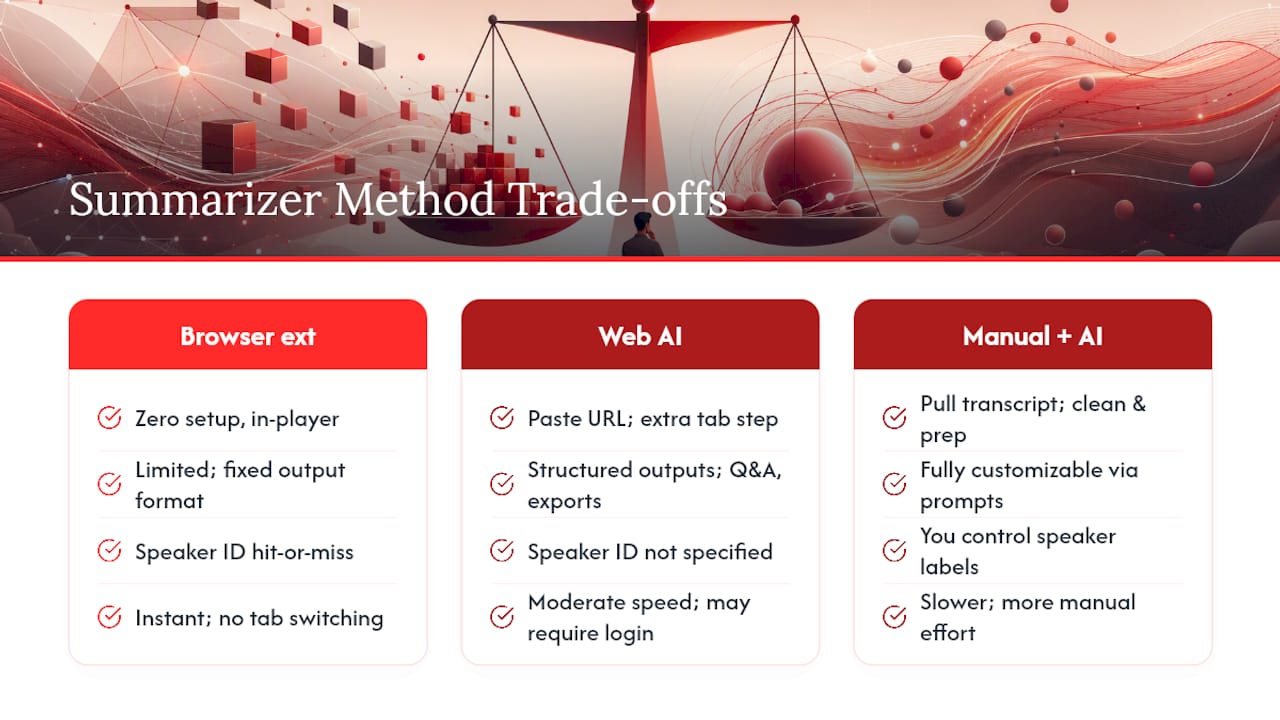
Web AI summarizers run in a separate browser tab. You paste the URL, and the tool fetches the transcript and generates a structured output. These tend to offer more features: follow-up Q&A grounded in the transcript, section breakdowns, and exportable notes. The cost is one extra step and, for some tools, a login requirement.
Manual transcript plus AI gives you the most control. You pull the raw transcript from YouTube, clean it up, then paste it into a general-purpose AI like ChatGPT or Claude with a custom prompt. This method works well for sensitive interviews or when you need a very specific output format. It takes longer but produces the most tailored result.
For recruiting and hiring, a browser extension or web summarizer handles the volume. For publishable journalism or academic synthesis, the manual transcript route gives you the verification trail you need. Quick skimming for personal research sits comfortably in the middle.
Free tiers across all three categories typically cap the number of summaries per day or month. Privacy is worth checking: some web tools store your transcripts on their servers, which matters when the interview contains confidential information.
How to get a reliable transcript and use three interview summary templates
The transcript is the foundation. A summary is only as accurate as the text it’s built from, so getting a clean transcript matters before you touch any AI tool.
Pulling the transcript from YouTube:
- Open the video, click the three-dot menu below the player, and select “Open transcript.” Copy the full text.
- For auto-captions with errors, run a find-and-replace pass on obvious mistakes before summarizing.
- If captions are missing entirely, download the audio (tools like yt-dlp work for this) and run it through a speech-to-text service. Whisper handles accented speech and non-English audio better than most alternatives.
- For interviews in languages other than English, confirm the summarizer supports that language before you start. Many tools handle Spanish, French, and Mandarin well; less common languages may need a manual translation step.
Once you have a clean transcript, the format you choose for the summary depends entirely on what you’ll do with it. Manual interview-summary best practices recommend prioritizing content by objective, using a structured format, and paraphrasing while preserving relevant quotes and action items.
Template 1: Q&A format
Use this for magazine-style pieces, verbatim quote collections, or any output where the interviewer’s questions matter as much as the answers. Structure it as alternating Q and A blocks, with a timestamp next to each answer. Keep the interviewee’s words verbatim inside quotation marks; paraphrase only for context lines between exchanges.
Template 2: Narrative summary
Best for research synthesis or longform writing where you need to weave the interview’s ideas into a coherent argument. Open with a one-paragraph overview of who was interviewed and the central thesis. Follow with thematic sections (not chronological), each anchored to at least one direct quote with a timestamp. Close with a “key claims” bullet list. Interview reports in Q&A or narrative style consistently reduce bias and speed up decision-making for both hiring and research contexts.
Template 3: Scorecard
Designed for recruiters and researchers who need to compare multiple interviews against fixed criteria. Each row is a criterion (communication clarity, domain knowledge, cultural fit, etc.), each column is a candidate or interview. Score 1–5 per cell and add a one-line note. A recommendation row at the bottom forces a decision. Predefined scorecards and automated reporting workflows measurably reduce interviewer bias and speed up team decisions.
Sample AI prompt to paste into your summarizer:
Pair this prompt with the detailed documentation practices used in structured interview analysis: record the session when possible, note key moments with shorthand during playback, and draft the summary within 24 hours while the context is fresh.
How do you verify and edit an AI-generated interview summary?
AI summaries are fast, but they hallucinate. A speaker attribution gets flipped, a paraphrase drifts from the original meaning, or a timestamp is off by 30 seconds. A quick verification pass catches most of this before you share anything.
Verification checklist:
- Compare every quoted line in the summary against the raw transcript. If the words don’t match, fix them or mark the line as a paraphrase.
- Click each timestamp. If the summary says “at 14:32, the guest argues X,” scrub to 14:32 and confirm.
- Check speaker labels. Auto-diarization sometimes swaps host and guest, especially when voices are similar in pitch.
- Flag any paraphrased claim that contains a number, statistic, or proper noun. These are the highest-risk hallucination points.
- For public sharing, every quote must be verbatim. For internal notes, paraphrases are fine as long as they’re labeled as such.
Interview-specific summarization should prioritize traceability: every paraphrased claim should link to a timestamp and a verbatim quote to maintain trust and verifiability.
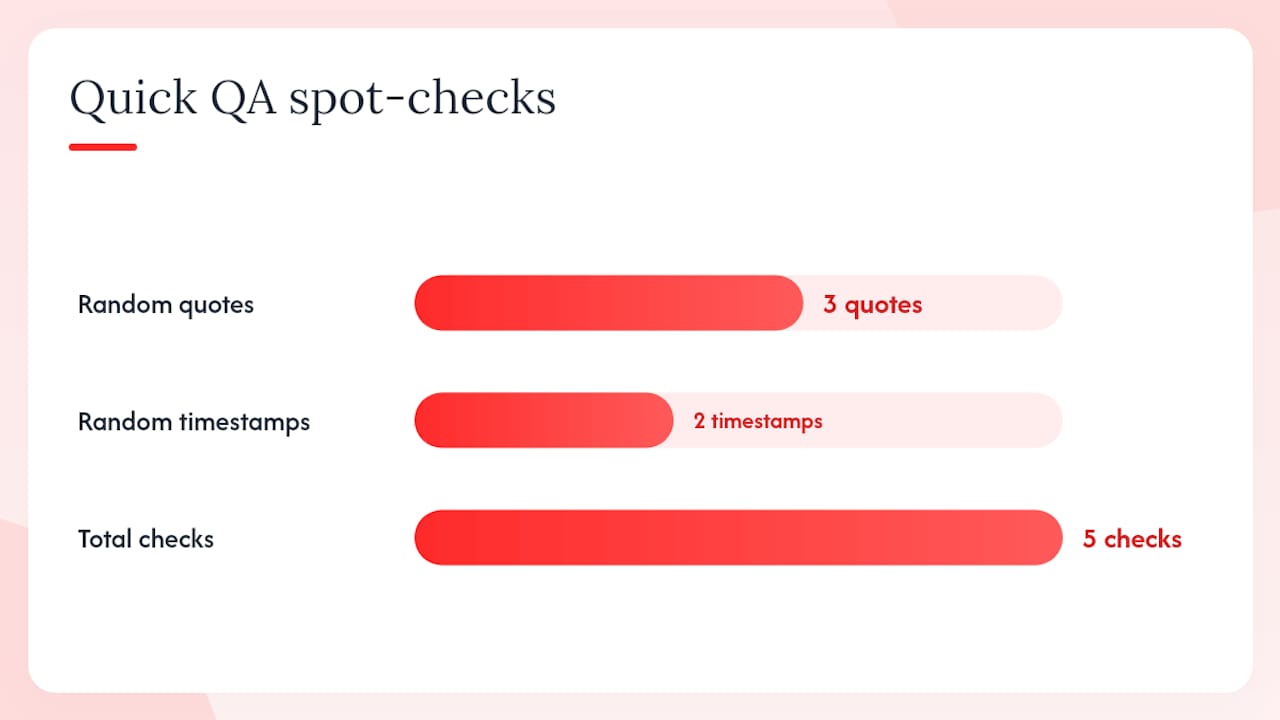
Pro Tip: Run a 5–10 minute QA pass immediately after generating the summary. Open the transcript in one tab and the summary in another. Spot-check three random quotes and two timestamps. If all five check out, the rest of the summary is likely reliable. If two or more fail, re-run the summary with a tighter prompt.
For any claim that involves a number or a named source, add a short context line: “Guest cites a 2024 Pew Research study (no link provided in interview)” rather than stating the statistic as verified fact.
What you need to know about privacy and copyright
This section is general information, not legal advice. For commercial reuse or republishing of interview content, consult a qualified attorney.
- Private interviews: Get explicit consent from all participants before summarizing and sharing, especially if the summary will be distributed beyond your immediate team. Redact names, contact details, and any sensitive personal data before the summary leaves your hands.
- Public YouTube interviews: Attribution is non-negotiable. Include the interviewee’s name, the channel name, and a link to the original video alongside any shared summary.
- Copyright and fair use: Summarizing an interview and quoting short passages for research, commentary, or criticism generally falls within fair use under U.S. copyright law. Reproducing a full transcript or a substantial portion of the video’s audio without permission is a different matter and may require a license.
- Timestamps as attribution: Including timestamps in your summary isn’t just good practice for verification. It also makes attribution concrete and checkable for anyone reading your notes.
- Data privacy: If you’re using a web-based AI summarizer, check whether the tool stores transcript data on its servers. For interviews containing confidential business or personal information, a local or privacy-first tool is the safer choice.
When AI summarization wins and when it doesn’t
AI handles the mechanical parts of summarization better than any human: pulling timestamps, flagging repeated themes, and extracting quotable lines from a 90-minute conversation in seconds. For factual screening, candidate shortlisting, or quick research triage, it’s the right tool. The output is consistent, the speed is unmatched, and the transcript-first approach means you have a verification trail.
Where AI falls short is in judgment. A narrative feature about a whistleblower, a sensitive mental health interview, or an academic conversation where subtext matters as much as the words on the page — these need a human editor who reads the transcript, not just the summary. The AI will give you the five most-repeated claims. It won’t tell you which claim the interviewee seemed reluctant to make, or which answer contradicted something said 40 minutes earlier.
My recommendation: use AI for the first pass every time. For hiring screening, that first pass is often enough. For publishable journalism, treat the AI output as a rough draft that still needs a human read-through against the full transcript. For academic synthesis, the AI summary is a map, not the territory. Template-driven summaries help teams make faster, less biased decisions compared with free-form notes, but the final judgment on meaning and context still belongs to a person.
Baitless makes YouTube interview summaries worth trusting
Most AI summarizers give you a wall of text with no way to check where anything came from. Baitless takes a different approach: paste a YouTube interview URL and get a structured summary that shows you exactly what to focus on, what to skip, and where each key moment lives in the video.

The workflow is direct. Drop in the URL, and Baitless pulls the transcript, generates a timestamped summary, highlights speaker moments, and surfaces exportable quotes you can drop straight into a report or a hiring note. For teams running multiple interviews a week, the shareable note cards mean everyone works from the same verified output instead of separate handwritten notes.
New users start with 25 free summary credits — enough to test the tool across a range of interview lengths before committing to a subscription. Heavy users (recruiters, researchers, content teams) can move to a paid plan for daily volume. No long onboarding, no complex setup: install the Chrome extension, open a YouTube interview, and paste the URL.
Sources
- How to Write an Interview Summary: 11 Easy Steps
- Indeed
- Tech Business Development — Why consultants need automated reporting in 2026