
Cut 4 Hours to 45–60 Minutes: Batch Finance Video Summaries for Pros
Cut 4 Hours to 45–60 Minutes: Batch Finance Video Summaries for Pros

Yes, you can automatically transcribe and get a timestamped, speaker-attributed summary of a finance video, and it saves hours of watch time. The output you typically get back a handful of bullet takeaways, timestamps you can jump to for verification, and direct speaker quotes pulled from the transcript. To start, paste a YouTube URL into a summarizer or install a Chrome extension like Baitless, and you have a working summary in under one minute.
TL;DR:
- Automatic summarization works best with structured, verbal content like earnings calls and macro commentary, but poorly with chart-only or live trading videos.
- Verifying key numbers and quotes against timestamps is essential, as summaries often drop qualifiers, transpose data, or misattribute speakers.
- Batch processing multiple videos and saving searchable, annotated summaries can reduce research time from four hours to under one hour.
- Effective tools should provide accurate transcripts, timestamped highlights, speaker attribution, and export options, with free credits available for initial testing.
- The true value lies in identifying which videos to skip entirely by relying on summaries as filters, not final sources of truth.
Table of Contents
- How Does Automatic Finance Video Summarization Work?
- Which Finance Videos Are Worth Summarizing?
- What’s the Best Workflow for Summarizing Finance Videos?
- What Features Should a Finance Video Summarizer Have?
- Where Do Finance Video Summaries Go Wrong?
- Who’s Behind This Guide?
- How Do You Capture Financial Jargon Accurately in Summaries?
- How Do You Summarize the Numbers and Financial Metrics From a Video?
- How Do You Avoid Misleading Interpretations in Video Summaries?
- The Real Value Isn’t Speed, It’s What You Stop Watching
- Try Baitless: Start Summarizing With Free Credits Today
- Sources
- FAQ
How Does Automatic Finance Video Summarization Work?
The pipeline behind most tools follows the same basic path: a YouTube URL goes in, an automated transcript (or the video’s official captions) gets generated, and a language model condenses that transcript into a summary. Some tools add a timestamp mapping layer so each bullet point links back to the exact moment in the video where the claim was made. That link between summary and source is what separates a useful tool from a glorified guess machine.
Output formats vary by tool, but the useful ones tend to offer more than one view. You might get a short bullet list for a five-second skim, a narrative recap for context, timestamped highlights for verification, and pulled quotes attributed to whoever said them, whether that’s a CEO on an earnings call or an anchor on a market program.
Quality depends heavily on what kind of video you feed it. A video built on spoken, structured explanation, like a Federal Reserve chair answering questions, summarizes cleanly because the information lives in the audio. A video where the real content is a chart scrolling across the screen, or a trader narrating a live position, summarizes poorly because the model has no reliable way to read numbers off a candlestick pattern.
What you’ll typically see in a summary:
- A headline recap of the video’s core argument or announcement
- Three to six bullet takeaways ranked by relevance
- Timestamps for each major point, so you can jump straight to the source
- Direct quotes attributed to the specific speaker who said them
- An export option (text, Notion, or a saved library entry)
Which Finance Videos Are Worth Summarizing?
Not every finance video deserves the same five minutes of your attention, and knowing which ones compress well saves you from wasting credits on content that won’t translate.
- Earnings calls and investor day presentations. These are structured, scripted in parts, and dense with numbers executives say out loud, which makes them a strong fit for automated summarization.
- Analyst and executive interviews. Conversational but focused, these tend to produce clean, quotable takeaways because speakers make direct claims rather than gesturing at a screen.
- Macro commentary and long-form explainers. A host walking through inflation data or a rate decision compresses well because the reasoning is verbal, not visual.
- Chart-only videos and live trading screens. Skip summarizing these. The core information, price action, order flow, chart patterns, lives in pixels the model can’t parse, so the summary will miss the point entirely.
Before you trust a tool with your research pipeline, run one test: summarize a full earnings call and check the summary’s numbers against the transcript. If the revenue figures, growth percentages, and guidance numbers all line up, you’ve found a tool worth building a habit around.
What’s the Best Workflow for Summarizing Finance Videos?
There’s a single-video workflow for quick decisions and a batch workflow for ongoing research. Both are worth learning, because they solve different problems.
Single video, when you need a fast answer:
- Paste the URL into your summarizer of choice
- Generate the transcript (most tools do this automatically)
- Request 3 to 5 bullet takeaways, not a full paragraph dump
- Pull the timestamps for any number or claim you plan to cite or act on
Batch workflow, when you’re tracking a topic over time:
- Build a watchlist of 10 to 15 videos around a theme (say, every major bank’s earnings call this quarter)
- Run all of them through summarization in one sitting
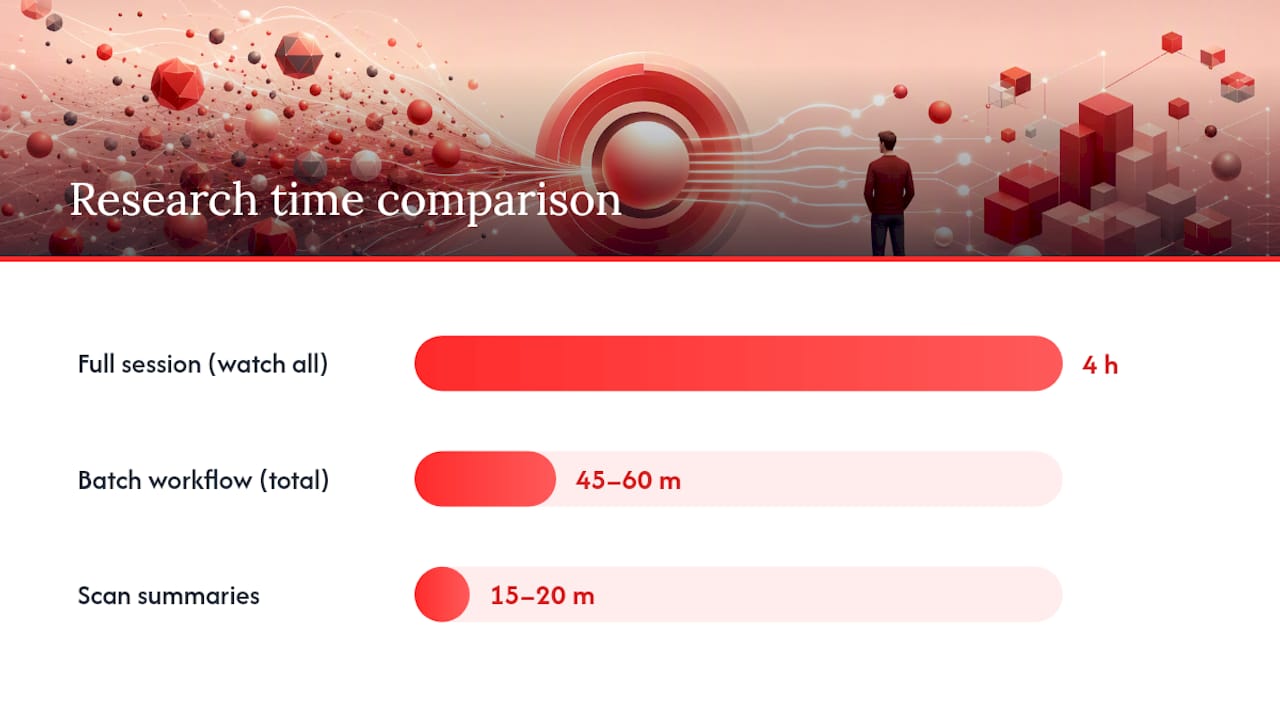
- Scan the summaries in 15 to 20 minutes and flag 2 to 3 that deserve a full watch
- Save the flagged videos for deep review; discard or archive the rest
This isn’t a hypothetical time saver. Professionals using this exact batching approach have collapsed a 4-hour research session into 45 to 60 minutes, spending most of that time on the 2 or 3 videos that actually matter instead of watching everything start to finish.
Once you’ve got summaries worth keeping, archive them somewhere searchable. Export to Notion or Obsidian with metadata attached: date, channel name, tags, and the key claims made. Six months later, when you’re trying to remember which analyst called the last rate cut correctly, a tagged archive beats scrolling through your watch history.
Pro Tip: Before you trust any summarizer with your actual research, feed it one earnings call you already know well and grade its numbers against the transcript. If it nails the specifics on a call you understand, you can trust it on calls you don’t have time to watch.
What Features Should a Finance Video Summarizer Have?
A handful of features separate a tool you’ll use daily from one you’ll abandon after a week.
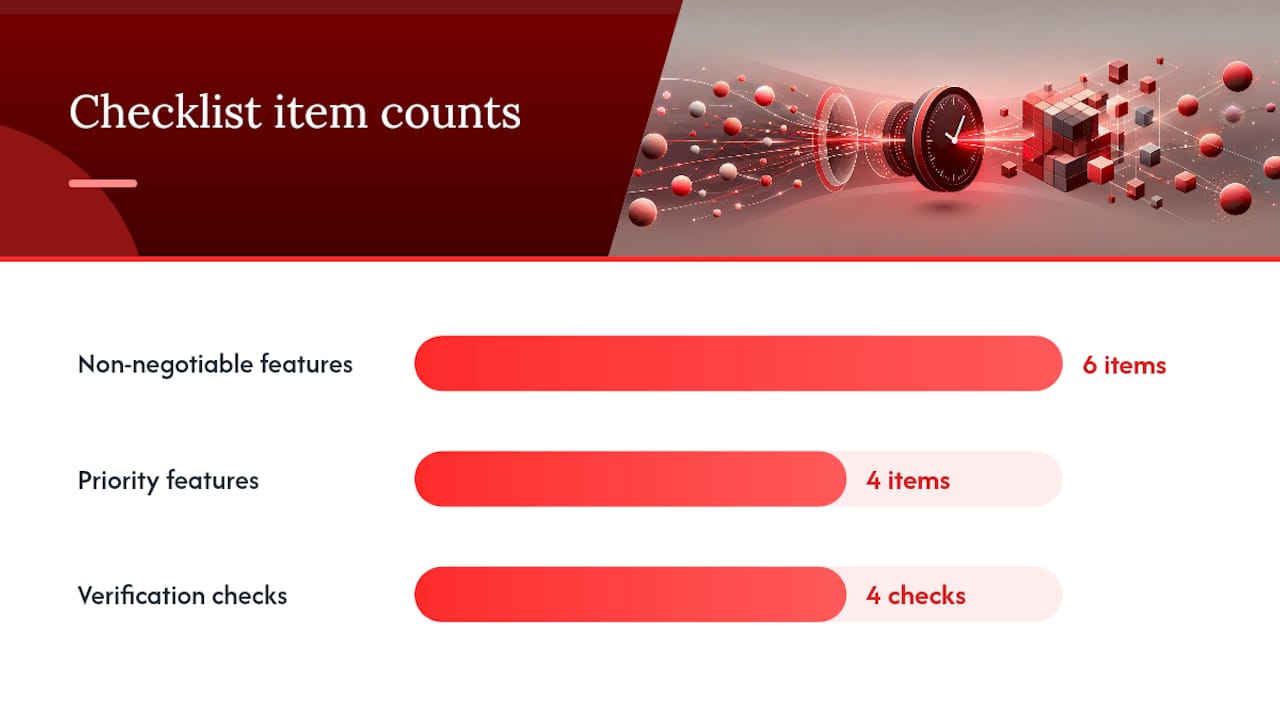
Non-negotiable features:
- Accurate transcription, since a bad transcript guarantees a bad summary
- Timestamped highlights that link each bullet back to the moment in the video
- Speaker attribution, especially for interviews and panels with multiple voices
- Direct YouTube URL support, no downloading or file conversion required
- Export options you can drop into your existing notes system
- Batch mode for processing multiple videos without repeating the same steps
Features worth prioritizing if you have a choice:
- Summary length control (short bullets versus a fuller narrative recap)
- A “focus on numbers” mode that prioritizes figures over color commentary
- A searchable library of past summaries
- A chat or Q&A feature that lets you ask follow-up questions against the transcript, a pattern that several finance summarization tools now build in
To test any tool before committing, verify three numeric claims and one quoted statement against the source video. If all four check out, you’ve likely found a reliable option.
Baitless is built around this exact checklist. It’s a Chrome extension that generates a summary directly from a YouTube URL, breaking down what to watch versus what to skip without asking you to leave the tab you’re already in. The free tier includes a limited number of summary credits, no card required, which is enough to run the numeric-accuracy test above several times over before deciding whether the Pro plan fits your daily research volume.
Where Do Finance Video Summaries Go Wrong?
Every summarization tool fails in predictable ways, and knowing the failure modes matters more than knowing the success stories.
The most common problems: qualifiers get dropped (a CEO’s “we expect roughly 8 percent growth, assuming rate cuts materialize” becomes a flat “8 percent growth”), percentages or dates get transposed, and any claim that depended on a visual, a chart, a slide, an on-screen graphic, disappears entirely because the model never saw it. Speaker misattribution shows up most often in multi-guest panels, where a quote gets pinned to the wrong voice.
A short verification checklist before you act on a summary:
- Check the timestamp and listen to the original 30 seconds around any figure you plan to use
- Confirm numbers against primary filings, earnings decks, or official transcripts, not just the AI-generated version
- Capture verbatim quotes yourself when precision matters for a report or client communication
- Keep dated, text-searchable records of your source videos and summaries if you need an audit trail
As a pattern rather than a hard number: accuracy tends to run highest on structured, spoken content, earnings calls, scripted interviews, verbal macro commentary, and drops noticeably on anything visual-dependent, like chart walk-throughs or screen-recorded trading sessions. Treat every AI summary as a starting point for verification, not a substitute for it, especially before the numbers make it into client materials or investment decisions.
Who’s Behind This Guide?
This guide comes from Sergio, who covers video summarization tools and workflows regularly, including deeper breakdowns of how AI handles YouTube content on the Baitless blog. Baitless itself is built specifically for this problem: a Chrome extension that turns long YouTube videos into a clear watch-or-skip breakdown, with a free 25-credit tier and a paid plan for daily users, all detailed at Baitless.
Editorial note: case studies and internal accuracy benchmarks for finance-specific summarization will be added here as that data becomes available.
How Do You Capture Financial Jargon Accurately in Summaries?
Financial vocabulary breaks generic summarizers in specific, predictable ways. Terms like “EBITDA margin compression,” “forward guidance,” or “same-store sales” carry precise meaning that a model trained mostly on general text can flatten into vague paraphrase.
The fix starts with the transcript layer, not the summary layer. A transcript that renders “quantitative tightening” as “quantitative tightening” and not a garbled homophone gives the summarization step a clean foundation to work from. If your tool lets you see the raw transcript alongside the summary, use it, especially for calls loaded with sector-specific terms like “same-store sales” in retail or “net interest margin” in banking.
Speaker-attributed quotes help here too. When a summary preserves the exact phrase a CFO used, rather than paraphrasing it into simpler language, you keep the precision that matters for citing the claim later. A paraphrase that turns “we guided to high single-digit growth” into “the company expects strong growth” has quietly lost information a professional reader needs.
If you work across multiple sectors, watch for terminology drift between industries. “Yield” means something different in a REIT earnings call than in a bond market explainer, and a summarizer with no sector context can blur that distinction. When precision on terminology genuinely matters for a report, cross-check the specific term against the timestamped moment in the original video rather than trusting the summary’s word choice alone.
How Do You Summarize the Numbers and Financial Metrics From a Video?
Numbers are where finance video summaries earn or lose your trust fastest.
Start by treating every number in a summary as a claim, not a fact, until you’ve checked it against the timestamp. Good summarizers will flag which bullet points contain figures, and some offer a “focus on numbers” mode that prioritizes metrics over narrative color, useful when you’re scanning ten earnings calls in one sitting and only care about revenue, margin, and guidance figures.
Context matters as much as the raw digit. A revenue figure means something different depending on whether it’s year-over-year, quarter-over-quarter, or compared against analyst estimates, and a flattened summary sentence can lose that framing entirely. If a summary says “revenue grew 12 percent,” check whether the original speaker said that was against consensus, against last year, or against a lowered guidance range.
For multi-metric videos, like a bank earnings call touching net interest margin, loan growth, and credit losses in the same ten minutes, batch-summarizing with timestamps attached lets you jump straight to each metric’s mention instead of hunting through the full transcript. That’s a meaningfully faster way to build a spreadsheet of comparable figures across a sector than watching each call in full.
How Do You Avoid Misleading Interpretations in Video Summaries?
Context loss is the subtlest failure mode in AI summarization, and it’s the one that causes the most damage precisely because the summary doesn’t look wrong. It just leaves something important out.
A CEO saying “we expect growth to moderate if rates stay elevated” can get compressed into “the company expects growth to moderate,” dropping the conditional entirely. That’s not a factual error in the strict sense, every word traces back to something said, but it changes the claim’s meaning. The safeguard is reading summaries with an eye for missing qualifiers: words like “if,” “assuming,” “roughly,” and “subject to” carry real information, and their disappearance is a signal to check the original clip.
Sequence matters too. A summary that lists five bullet points in the order the model found them, rather than the order the speaker made them, can imply a cause-and-effect relationship that never existed. If a summary implies point three caused point four, verify that against the timestamped transcript before repeating that framing anywhere.
The most reliable habit: treat the summary as a map, not the territory. Use it to decide what’s worth your attention, then verify anything you plan to act on, cite, or repeat to a client against the actual moment in the video. Research on multimodal summarization suggests future tools will get better at preserving this kind of nuance by combining audio, transcript, and visual signals, but today’s tools remain largely transcript-driven, which is exactly why the verification habit still matters.
The Real Value Isn’t Speed, It’s What You Stop Watching
Most advice about AI video tools focuses on how fast they are. That’s the wrong frame for finance content specifically. The real value of summarizing finance videos isn’t the minutes saved on any single clip, it’s the videos you correctly decide never to watch at all.
Conventional wisdom treats summarization as a transcription shortcut. It’s better understood as a filtering system. Batch several earnings calls, scan the summaries, and you’ll usually find most say nothing new, with value concentrated in a few that surprise you, and a workflow exists to find those quickly.
Where most people go wrong is trusting the summary as the final answer instead of the first filter. The professionals getting genuine value from this treat every bullet point as a hypothesis to check, not a fact to repeat. Prioritize verification habits over tool features. A summarizer with mediocre timestamps but a user who checks every number will outperform a flashy tool used carelessly, every time.
— Sergio
Try Baitless: Start Summarizing With Free Credits Today
Some tools get you a usable summary from a raw YouTube link quickly, with no card or complicated setup beyond a simple install. They offer free credits to run the verification test this guide recommends: summarize an earnings call you already know, check the numbers, and decide for yourself whether the accuracy holds up before you commit to anything.

Once you’re past the free tier and summarizing finance content daily, whether that’s earnings season coverage or a running watchlist of macro commentary, the Pro plan at a monthly subscription unlocks higher-volume credits without the friction of buying one-off packs. Install the extension, paste your first link, and see what you’re actually spending your watch time on.
Sources
A few places worth bookmarking if you want to stress-test a summarizer or dig deeper into the research behind it:
- YouTube Summarizer for Financial Professionals: Stay on Top of Market Content Without the Watch Time | YT Summarizer Blog
- How to Get a Finance Video Summary Without Rewatching
- Presenting an Order-Aware Multimodal Fusion Framework for Financial Advisory Summarization With an Exclusive Video Dataset
FAQ
What Are the Best Financial Advice Videos on YouTube for Summarizing?
Earnings calls, investor day presentations, and structured macro commentary summarize best because they’re verbal and dense with explicit claims. Interview-style videos with a single analyst or executive also compress cleanly, while chart-walkthrough or live-trading videos summarize poorly since the core content lives in visuals a transcript can’t capture.
What Are the Basic Principles Every Finance Video Summary Should Preserve?
A reliable summary should preserve the speaker’s exact claims, the numbers as stated, any qualifiers like “if” or “assuming,” and the original sequence of points. Losing any of these turns an accurate transcript into a misleading summary, even when every individual word traces back to the source.
Can ChatGPT Do Financial Analysis From a Video Transcript?
A general-purpose chatbot can summarize a transcript you paste in, but it won’t independently verify numbers, timestamp the source, or attribute quotes to specific speakers without extra prompting and manual work. Purpose-built tools like Baitless handle the transcript-to-summary pipeline automatically, including timestamps, which makes verification faster.
What Does a Good Financial Video Summary Actually Look Like?
A strong summary includes a headline recap, several bullet takeaways, timestamps linking each point back to the video, and direct quotes attributed to the person who said them. For an earnings call, that might mean a bullet on revenue guidance, one on margin trends, and a timestamped quote from the CFO on forward expectations.
How Much Time Can Summarizing Finance Videos Actually Save?
Batching a watchlist of 10 to 15 videos and reading summaries instead of watching everything in full can cut a 4 hour research session down to 45 to 60 minutes, with most of that remaining time spent on the two or three videos flagged as worth a full watch.