
How to Summarize a Conference Talk in Minutes
How to Summarize a Conference Talk in Minutes

The fastest useful summary of a recorded conference talk is a single-sentence TL;DR, three to five key points, and timestamped chapters you can jump to directly. You can get that in under five minutes using a browser extension like Baitless, or build it yourself with a transcript and a quick LLM prompt.
Here’s what that output looks like in practice:
TL;DR: Researcher Lena Fischer argues that retrieval-augmented generation outperforms fine-tuning for low-resource NLP tasks when training data is under 10,000 examples.
- Key point 1: RAG reduces hallucination rates by grounding outputs in retrieved documents (see 14:32)
- Key point 2: Fine-tuning still wins on latency-sensitive production tasks (28:10)
- Key point 3: Hybrid approaches showed the best accuracy-cost tradeoff in Fischer’s benchmarks (41:05)
That format tells you in 30 seconds whether the talk is worth 47 minutes of your evening.
Pro Tip: Before you watch anything, run the summary first. If the TL;DR doesn’t mention a method, finding, or data point you haven’t seen before, skip it.
Key Takeaways
| Point | Details |
|---|---|
| Summary structure | A TL;DR, 3–5 key points, timestamps, and speaker context are the minimum for a useful output. |
| Time savings | Multimodal summaries reduced viewing time by ~53% at equivalent comprehension in FastPerson’s evaluation. |
| Video plus summary | Students who reviewed both video and summary showed larger quiz gains than those using either alone. |
| Verification step | Always check named entities, timestamps, and slide-dependent claims before sharing any automated summary. |
| Baitless | One-click Chrome extension that delivers TL;DR plus timestamped chapters from any YouTube conference talk, free for the first 25 summaries. |
Table of Contents
- What does a high-quality conference-talk summary contain?
- How do you summarize a conference talk quickly?
- How do you verify and edit an automated summary?
- How do you use a summary to decide what to watch or skip?
- Where do automated summaries fail, and what about privacy?
- Why Baitless is the practical choice for this workflow
- An honest look at what summaries actually changed
- Get your first summary before you press play
- Sources
What does a high-quality conference-talk summary contain?
A summary that actually helps you decide whether to watch has five components. Miss one and the output becomes either too vague to act on or too dense to skim.
| Component | What it includes | Why it matters |
|---|---|---|
| Single-sentence TL;DR | Core argument or finding in one sentence | Lets you decide in 10 seconds |
| 3–5 key points | Specific claims, methods, or data | Replaces re-watching for most use cases |
| Concrete takeaways | Named tools, thresholds, or next steps | Converts insight into action |
| Speaker and session context | Name, role, session title, conference | Anchors the content for citation or follow-up |
| Timestamps and chapters | Minute markers for each major section | Lets you jump directly to the relevant segment |
Timestamps are the component most automated tools skip or get wrong. A format like 14:32] RAG vs. fine-tuning tradeoff tells you exactly where to land without scrubbing. When a speaker explains a concept entirely through a slide diagram, audio-only transcription misses it. [Multimodal summarization that combines on-screen text and images with the audio track preserves those visual explanations in the output.
Pro Tip: Check whether the summary mentions anything the speaker pointed to on screen. If a key claim has no supporting sentence in the summary, that’s a visual-dependency gap.
How do you summarize a conference talk quickly?
Three routes exist, ordered by speed.
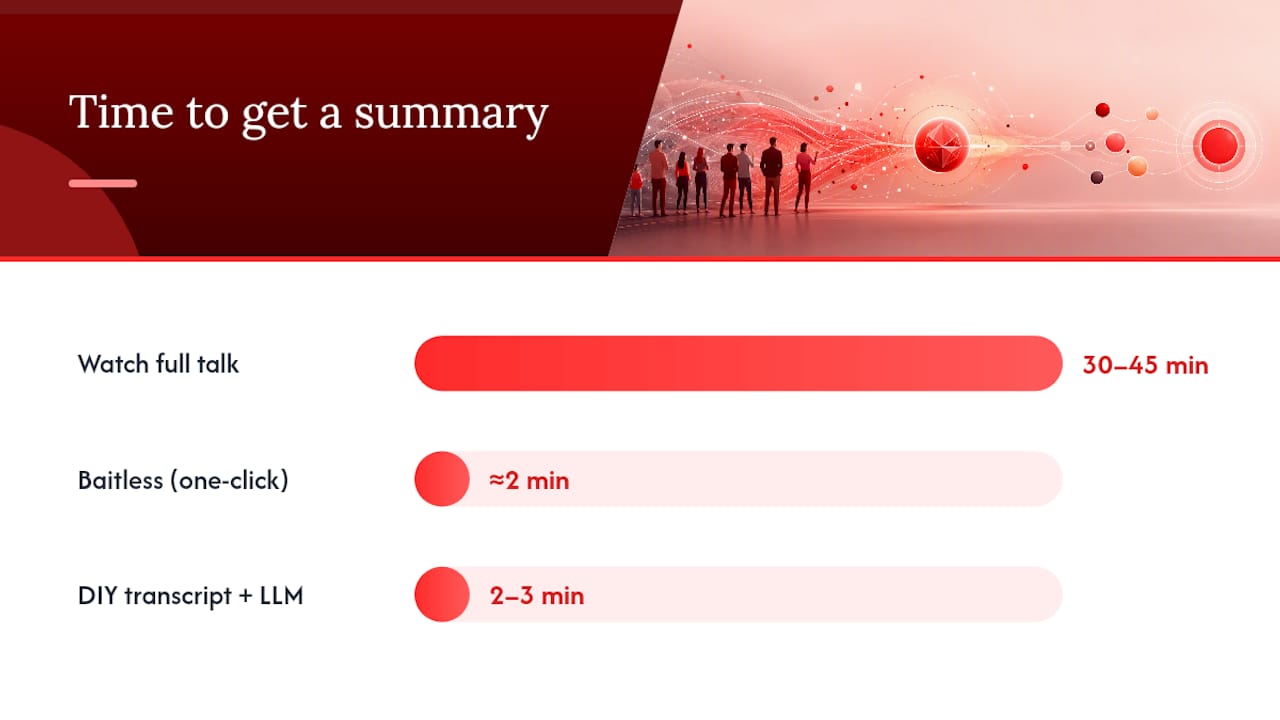
Fastest: one-click browser extension. Paste the YouTube link into Baitless, click summarize, and get a TL;DR plus timestamped chapters in roughly two minutes. No transcript download, no prompt engineering. This is the right choice when you have a queue of talks to triage and need a decision in under five minutes per video.
Recommended for reproducible accuracy: the ASR → LLM pipeline.
- Generate a transcript using OpenAI’s Whisper or YouTube’s auto-captions (download via the three-dot menu under the video).
- Clean the transcript: remove filler words, fix obvious misheard terms, and break it into logical chunks by topic shift.
- Feed each chunk to an LLM (GPT-4o, Claude 3.5 Sonnet, or similar) with a prompt like: “Summarize this section in two sentences. Identify the main claim, any named methods, and any quantitative results.”
- Run a second condensing pass across all chunk summaries to produce the final TL;DR and key-point list.
- Attach timestamps manually or pull them from the transcript’s time codes.
Researchers who built the FastPerson system used Whisper for transcription and an LLM for summarization specifically because a modular pipeline exposes where errors enter, making them easier to fix than end-to-end black-box systems.
DIY quick method. Copy YouTube’s auto-generated transcript (open the transcript panel, select all, paste into a text editor), then drop it into any LLM with the prompt: “Give me a one-sentence TL;DR and three key points with timestamps.” A second pass asking the model to cut the output to 150 words tightens it further. Practical conference workflows confirm this approach produces a readable summary of a 30–45 minute talk in 2–3 minutes.
On cost and credits: Baitless offers 25 free summary credits, which covers most casual users for weeks. A subscription makes sense once you’re processing five or more talks per week regularly.
FastPerson’s evaluation found that multimodal summaries reduced viewing time by roughly 53% while maintaining comparable comprehension, which is clear evidence that a good summary offers a more efficient path to the same understanding.
How do you verify and edit an automated summary?
The remaining gap is where trust breaks down, so a fast six-point check before sharing any summary is worth the three minutes it takes.
- Named entities: Confirm every person, tool, dataset, and organization name against the video. ASR systems frequently mishear technical terms (“BERT” becomes “bird,” “LLaMA” becomes “llama”).
- Negation: LLMs occasionally drop “not” from a sentence, flipping the meaning entirely. Spot-check any claim that sounds absolute.
- Timestamps: Scrub to the cited minute and confirm the topic matches. Off-by-two-minute errors are common when chapters aren’t explicitly marked.
- Slide-dependent claims: If the summary mentions a chart, graph, or formula, verify the speaker actually explained it verbally. If not, flag it as “visual-only — see [timestamp].”
- Quoted recommendations: Any time the summary attributes a specific recommendation to the speaker, confirm the speaker actually said it rather than implied it.
- Hallucinated claims: Watch for confident-sounding sentences that don’t appear anywhere in the talk. These are rare but consequential.
For team sharing, append a one-line note at the top: “Auto-generated, verified [date] by [name]. Flagged items marked [?].” That single line shifts the summary from a raw output to a curated document.
How do you use a summary to decide what to watch or skip?
The summary is a decision tool, not a replacement for the talk itself. Here’s how to apply it:
- Watch if the TL;DR names a method, dataset, or finding you haven’t encountered before, or if the speaker’s conclusion contradicts something you currently believe.
- Skip if the TL;DR describes a high-level overview of a topic you already know well, with no new data or named tools.
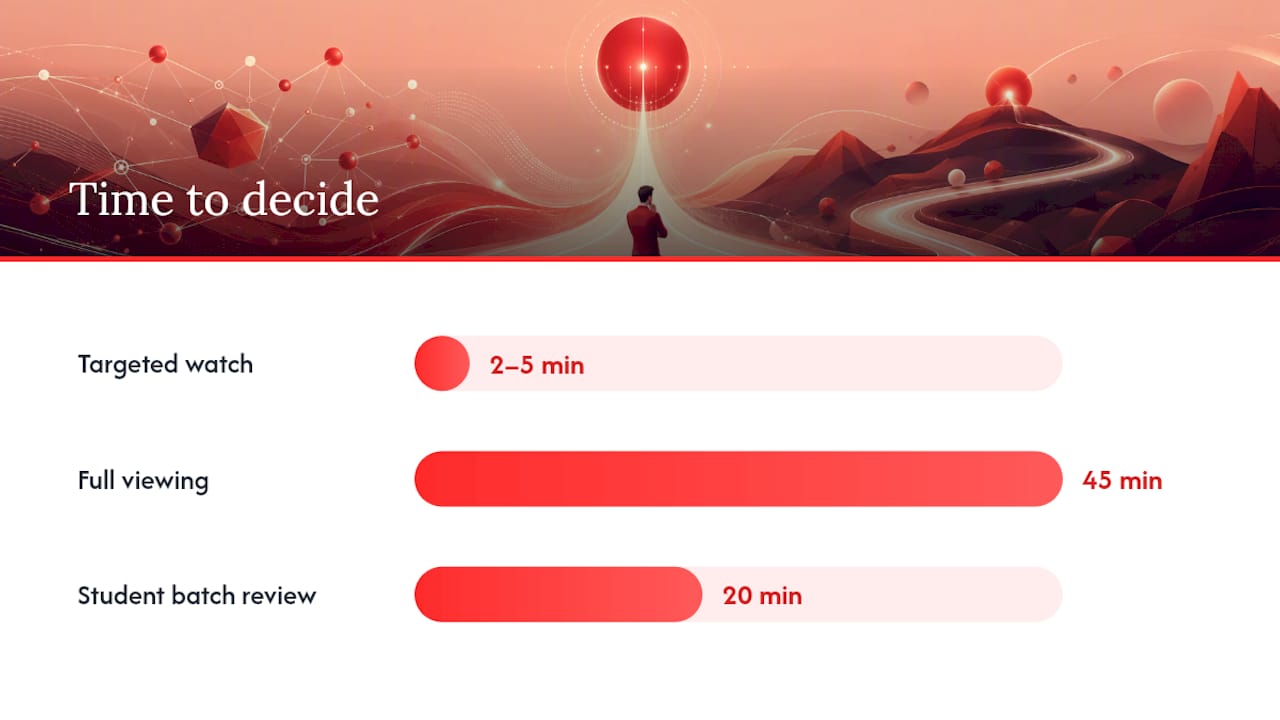
- Jump in using timestamps when you want one specific section — the benchmark results, the Q&A, or the methodology. A 2–5 minute targeted watch often replaces a full 45-minute viewing.
- Save for later when the TL;DR is relevant but not urgent. Clip the timestamp link and the key-point list into a reference folder.
For daily use: professionals can run five talks through a summarizer each morning and decide which one deserves full attention that day. Students preparing for an assignment can pull key points from three or four talks in 20 minutes and identify which one to cite. Researchers doing a literature review can use the speaker context field (name, institution, session title) to prioritize talks from known labs or on specific methods.
A controlled study found that students who reviewed both lecture videos and automatically generated summaries showed larger post-review quiz improvements than those who reviewed only the video or only the summary — the combination beats either alone.
Where do automated summaries fail, and what about privacy?
Common failure modes:
- Slide-first explanations: If the speaker says “as you can see here” and points to a diagram, the transcript captures nothing useful. The summary will either skip the point or fabricate a plausible-sounding explanation.
- Dense math or formulas: Equations spoken aloud (“x sub i equals the sum of…”) rarely survive transcription intact.
- Poor audio quality: Background noise, heavy accents, or overlapping voices degrade ASR accuracy significantly, and errors compound through the LLM pass.
- Multilingual talks: Code-switching mid-sentence confuses most ASR systems.
- Q&A nuance: Audience questions are often inaudible, so the speaker’s answer appears without context, making it easy to misread.
Privacy considerations: When you upload a recording to a third-party tool, that audio or video may be processed on external servers. Check the tool’s privacy policy for data retention terms before processing any internal or proprietary talk. For sensitive content, a local Whisper install processes audio entirely on your machine.
Pro Tip: Keep the raw transcript file alongside any shared summary. If a colleague questions a claim, you can point to the exact transcript line rather than rewatching the full talk.
Why Baitless is the practical choice for this workflow
Baitless handles the full pipeline in one click: paste a YouTube link into the Chrome extension, and it returns a TL;DR, timestamped chapters, and a key-point breakdown without requiring any transcript download or prompt writing.
- One-click summarization directly from YouTube
- Timestamped chapters so you can jump to any section immediately
- TL;DR plus three-point takeaways in a consistent format
- 25 free credits to start, with a subscription for regular users
- Works within the browser, no separate app or account setup beyond the extension
The free tier covers occasional users comfortably. If you’re processing more than a handful of talks per week, the subscription removes the credit ceiling without changing the workflow. The FastPerson research showed a ~53% reduction in viewing time with multimodal summaries — Baitless applies the same logic to YouTube conference content, giving you the decision-relevant information before you commit a single minute to watching.
Quick setup: install the Baitless Chrome extension, open any YouTube conference talk, click the extension icon, and run the summary. Verify named entities against the video for any talk you plan to share or cite.
An honest look at what summaries actually changed
Summaries didn’t make me watch less. They made me watch better. Before using them, I’d commit to a 50-minute talk based on a title and end up 35 minutes in, realizing the first 30 were setup I already knew. Now I read the TL;DR, check two timestamps, and either jump straight to the 28-minute mark or close the tab entirely.
The clearest example: three talks from a recent AI conference, each running 40–50 minutes. Summaries took about 20 minutes total. One talk got a full watch. One got a 12-minute targeted jump. One got skipped. That’s roughly two hours of video reduced to a 20-minute evening review with no meaningful loss of information.
The part most people underestimate is the verification step. Skipping it feels fine until you share a summary with a colleague and a named tool turns out to be misheard. One quick entity check per summary is the difference between a useful document and an embarrassing one.
Get your first summary before you press play
Baitless gives you the point of a YouTube conference talk before you invest a minute watching it. Install the Chrome extension, paste the link, and get a TL;DR plus timestamped chapters in seconds.

Your first 25 summaries are free. No subscription required to start. If you’re regularly working through conference recordings — for work, research, or coursework — the paid plan removes the credit limit and keeps the same one-click workflow. The goal is simple: decide faster, watch less, retain more.
Install Baitless and run your first summary now.
Sources
The research and practical guides behind this article, for readers who want to go deeper:
- Making lectures accessible: AI-based abstractive summarisation for video content
- How to Transcribe Conference Talks: Capture Every Session Without Missing a Thing – VidNotes Blog