
Study Faster: Curate 3–5 YouTube Videos, Watch in 20 Minute Cycles
Study Faster: Curate 3–5 YouTube Videos, Watch in 20 Minute Cycles
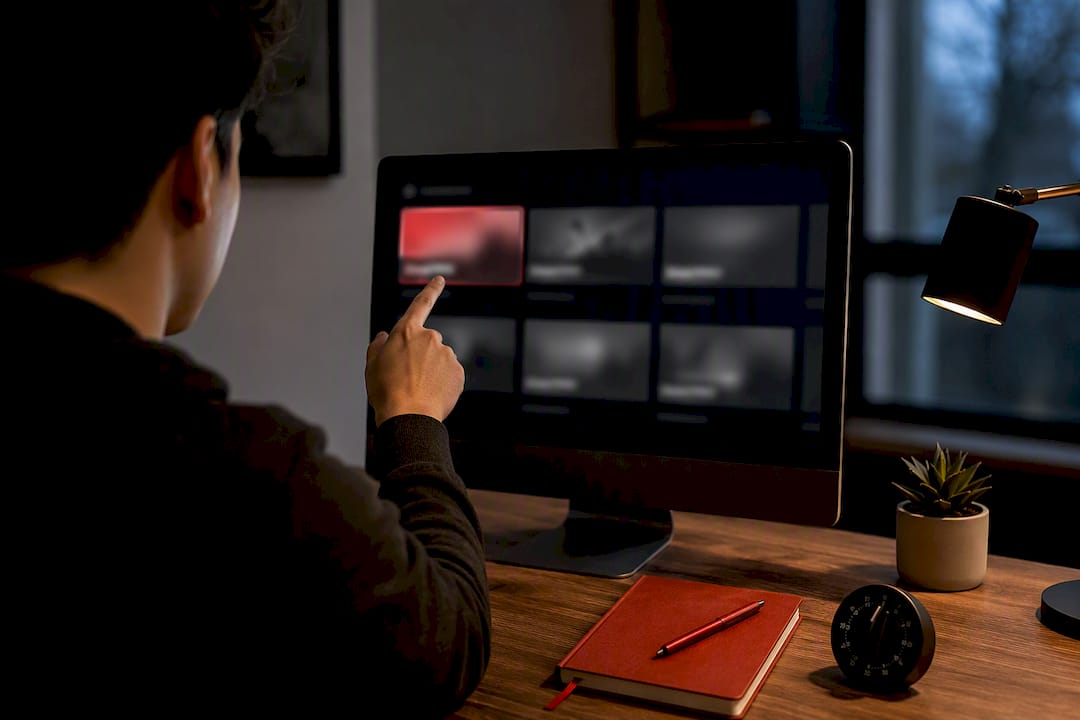
AI summarizers like Baitless can flag the key moments so you know what deserves full attention and what to skip.
TL;DR:
- Using AI summarizers like Baitless helps identify key segments in videos, reducing the time spent on filler content and focusing attention on crucial parts.
- Calibrating playback speed according to material complexity, such as 1x to 1.5x for new concepts and 2x for review, maintains comprehension while optimizing watch time.
- Pre-selecting 3 to 5 foundational videos and reviewing them in order prevents unstructured binge-watching and ensures a progressively deeper understanding.
- Active note-taking involves limiting live annotations to 3-5 timestamps per 10-minute segment and expanding these notes shortly after watching.
- Incorporating spaced retrieval practice and immediate brain-dumps after sessions significantly enhances long-term memory retention of studied material.
Table of Contents
- How Do You Actually Study Faster With YouTube?
- Tools That Turn YouTube Videos Into a Study Package
- Turning a Fast Watch Into a Lasting Memory
- Common Mistakes That Waste Your Study Time
- Why This System Speeds Studying Without Killing Retention
- Combining YouTube With PDFs and Quizzes for Deeper Learning
- Cutting Distractions While Studying on YouTube
- When YouTube Beats a Course, and When It Doesn’t
- Try Baitless to Skip Filler and Find the Key Moments Fast
- Sources
- FAQ
How Do You Actually Study Faster With YouTube?
Most people treat YouTube like television: hit play, let it run, hope something sticks. That passive mode is the single biggest reason video-based studying feels slow even when the content is good. The fix isn’t watching less YouTube. It’s watching it differently, with three habits working together: calibrated speed, a pre-watch filter, and active notes tied to timestamps.
Calibrate your playback speed instead of guessing. New, dense material (math derivations, unfamiliar vocabulary, hands-on demonstrations) deserves 1x or maybe 1.1x. Standard lecture-style content runs well at 1.25x to 1.5x, which research on speed-watching shows often preserves comprehension while cutting watch time meaningfully. Reserve 2x for review passes, material you’ve already half-learned, or filler segments (long intros, recap sections) you just need to confirm you’re not missing anything. The mistake is picking one speed and sticking with it for an entire video regardless of difficulty. Toggle it mid-video. Slow down the moment a professor writes something on a whiteboard; speed back up once they’re recapping.
Build your pre-watch checklist before you click play. Define what you actually need to learn in one sentence. Then scan titles, descriptions, and chapter markers on 5 to 8 candidate videos, and narrow that down to 3 to 5 based on which ones look most foundational rather than most entertaining. A self-study playbook from Notiq makes the case that this curation step, done before any watching starts, prevents the wasted hours that come from unstructured binge-watching one recommended video after another. Rank your shortlist from foundational to advanced, and watch in that order.
Run sessions in tight cycles, not marathons. A focused watch for about twenty minutes, followed by practice or application time, then a short brain-dump, beats a 90-minute uninterrupted sit almost every time. The short cycle forces you to apply what you just saw before your brain files it away as “watched” instead of “understood.”
Here’s the note-taking rule that actually works on video, adapted from workflows built around timestamp anchoring:
- While watching, jot no more than 3 to 5 anchor points per 10-minute segment, just enough to mark the timestamp and a two-word cue.
- Resist the urge to write full sentences live. You’ll fall behind and end up rewinding constantly.
- Within an hour of finishing, do a post-pass: expand each anchor into a full note using your own words.
- Convert every expanded anchor into a question. “Mitochondria produce ATP” becomes “What does the mitochondria produce, and how?”
- For anything foundational, watch the segment a second time at a slower speed before moving on. Foundational material earns a second pass; filler doesn’t.
Pro Tip: Keep a running list of timestamps where you got confused. Watching just those brief clips again, days later, is far more efficient than rewatching an entire long lecture from the start.
Tools That Turn YouTube Videos Into a Study Package
The transcript button under most videos is the most underused study tool on the platform. Open it, and you get a full text version of the video with clickable timestamps, so you can copy a line, click it, and land exactly where that moment happens instead of scrubbing the progress bar blindly. For dense lectures, this alone can cut review time in half, since you’re rereading text instead of re-listening to audio at normal speed.
AI summarizers extend that same idea further. A Chrome extension like Baitless scans a video and returns a breakdown of what to focus on versus what to skip, which matters most when you’re deciding among your shortlist of 3 to 5 candidate videos and don’t have time to sample all of them manually. Baitless offers free summary credits, enough to test the workflow across a handful of topics before deciding whether a subscription plan makes sense for daily use. It won’t replace watching the parts that matter, but it does replace the 10 minutes you’d otherwise spend scrubbing through a video trying to figure out if it’s worth your time at all.
Playback extensions matter too. Video Speed Controller and YouTube’s own keyboard shortcuts (J and L to jump back or forward 10 seconds, the number keys 1 through 9 to jump to percentage points in the video, and the period and comma keys for frame-by-frame control during review) let you adjust speed and navigate without touching the mouse. That sounds minor until you’re three videos deep into a study session and every second of friction compounds.
A practical five-step workflow ties this together:
- Collect 3 to 5 videos on your target topic, ranked from foundational to advanced.
- Run each through an AI summarizer to confirm which segments deserve full-speed, full-attention viewing.
- Watch at your calibrated speed, using transcript timestamps to jump straight to flagged sections.
- Generate 5 to 10 practice questions from your notes immediately after.
- Export those questions into flashcards or a spaced-review schedule.
One case study using Google’s NotebookLM describes feeding multiple video transcripts into a single tool to build a combined outline and quiz set, effectively turning three or four hours of separate lecture content into one study document. That’s the real payoff of cross-video synthesis: instead of holding five mental models of five separate videos, you end up with one map showing where they agree, where they overlap, and where one video covers a gap another left open. For readers who want the fuller mechanics of building that kind of note system, Baitless has a step-by-step breakdown of note-taking tools and workflows worth a look.
Turning a Fast Watch Into a Lasting Memory
Watching efficiently only gets you halfway. The other half is what you do in the minutes and days after the video ends, and this is where most fast-watchers quietly lose all the time they just saved.
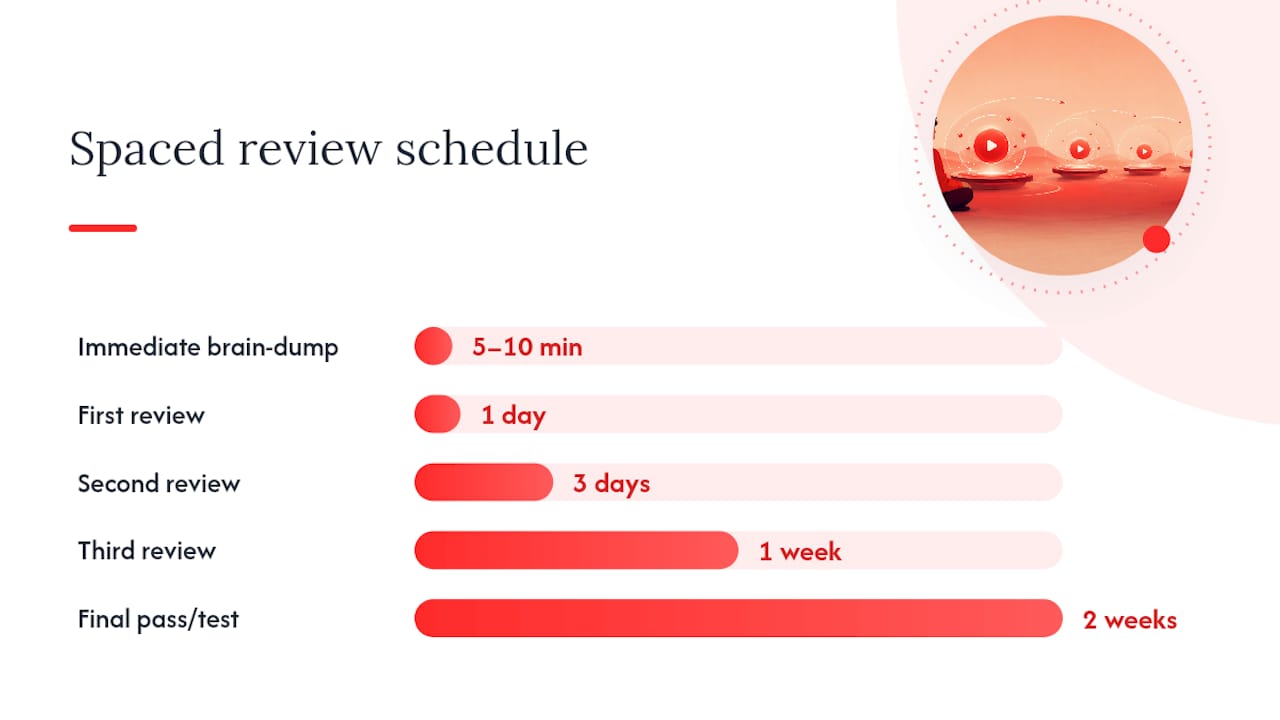
Start with an immediate brain-dump. The moment a video or session ends, close your notes and spend 5 to 10 minutes writing down everything you remember, unprompted. Only after that do you check your timestamped notes against what you wrote and fill the gaps. This single step, forcing retrieval before review, is what separates people who remember material a week later from people who recognize it but can’t reproduce it.
From there, follow a spaced schedule. Memory research reviewed on NCBI consistently finds that spaced retrieval practice beats passive rereading for long-term retention, and the schedule doesn’t need to be complicated:
- Review your notes and questions 24 hours after the first watch.
- Review again after 3 days, this time answering your converted questions from memory before checking notes.
- Review a third time after 1 week, focusing only on questions you missed the previous round.
- Do a final pass after 2 weeks, treating it as a real test rather than a review.
Turn your timestamped anchors into flashcards at the 24-hour mark, not later; the longer you wait, the more context you lose about why that moment mattered. Tools built around transcript extraction can automate much of this conversion, turning a list of anchors into draft flashcard prompts in minutes instead of the hour it takes to write them by hand.
One caution worth taking seriously: limit yourself to a small number of dense, foundational videos per day. Pushing through three or four back-to-back feels productive but produces diminishing returns. Retention research consistently favors distributed effort over cramming, even when the material is delivered through video instead of a textbook.
Common Mistakes That Waste Your Study Time
- Letting the algorithm pick your next video. Autoplay and recommendations are built to maximize watch time, not your grade. Build a manual watchlist before you start and ignore the sidebar entirely.
- Speeding through unfamiliar, dense material. 2x is for review, not first exposure. Running a brand-new derivation at double speed guarantees you’ll rewatch it later anyway, at a cost of more total time.
- Transcribing instead of thinking. Copying a lecturer’s exact words feels productive but skips the mental work of restating an idea yourself. Paraphrase live, then convert that paraphrase into a question during your post-pass.
- Hoarding videos instead of pruning them. Ten videos on the same subtopic isn’t more coverage, it’s decision fatigue. Keep 3 to 5 strong sources and cut anything that just repeats what you already have.
Why This System Speeds Studying Without Killing Retention
The playback-speed adjustment and the recall step aren’t optional extras, they’re the two halves of the same mechanism. Speed control buys you time; retrieval practice is what actually locks material into memory. Skip the second half and the first half is just faster forgetting.
Retrieval practice, actively recalling information rather than passively rereviewing it, produces measurably stronger long-term retention across a wide range of study conditions, according to memory research reviewed on NCBI. Speed-watching only pays off when it’s paired with that kind of active recall afterward.
Baitless’s own tag pages on YouTube video analysis and AI summarization for videos walk through hands-on versions of this workflow for readers who want to see it applied to specific subjects rather than described in the abstract.
Combining YouTube With PDFs and Quizzes for Deeper Learning
YouTube videos rarely stand alone as a complete study source, and treating them that way is a common gap. A lecture video explains a concept; a textbook PDF or lecture-slide deck usually formalizes it with the exact terminology an exam will use. Pair them deliberately: watch the video first for intuition, then skim the corresponding PDF section to confirm the vocabulary and catch anything the video glossed over.
Quizzes close the loop. After your brain-dump and note review, run your self-generated questions as a quiz, then check them against any practice problems from a textbook or course packet covering the same material. If a topic has an accompanying problem set, that’s a better test of whether you actually learned the concept than rewatching the video ever will be. Some students keep a physical or digital notebook specifically for merging video notes with textbook notes side by side. A resource like Trinity Education’s notebook selection works well for learners who find that writing by hand, rather than typing, helps the merge stick.
The sequence that tends to work best: video for concept, PDF for precision, quiz for proof. Skipping any one of the three leaves a gap that shows up on test day, usually in the form of a question phrased slightly differently than the video phrased it.
Cutting Distractions While Studying on YouTube
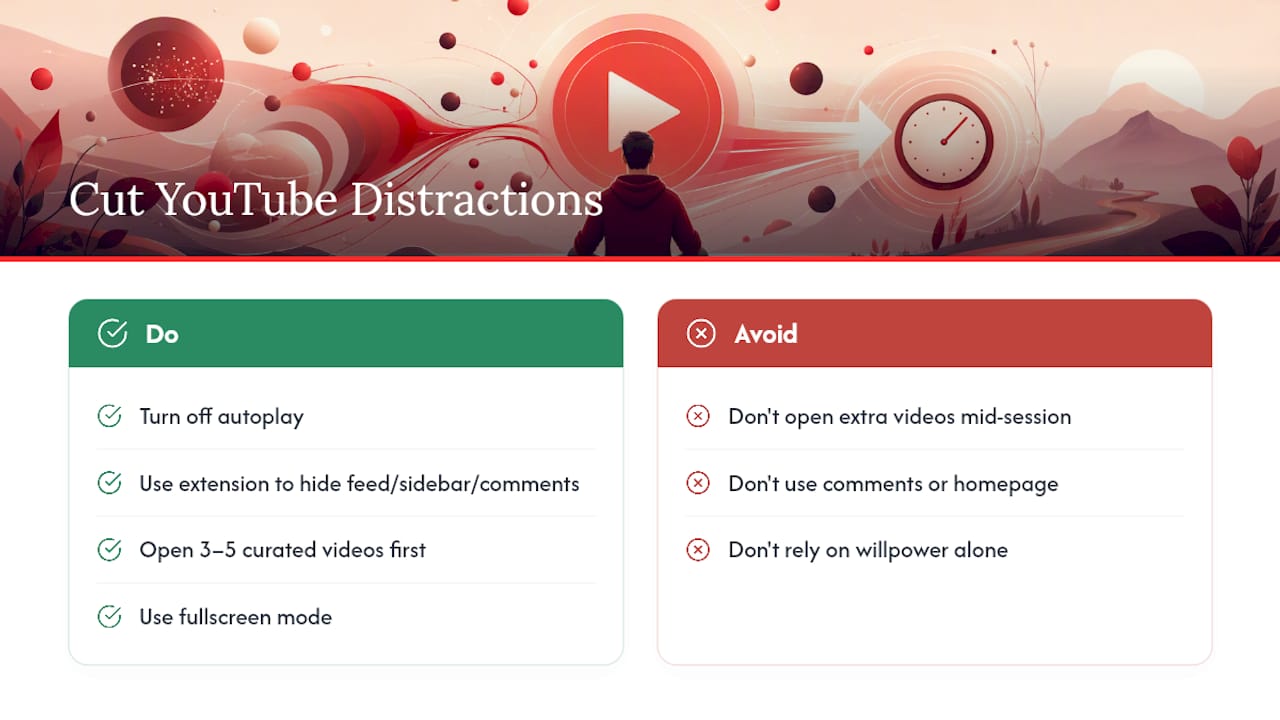
YouTube’s entire interface is built to keep you watching something, anything, which is precisely at odds with studying one specific thing well. The sidebar of recommended videos, the autoplay countdown, and the comments section are three separate distraction machines running during every study session unless you actively shut them off.
Turn off autoplay before you start; it’s a single toggle near the player controls, and it stops the platform from choosing your next 15 minutes for you. Browser extensions built to hide YouTube’s homepage feed, sidebar recommendations, and comments exist specifically for this purpose, and using one turns YouTube into something closer to a private video library than a content feed. Full-screen mode helps too, since it removes the sidebar from view entirely during playback.
Beyond the platform itself, treat your watchlist as a closed loop for the session. Open your 3 to 5 curated videos in separate tabs before you start, work through them in order, and resist opening a sixth “just to check.” A tool like AmmarAI’s guidance on AI study tools covers broader habits for keeping AI-assisted study sessions focused rather than scattered across a dozen half-finished resources. The goal isn’t willpower, it’s removing the decision points where distraction gets a foothold in the first place.
When YouTube Beats a Course, and When It Doesn’t
YouTube wins when you have a specific, narrow gap: one confusing concept, one skill you need for a project due Friday, one technique a textbook explains poorly. It loses to a structured course when you need a full curriculum, a credential, or graded feedback on your actual work. The two aren’t rivals so much as different tools for different jobs.
The strongest students I’d point to use both: YouTube for the “I need this understood right now” moments, and a structured course for the scaffolding that keeps those moments connected into something coherent. Treat video as your fast lane, not your whole road.
— Sergio
Try Baitless to Skip Filler and Find the Key Moments Fast
Baitless is the fastest way to apply this whole workflow without doing the pre-watch filtering by hand. Paste in a video URL, and it returns a breakdown of what to focus on and what to skip, so your curated shortlist of 3 to 5 videos gets filtered to the segments actually worth your calibrated-speed attention before you’ve spent a minute watching.

The starter workflow is simple: paste the URL, review the highlights Baitless surfaces, run your 5 to 10 minute brain-dump on just those segments, then slot the result into your spaced-review schedule. The free tier includes 25 summary credits, enough to run this across several topics and see whether it fits how you study before committing to anything. If you’re studying multiple subjects a week, that’s a real test drive. Head to the Baitless landing page and try it on the next lecture video sitting in your watch-later list.
Sources
For deeper mechanics behind the habits above, see the memory research on spaced retrieval practice, the self-study playbook on video curation, and Baitless’s own guides on analyzing YouTube content and study notes from video.
- Spacing effects and memory research (NCBI review)
- Want to learn faster and retain more? Science says start watching YouTube videos at 2X speed (Inc.)
FAQ
What Is the 7-Second Rule on YouTube?
The ‘few-second rule’ refers to how quickly a video needs to grab attention before a viewer clicks away, which is a creator-side engagement concept rather than a study technique. For studying, the more useful equivalent is scanning a video’s chapter markers in the first few seconds to judge whether it’s foundational enough to make your shortlist.
What Is the 8-Minute Rule on YouTube?
There’s no verified study framework called the “8-minute rule” tied to YouTube; the term shows up mostly in creator and algorithm discussions about watch time thresholds, not learning science. If you’re looking for a session-length guideline instead, the better-supported approach is a 20-minute focused watch cycle followed by short practice and recall.
What Is the Fastest Way to Study?
The fastest verified approach combines calibrated speed-watching with immediate active recall and spaced review, rather than any single speed hack alone. Retrieval practice paired with spacing consistently outperforms passive rereading or rewatching for long-term retention.
How Can I Study Effectively Using YouTube?
Curate 3 to 5 videos before watching, adjust playback speed based on how dense the material is, take minimal live notes anchored to timestamps, and follow every session with a brain-dump and a spaced-review schedule. AI tools like Baitless can speed up the curation step by flagging which segments of a video are worth watching at full attention.
Does Watching YouTube Videos at 2x Speed Hurt Comprehension?
For review material you’ve already partly learned, 2x often preserves comprehension while saving real time.