
Key Video Moments for Creators: AI Pipelines, SeekToAction, Baitless
Key Video Moments for Creators: AI Pipelines, SeekToAction, Baitless
Key moments are timecoded highlights that let you jump straight to the most important parts of a video instead of watching it start to finish. You can get them instantly through AI-powered transcript analysis, or, for videos you host yourself, by adding deep-link markup like Google’s SeekToAction. Tools like Baitless already build this into a Chrome extension for YouTube, turning any long upload into a scannable list of moments worth your time.
TL;DR:
- Transcript quality significantly affects key moment detection accuracy, especially for visually driven content or videos with poor audio.
- Using structured markup like SeekToAction or properly formatted YouTube chapters enhances the visibility of key moments in search results.
- The most reliable key moments come from footage with clear speech, natural shot changes, and visual cues that match the spoken content.
- Building an effective pipeline involves five steps, with transcript generation and separate shot detection as critical stages for high-quality highlights.
- AI tools like Baitless work best for talk-heavy videos and require human review for visually complex or noisy content to ensure accurate segmentation.
Table of Contents
- What Are Key Moments in Video, and Why Do They Matter?
- How Do AI Tools Detect Key Moments in Footage?
- How Do You Build a Pipeline to Extract Key Moments?
- How Do You Make Key Moments Show Up in Search?
- Who Actually Uses Key Moments Day to Day?
- Why This Pipeline Works, and Where It Still Falls Short
- Try Baitless for Instant Timestamped Video Summaries
- Where to Read More on Key Moments and Deep Linking
- Sources
- FAQ
What Are Key Moments in Video, and Why Do They Matter?
Key moments work as navigational metadata. Instead of a video being one long, unbroken file, it gets mapped to timestamped segments, each one tagged with what actually happens there. Google formalized this idea back in 2019 when Search started surfacing clickable video segments directly in results, letting someone searching “how to fold a fitted sheet” skip straight to the folding part of a 20-minute video instead of sitting through the intro.
The practical value shows up in three places:
- Discovery. Search engines can index individual segments, not just whole videos, so a single upload can rank for dozens of specific queries.
- Accessibility. Viewers with limited time, or anyone re-watching for a specific detail, get a map instead of a timeline.
- Engagement. People stick around longer when they can find the part they actually came for, instead of abandoning the video in the first two minutes.
That last point is why key moments have become less of a nice-to-have and more of a baseline expectation. A lecture, a product demo, a two-hour interview: all of them get more useful the moment someone attaches real timestamps to the parts that matter.
How Do AI Tools Detect Key Moments in Footage?
Detection systems lean on a handful of concrete signals, and the quality of each one determines how clean the final output looks.
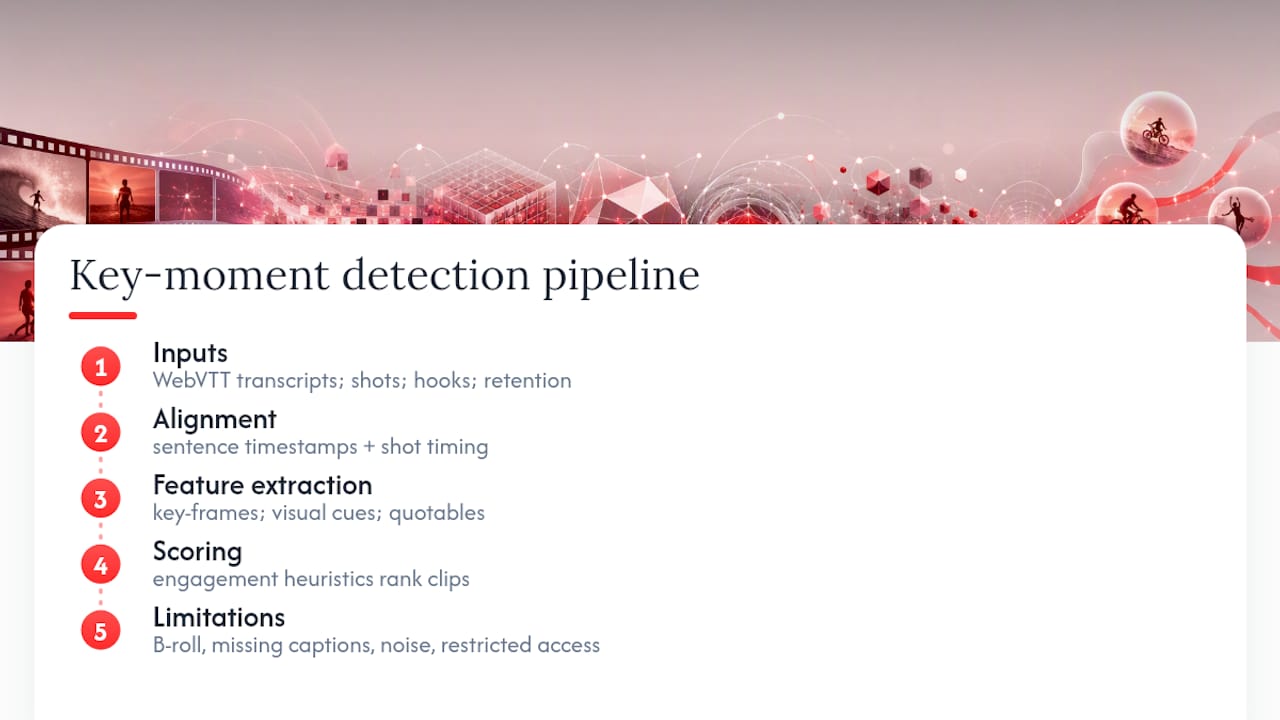
Transcripts are the foundation. A transcript formatted as WebVTT with sentence-level timestamps gives a system something precise to align against, so it can mark exactly where a claim starts and ends rather than guessing at a rough window. Azure AI Content Understanding is a good example of this in production. It returns sentence-level timestamps and shot-timing data that developers use to build tighter, more accurate clip boundaries.
Shot detection and key-frame extraction add a visual layer on top of the transcript. Azure’s content understanding pipeline flags camera shot changes, giving editors a natural cut point that lines up with a visual break instead of chopping mid-scene.
Engagement heuristics come next: scoring models look for hook strength in the first few seconds of a segment, quotable phrasing, or a spike in retention if watch-time data is available.
Here’s where it breaks down: a transcript-only approach struggles badly with B-roll-heavy or visually driven content. If the value of a moment is visual (a demonstration, a reaction, a product close-up) rather than verbal, transcript alignment alone misses it entirely, and you need frame-level analysis to catch it. Videos without captions, heavy background noise, or platforms that restrict automated access all limit how reliable detection can be, no matter how good the underlying model is.
How Do You Build a Pipeline to Extract Key Moments?
Getting from raw footage to a clip-ready highlight takes five steps, and skipping any one of them is usually where the final cut goes wrong.
- Ingest the video. Upload the file directly or reference an owned YouTube URL. Third-party hosted videos you don’t control come with real limitations: you generally can’t add deep-link markup to something you don’t own.
- Transcribe it. Generate a WebVTT file with sentence-level or word-level timestamps, using something like Whisper or the platform’s built-in captions. Skip this step and every downstream cut gets sloppier.
- Segment and score. Run the transcript through an LLM prompt or a heuristic scoring pass that proposes start and end times, along with a reason for each pick.
- Refine the cuts. Adjust timecodes by hand, check the key frames around each boundary, and confirm the clip makes sense without the surrounding context.
- Export and format. Use FFmpeg presets for trimming, burn in subtitles, and crop for whatever aspect ratio the destination platform expects.
Developer write-ups on building clip pipelines consistently point to a two-stage structure as the difference between usable output and a pile of awkward cuts: selection first, using transcript and LLM scoring, then a separate extraction pass with FFmpeg. Treating those as one step is the most common mistake in DIY pipelines.
Pro Tip: Before you run FFmpeg on anything, pull a thumbnail from the exact start and end frame of each proposed clip. A ten-second scan of those two images catches more bad cuts than any amount of transcript review.

How Do You Make Key Moments Show Up in Search?
Detecting a moment is only half the job. Getting it in front of someone searching Google is the other half, and that runs through structured markup rather than good intentions.
SeekToAction is the mechanism. It lets you define a URL pattern, typically a ?t= seconds parameter, so Google can deep-link straight to a timestamp instead of the video’s start. The catch: it only applies to videos embedded on pages you control, and Google has to be able to fetch the actual video file to identify moments automatically.
YouTube chapters work differently but solve a similar problem. Timestamps typed into a video description, formatted correctly, automatically expose named segments that YouTube displays as a clickable list under the player.
A short checklist for improving your odds in Search:
- Publish accurate captions, since Google’s detection leans on transcript quality.
- Add SeekToAction markup if you host video on your own site.
- Format YouTube chapter timestamps correctly in the description, starting at 0:00.
- Keep segment titles specific and descriptive rather than generic.
Who Actually Uses Key Moments Day to Day?
Students and researchers use timestamps to jump straight to the exact minute of a lecture where a professor explains a formula, then cite that timestamp directly instead of describing “somewhere in the middle.”
Creators and marketers cut long-form footage into short, platform-native highlight reels, using the highest-scoring segments as the backbone of a social clip strategy instead of guessing which ten seconds will hook viewers.
Corporate and training teams tag specific scenes in onboarding or compliance videos so new hires can jump to the one policy explanation they need instead of rewatching a 40-minute session.
Archivists and internal knowledge teams build searchable libraries where every clip carries timestamped metadata, turning a folder of raw footage into something you can actually query.
Why This Pipeline Works, and Where It Still Falls Short
Video is the least searchable format most of us deal with daily, and that’s the real problem key moment detection solves. A 90-minute podcast holds maybe four minutes of content you actually need, and until recently, finding that four minutes meant scrubbing through a timeline by hand.
Baitless approaches this directly for YouTube: the Chrome extension breaks a video down into what to watch and what to skip, so you can decide in seconds whether a video is worth your time at all. The free tier allows casual users some summary credits to test the workflow without committing to anything, while a subscription plan supports frequent users who process many summaries daily.
None of this is magic, and it shouldn’t be sold as such. Transcript quality still drives most of the accuracy: a video with poor audio, heavy accents, or no captions at all will always produce shakier segment boundaries than one with clean dialogue. Visually driven content, where the moment that matters is a demonstration rather than a sentence, still challenges transcript-based systems more than talk-heavy formats like interviews or lectures. The honest takeaway is that AI-powered key moment detection works best where speech carries the meaning, and needs a human check wherever the video relies on what’s shown rather than what’s said.
— Sergio
Try Baitless for Instant Timestamped Video Summaries
Baitless turns any long YouTube video into a breakdown of what to watch and what to skip, built specifically for talk-heavy content like interviews, lectures, tutorials, and podcasts.

Getting started takes about thirty seconds: install the Baitless Chrome extension or visit the landing page, and your first 25 summaries come free with no card required. Open any YouTube video, run a summary, and you’ll get a breakdown of the key moments before you’ve committed to watching a single minute. For research-heavy workflows, dense lectures, or long-form interviews, that free tier alone usually settles whether a video is worth your full attention. Once you’re running summaries daily, the paid plan keeps the credits flowing without breaking your budget. If a video leans heavily on visuals rather than spoken content, treat the summary as a starting point and confirm the key visual beats yourself.
Where to Read More on Key Moments and Deep Linking
For deeper technical grounding, Google’s own Search Central blog on SeekToAction covers the exact markup requirements. Azure’s Content Understanding documentation details shot detection and transcript outputs for developers building their own pipelines. For terminology around embeddings and transcription models, the AI glossary from Pattrn Data is a solid quick reference.
Sources
- Search helps you find key moments in videos
- A new way to enable video key moments in Search | Google Search Central Blog
- Azure AI Services — Content Understanding: video overview
- How I built an AI video clipping pipeline with LangGraph, Whisper and FFmpeg
FAQ
What Are Key Moments in a Video?
Key moments are timestamped segments that map to specific, meaningful parts of a video, letting viewers or search engines jump directly to that section instead of watching from the start.
What Are Key Moments on YouTube Specifically?
On YouTube, key moments usually appear as chapter markers pulled from timestamps in the video description, showing as a clickable list of named segments under the player.
How Do I Remove Key Moments From a Video in Google Photos?
Google Photos handles key moments and highlights differently from YouTube or Search, and options for editing or removing them live within the app’s own video editing settings rather than through creator-side markup like SeekToAction.
What Are the Key Elements That Make a Video Segment Worth Highlighting?
A strong key moment usually combines a clear spoken claim or demonstration, a natural shot change or visual anchor, and enough standalone context that it makes sense without the rest of the video.
Do I Need Captions for AI Tools to Find Key Moments?
Yes, in most cases. Transcript-based detection depends on accurate captions or a clean transcription pass, so videos without captions or with poor audio quality tend to produce less reliable segment boundaries.
How Does Baitless Identify Key Moments in a YouTube Video?
Baitless analyzes the video content to generate a summary that separates what’s worth watching from what’s safe to skip, giving you the key moments without opening the full video first.