
30–90s Study First Video Summaries Improve Focus for Busy Learners
30–90s Study First Video Summaries Improve Focus for Busy Learners

Use an AI summary first, then rewatch only the marked clips in short, timed intervals. That single change cuts the time it takes to reach the core idea of a video and keeps attention from draining the way it does during a passive, full-length watch. Pair a tool like Baitless with a Pomodoro-style session, and you get a workflow: skim, decide, rewatch, retain, without ever pressing play on a video you didn’t need.
TL;DR:
- Using a summary first approach reduces overall viewing time by allowing quick decisions on whether to watch fully or skip segments.
- Setting specific objectives and focusing on key segments during rewatch sessions enhances comprehension and retention.
- Clickable timestamps, visual snapshots, and prompts tailored to the video’s structure improve focus and verification of important points.
- Tools like browser extensions and focus-mode apps complement summary generation, making the process efficient for daily use.
- Integrating summaries into existing note systems with tagging and question prompts boosts long-term memory and knowledge retrieval.
Table of Contents
- Practical Techniques to Sustain Attention While Watching Videos
- How AI Video Summarizers Work and What Makes a Summary Actually Useful
- A Step-By-Step Workflow for Watching Smarter, Not Longer
- The Research Behind Summary-First Watching
- Recommended Tools for Video Summarization
- Fitting Video Summaries Into Your Note-Taking System
- Adapting the Technique to Different Types of Video
- How We Turned a Video Backlog Into Actual Knowledge
- Try the Baitless Workflow on Your Next Video
- Sources
Practical Techniques to Sustain Attention While Watching Videos
Attention during long-form video doesn’t fail all at once. It leaks out in small doses, usually starting the moment the content stops surprising you. A few adjustments to how you watch fix most of that leak before it starts.
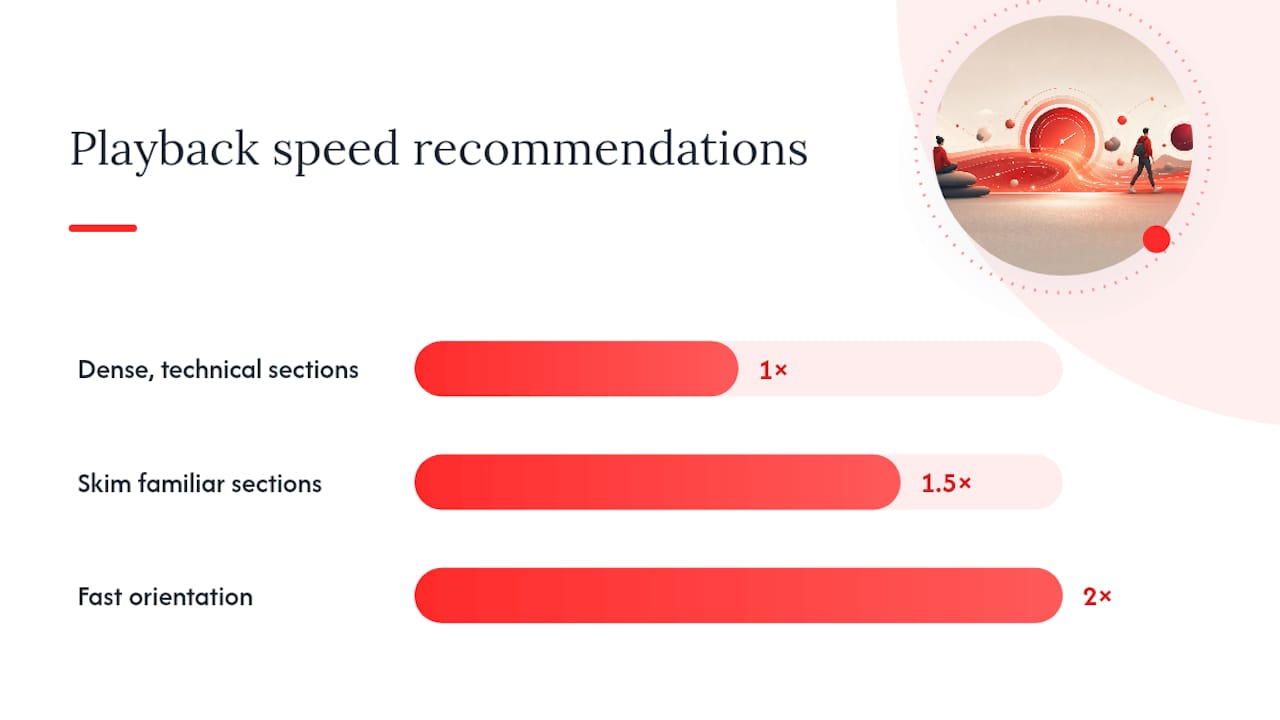
Playback speed is the easiest lever. Skim unfamiliar or lower-priority sections at 1.5x to 2x speed just to catch structure and sequence, then drop back to 1x whenever the material gets dense, technical, or math-heavy. Speed listening works for orientation. It fails for comprehension of anything with real cognitive load, so don’t force it on a section that requires actual thinking.
Captions do more than help with noisy audio. Reading along while listening reduces the wandering that happens when your eyes have nothing to anchor to, especially in videos with slow visual pacing or a single talking head.
Timing matters as much as speed. Set a suitable fixed time block for focused viewing, and give that block exactly one objective: not “learn this topic” but “understand what causes X” or “get the three steps in this process.” A vague goal invites your attention to drift; a narrow one gives it a job.
Environment control closes the loop:
- Go full screen and hide the recommendation sidebar so you’re not one click away from a different video.
- Mute phone notifications and close unrelated browser tabs before you start the timer.
- Keep a single note document open, nothing else.
Then convert passive watching into active recall by using the summary as your outline. Turn each summary point into a one-sentence note in your own words, or better, into a question you’d have to answer if quizzed later. This habit strongly supports retention.
Pro Tip: If a video runs over 20 minutes, don’t wait until the end to take notes. Pause at each summary-marked segment and write your one sentence immediately, while the point is still fresh instead of buried under ten more minutes of content.
How AI Video Summarizers Work and What Makes a Summary Actually Useful
The pipeline behind most AI video summarizers is simpler than it looks. Speech gets converted to text, natural language processing tools scan that transcript for structural cues (topic shifts, repeated emphasis, question and answer patterns), and the output gets compressed into a summary with timestamps pointing back to the original clip. A YouTube video summarizer can extract transcripts, identify important ideas, and output structured summaries with clickable timestamps, often saving a viewer minutes to hours depending on the video’s length.
Not every summary format serves the same purpose, and that’s the part most people miss. A useful summarizer typically returns some combination of:
- A 30- to 60-second TL;DR for a quick watch/skip decision
- Three bullet takeaways that capture the argument without the padding
- Chapter-level bullets that mirror how the video is actually structured
- An action checklist when the video teaches a process rather than an idea
Some tools go further and offer multiple depths from the same source. AI video summary generators often return both a short TL;DR and a longer chapter-style breakdown with short clips, so a 40 minute conference talk can become a 30 second brief when you’re deciding whether to watch it, or a full chapter breakdown once you’ve committed.
Clickable timestamps and paired visual snapshots matter more than they seem to on paper. They solve the trust problem: instead of taking a condensed summary on faith, you can jump straight to the ten seconds that back up the claim. Tools that include screenshots or visual highlights alongside text report better subjective recall from viewers who learn visually, since the image preserves context that plain text strips out.
Getting a good summary also depends on what you ask for. Specify the length you want, the audience level (beginner versus expert), and whether you want steps extracted or examples listed. Explicit prompts like these measurably improve how useful an AI summary turns out to be for actual study use, rather than a generic paragraph recap.
A Step-By-Step Workflow for Watching Smarter, Not Longer
This is the sequence to run on the next video that’s too long to justify watching start to finish.
- Get the summary first. Fetch a 30 to 90 second TL;DR along with three takeaways and timestamps before you touch the play button. This is your watch or skip decision point.
- Mark your targets. Scan the summary and flag one to three timecoded segments that actually matter for what you need. Ignore the rest.
- Rewatch in a focused block. Set a 25 to 45 minute timer, jump straight to your marked segments, and write one sentence of notes per segment as you go.
- Build a quick recall check. Within 24 hours, turn your notes into two or three flashcards or a two-question self-quiz. This step is what separates information you skimmed from information you’ll actually remember; pairing summary-first scanning with active recall converts passive watching into durable learning.
- Archive it. Drop the summary and your notes into a searchable library, tagged by topic, so a spaced review later takes minutes instead of a full rewatch.
Pro Tip: Don’t skip step 4 because it feels like extra work. A 90 second self-quiz the same day you watched something is worth more for retention than three passive rewatches a week later.
The Research Behind Summary-First Watching
Attention doesn’t hold steady through a full lecture. Research on classroom lectures shows that students’ focus begins to wane after 10 to 15 minutes, which is exactly the window most educational videos blow past without a break. A summary-first approach works because it front-loads the structure before fatigue sets in, so when you do rewatch, you already know what you’re looking for.
The time savings compound. Tools that pair summaries with clickable timestamps and short clips solve what’s really a verification problem: instead of trusting a condensation on faith, you check the ten-second clip behind the claim, which is faster than rewinding through an unfamiliar video hoping to land in the right spot.
A structured summary with timestamps doesn’t just save time. It changes how you watch: you go from passively hoping the important part shows up to actively navigating straight to it.
Feature-wise, a few things consistently matter for focus:
- Clickable timestamps that jump to the exact clip behind a claim
- Visual snapshots paired with text for viewers who need context to remember
- Session timers that track how long you actually stayed focused, not just how long the video ran
Sergio at Baitless has watched this pattern show up repeatedly with heavy video users: the ones who stop rewatching entire videos “just in case” are the ones who start finishing their backlog instead of drowning in it.
Recommended Tools for Video Summarization
Most video summarization tools fall into one of three categories, and each comes with a real tradeoff.
Browser extensions that generate summaries directly on the video page, like Baitless, are the fastest option for casual and daily use. You get a summary without leaving the tab, timestamps link straight back into the player, and the free tier is usually enough for occasional viewers. The tradeoff: free plans cap out at a limited number of credits, so heavy users eventually need a paid tier.
Standalone web summarizers that accept a pasted URL tend to offer more format flexibility, including transcript exports and multiple summary depths in one pass. The downside is an extra step: copy the link, paste it into another site, wait for processing, then come back. For a five-minute video that overhead isn’t worth it.
Focus-mode companion tools aren’t summarizers at all, but they solve a different half of the problem. Distraction-free players that hide recommendations, go full screen, and pause automatically when you switch windows help sustain attention once you’re actually watching. Pairing one of these with a summarizer covers both ends: deciding what’s worth watching, and staying locked in once you commit.
The practical answer for most people is a browser extension for daily triage and a focus-mode tool for the sessions that matter most.
Fitting Video Summaries Into Your Note-Taking System
A summary is only useful if it lands somewhere you’ll actually see it again. Drop it straight into whatever system you already use, whether that’s Notion, Obsidian, a plain Google Doc, or even a note-taking app tied to your school or company. The goal is one searchable home, not a folder of screenshots you’ll never open.
Structure matters more than the tool. Use the summary’s own bullet takeaways as your note headers, then fill in your one-sentence observations underneath each one during your focused rewatch. This keeps your notes organized the same way the source video was, which makes review far faster later.
Tag each entry by topic and by the questions it answers, not just the video title. Titles are forgettable; the question “how does compound interest actually work” is what you’ll search for three weeks later. A tutorial-video summarizing guide can walk you through building this habit if you’re summarizing how-to content specifically, where the checklist format tends to work better than prose notes.
For coursework or certification study, link summaries directly to your existing flashcard deck or spaced-repetition system. Two or three cards per video, created the same day, beats a pile of unreviewed notes every time. Students using AI tools for study workflows generally do better when the AI output feeds directly into an existing study system rather than sitting as a separate, disconnected file.
Adapting the Technique to Different Types of Video
A 12 minute cooking demonstration and a 90 minute conference keynote don’t call for the same summarization approach, and treating them identically wastes the method’s biggest advantage: flexibility.
For tutorials and how-to content, prioritize the action checklist format over a narrative summary. You want the steps, the tools required, and the specific timestamp where each step starts, not a paragraph describing what the video is generally about.
For lectures and educational talks, chapter-level bullets work best because these videos already follow a structure, an argument, evidence, a conclusion, and the summary should mirror that shape rather than flatten it into a single blob.
For interviews and panel discussions, a straight chronological summary usually fails because the best insight often shows up in minute 40, not minute 5. Ask for a summary organized by topic or theme instead of by timestamp order, so scattered points on the same subject get grouped together.
For product reviews and demos, the checklist should separate claims from evidence: what the reviewer says versus what they actually show. This is where visual snapshots matter most, since a screenshot of the product in use is worth more than a text description of it.
Match the summary format to the video’s own structure, not the other way around.
How We Turned a Video Backlog Into Actual Knowledge
The routine that works is boring, and that’s the point. Skim the summary, pick two clips that actually matter, rewatch them inside one Pomodoro block, and end with two flashcards before moving to the next video.
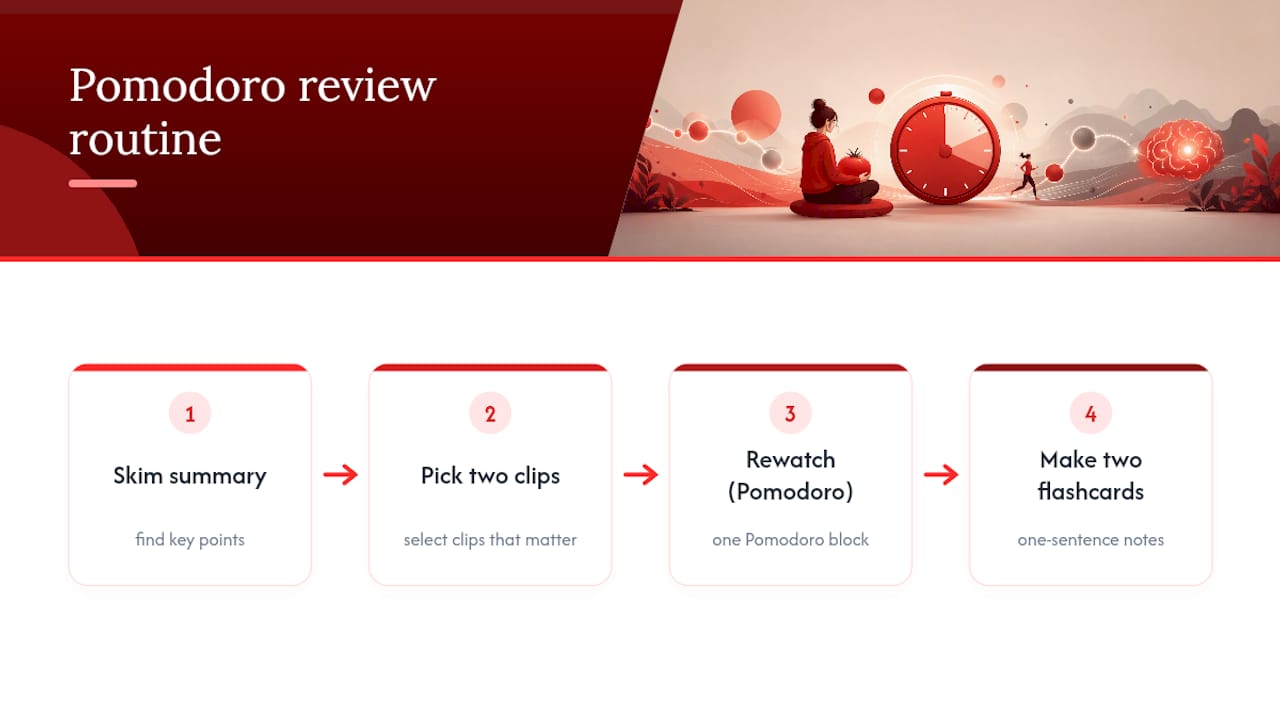
The mistakes it prevents are the ones almost everyone makes without noticing: skipping through a video hoping the important part appears, or rewinding the same 30 seconds four times because nothing was written down the first time. A marked timestamp fixes the first problem. A one-sentence note fixes the second.
None of this requires watching less video overall. It requires watching the right ten minutes instead of guessing at the wrong ninety.
— Sergio
Try the Baitless Workflow on Your Next Video
Baitless turns a YouTube link into a concise summary with clickable timestamps and visual snapshots in seconds, right inside your browser, so you can decide to watch, skip, or save before committing another 40 minutes you don’t have. The service offers a free tier with summary credits to test the workflow before deciding on a subscription.

Getting started takes five steps: install the Chrome extension, open any YouTube video and generate a summary, jump straight to the timestamps that matter, save the ones worth a full rewatch, and turn your notes into two quick flashcards before you move on. Busy professionals and students dealing with a genuine video backlog tend to notice the difference in the first week, once skipping becomes a real option instead of a guilty feeling. Head to Baitless and generate your first summary on whatever video has been sitting in your tabs the longest.
Sources
- Video summarizer ai: Turn long videos into quick study notes
- AI Video Summary Generator: Get Key Insights Instantly | LumiClip