
How to Extract Insights From Video Without Watching All of It
How to Extract Insights From Video Without Watching All of It

For a quick decision on a single video, install a browser-extension summarizer and let it generate timestamps and highlights before you commit any real time. For structured research or repeatable analysis, build an ASR plus OCR plus vision-language-model pipeline. For enterprise-scale libraries, use a cloud video-indexer API. Those three paths cover almost every real job someone has when they need to extract insights from video content instead of sitting through it.
Most people default to the wrong tool for their job. Someone deciding whether a 40-minute conference talk is worth their lunch break doesn’t need shot-level object detection. Someone building a searchable archive of 500 training videos doesn’t need a Chrome extension. Match the method to the job first.
- Quick decision (should I watch this?): browser extension, under a minute.
- Deep research (I need quotes, timestamps, slide text): local ASR+OCR+VLM pipeline, 5 to 20 minutes per video.
- Enterprise analytics (thousands of hours, compliance, search): cloud video-indexer API, ongoing pipeline.
Pro Tip: Before building anything complex, run one 10-minute test video through a free extension summary. If the output already answers your actual question, stop there. Complexity should be earned, not assumed.
Key Takeaways
Extracting insights from video comes down to matching one of three methods, browser extension, multimodal pipeline, or cloud API, to the actual size and stakes of the job.
| Point | Details |
|---|---|
| Match method to job | Use an extension for quick decisions, a pipeline for research, and a cloud API for enterprise scale. |
| Combine signals for accuracy | Pairing OCR of slides with ASR of speech catches information that’s shown but never spoken aloud. |
| Structure outputs once | Store transcripts, timestamps, and key frames as one JSON or markdown record you can query repeatedly. |
| Plan for failure modes | Noisy audio, overlapping speakers, and VLM hallucination all need a human spot-check before you trust the output. |
| Start simple with Baitless | Baitless delivers instant YouTube summaries and watch-or-skip guidance, the fastest first step before investing in a heavier pipeline. |
Table of Contents
- Which Method Actually Extracts Insights From Video?
- Building an ASR + OCR + VLM Pipeline for Deep Extraction
- How Do You Get an Instant Summary From a YouTube Video?
- What Do Enterprise Video-Indexing APIs Add?
- How Do You Store and Search Video-Derived Knowledge?
- Which Method Fits Your Job, and Where Each One Breaks
- How Do You Choose the Right Video Insight Tool?
- What The Research Actually Supports
- Start With the Fastest Way to Decide What to Watch
- Frequently Asked Questions
- Sources
Which Method Actually Extracts Insights From Video?
Three method classes dominate right now, and each produces a different kind of output for a different kind of user.
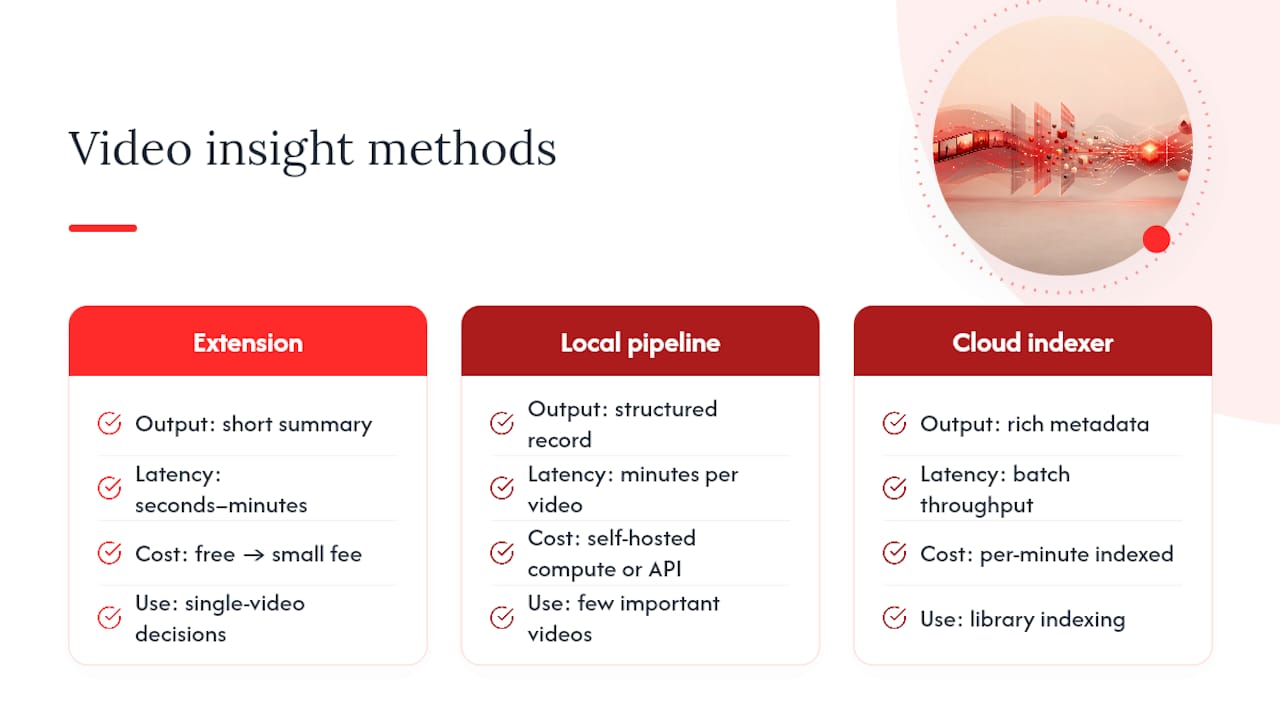
Browser-extension summarizers sit in your toolbar and generate a condensed text summary of a YouTube video in seconds. Output is typically a short paragraph, a bulleted list of key points, and clickable timestamps. Cost is usually free up to a credit limit, then a small monthly fee. Latency: seconds to a couple of minutes. Best for single-video decisions.
Local or hosted ASR+OCR+VLM pipelines transcribe speech, read on-screen text, and analyze frames to build a structured record: transcript, key frame descriptions, detected slide text, and section boundaries. Output is usually JSON or markdown. Cost depends on compute (self-hosted) or per-minute API pricing (hosted). Latency: minutes per video, longer for high frame-rate analysis.
Cloud video-indexer APIs (Azure AI Video Indexer, similar enterprise platforms) index footage at frame and shot level, detecting objects, faces, and speech across huge libraries. Output is rich metadata designed to plug into search systems, digital asset management, or compliance review. Cost is per-minute-indexed, and at real scale that adds up fast. Latency depends on the batch size but is built for throughput, not single-video speed.
The escalation path is straightforward: start with the extension for one-off decisions. Move to a pipeline when you need structured, reusable data from a handful of important videos. Move to a cloud API when you’re indexing a library, not a video.
Building an ASR + OCR + VLM Pipeline for Deep Extraction
This is the method that gives you the most complete picture of a video, because it treats spoken content, on-screen content, and visual context as three separate signals instead of guessing that a transcript alone tells the whole story.
- Extract the audio track. Tools like
ffmpegpull a clean audio stream from the video file in one command, which keeps the transcription step lightweight. - Run automatic speech recognition with timestamps and diarization. Whisper-family models (and hosted variants) produce a timestamped transcript and, with diarization enabled, label which speaker said what. This matters enormously for multi-speaker panels or interviews.
- Select key frames instead of every frame. Pixel-difference filtering keeps only frames where the visual content meaningfully changed, which cuts both noise and processing cost before anything touches a vision model.
- Run OCR on the selected frames. Tesseract or a cloud OCR service pulls text off slides, captions, and on-screen graphics, catching information that’s shown but never spoken.
- Run a vision-language model over frames and transcript together. Models like Qwen-VL or Gemini can identify section breaks, summarize what’s happening on screen, and flag action items by combining what was said with what was shown.
An open-source tool called vidwise packages the frame-selection and transcript-extraction steps together, following the logic of processing a video once and querying the result forever rather than re-analyzing it each time you have a new question.
The output worth aiming for is a single structured record: video ID, transcript segments with start and end timestamps, speaker labels, OCR text tied to the frame it came from, and a VLM-generated list of sections with one-line descriptions. Store that as JSON and you can query it with any downstream tool, including a chatbot layer, without touching the raw video file again.

Choose local models (self-hosted Whisper, open OCR, open VLMs) when data privacy or cost-at-scale matters more than setup time. Choose hosted APIs when you want a working pipeline in an afternoon instead of a week.
A multimodal quickstart from Snowflake demonstrates exactly this combination: OCR on slides, ASR on the audio track, and VLM analysis layered together to extract timestamps, decisions, and action items into structured tables a chatbot can query directly. For meeting recordings specifically, combining slide OCR with spoken-audio transcription tends to surface higher-quality insights than transcription alone, since a lot of the important content in a business meeting is displayed on a screen rather than said out loud.
How Do You Get an Instant Summary From a YouTube Video?
Install a Chrome extension built for video summarization, open the YouTube video you’re deciding on, and click generate. Most tools return a summary in well under a minute, no account setup required for the first use in most cases.
The workflow is genuinely three steps:
- Install the extension from the Chrome Web Store.
- Open any YouTube video and trigger the summary (usually one click, sometimes automatic).
- Review the short summary, the bullet-point breakdown, and the timestamps before deciding whether to watch, skip, or save the video for later.
What you get back typically includes a two-to-four sentence summary, a bulleted list of the main points covered, clickable timestamps that jump to specific moments, and in better tools a “watch versus skip” marker that tells you which sections are worth your actual attention. This is the fastest way to extract insights from video content when the job is simply deciding what’s worth your time.
Pricing models across this category tend to follow the same shape: a free tier with a fixed number of summary credits for casual use, then a monthly subscription once you’re running summaries daily. Privacy-wise, most extensions process only the video’s public transcript and metadata, not personal browsing data, but it’s worth checking any tool’s data-retention policy before feeding it anything sensitive.
Pro Tip: Save the timestamps from a summary you liked into a note app immediately. Extension summaries are usually not stored long-term on your end, and losing a good breakdown means running the tool again.
This method suffices for single-video decisions, quick studying, and content triage. It stops being enough the moment you need diarized speaker labels, exportable structured data, or analysis across dozens of videos at once. That’s the signal to move up to a pipeline.
What Do Enterprise Video-Indexing APIs Add?
Cloud video-indexer platforms exist for one reason: scale that no local pipeline or browser tool can match. Azure AI Video Indexer provides frame- and shot-level metadata, OCR, speech-to-text, and object detection for both stored footage and live streams, all through a single API surface.
What that buys an organization in practice:
- Object, place, and action detection across every frame, not just sampled ones.
- Streaming annotation for live video, useful for broadcast or real-time compliance monitoring.
- Metadata generated at the shot and frame level, which supports automated chaptering without manual review.
- Direct integration into digital asset management systems, ad-insertion logic, or compliance archives.
These outputs feed downstream systems that a single video summary never touches: a media company indexing its entire back catalog for licensing decisions, a legal team building a searchable compliance archive, a broadcaster automating ad breaks around detected scene changes. Gracenote’s content analytics work is a clear example of how video metadata gets used to drive investment, licensing, and distribution decisions rather than just internal organization.
Governance matters more here than anywhere else in this comparison. Data-residency requirements, retention policies, and access controls need to be settled before indexing anything with legal or personal-data sensitivity, since enterprise platforms are built to retain and index at scale by default.
The trade-off is cost and latency for volume. A cloud API charges per minute indexed, which is trivial for ten videos and significant for ten thousand hours. Local pipelines beat this on cost per video at small scale; cloud APIs beat everything on throughput and consistency once you’re operating at library scale.
How Do You Store and Search Video-Derived Knowledge?
Extraction is only half the job. Insight pulled from a video is worthless if it disappears into a folder you never open again, which is why the storage pattern matters as much as the extraction method.
- Build one record per video containing transcript segments with timestamps, extracted key points, tags, and a handful of representative key frames.
- Save transcripts in SRT format when timing matters for replay, and in plain markdown or JSON when the priority is text search and reuse.
- Add semantic embeddings over the transcript segments so you can ask natural-language questions across your whole video library instead of scanning file by file.
- Create timestamped note cards for anything you’ll want to revisit, each one linking back to the exact moment in the original video.
- Tag by topic and source so a meeting recording’s action items surface alongside similar items from other meetings, not just in isolation.
A markdown file with embedded key frames next to the relevant transcript section works well as a durable, human-readable format, and it plays nicely with most personal knowledge tools without any special plugin. For meeting recordings specifically, structured extraction can go further: some platforms support diarization and custom schemas that pull out decisions, assigned owners, and due dates as discrete fields rather than burying them inside a paragraph of narrative summary, according to Microsoft’s documentation on video content understanding.
Pro Tip: Keep a provenance field on every extracted record, video URL, timestamp, and extraction method used. Six months from now you’ll want to know whether that “insight” came from a transcript or a hallucinated VLM guess.
Automate ingestion where you can. A folder watcher that runs new recordings through your pipeline and drops the JSON output into your knowledge base beats manually processing videos one at a time, and it’s the difference between a system you maintain and one you abandon after a month.
Which Method Fits Your Job, and Where Each One Breaks
Match the method to the job before you match it to the technology. Quick decision-making calls for the extension. Studying a lecture in depth calls for a pipeline that preserves timestamps and on-screen text. Compliance review calls for diarization and an audit trail. Enterprise analytics calls for a cloud indexer built for volume.
Every method fails in predictable ways, and knowing the failure mode in advance saves you from trusting bad output.
- Noisy audio and overlapping speakers degrade ASR accuracy fast. Panel discussions and crowded rooms are the hardest case for any transcription model.
- Stylized fonts and low-contrast slides trip up OCR, especially decorative title slides or text over busy backgrounds.
- Vision-language models occasionally hallucinate a scene description or an action item that isn’t actually in the frame, particularly on ambiguous or low-resolution footage.
- Privacy and processing time both scale with video length; a two-hour recording through a full multimodal pipeline can take considerably longer than a ten-minute clip.
Mitigate these with confidence thresholds on ASR and OCR output, a human spot-check on any extracted action item before it goes into a compliance record, and a sample review pass on the first batch of any new pipeline before trusting it unsupervised. For small workloads, a single video through a full pipeline might take a few minutes and cost little. At library scale, budget real time for the initial pipeline setup and ongoing per-minute costs for whichever cloud service you land on.
How Do You Choose the Right Video Insight Tool?
Answer four questions before you pick anything: What outputs do you actually need (summary, transcript, structured action items)? How much accuracy error can you tolerate? How many videos are you processing, one or one thousand? What privacy or legal constraints apply to the footage?
Run a small pilot before committing to any tool at scale.
- Pick 5 to 10 representative videos, including at least one with multiple speakers and one with dense on-screen text.
- Measure precision and recall on the specific items you care about, not general summary quality.
- Track time-to-summary from upload to usable output.
- Compare that against your tolerance for the job at hand.
Before signing up for any paid tool, ask directly: How long is data retained? Does it support speaker diarization? Can it read on-screen text, or transcript only? What export formats does it support, JSON, SRT, plain text? The answers to those four questions rule out more tools than any feature list will.
What The Research Actually Supports
The honest read of this space is that most advice skips straight to complexity. Guides push readers toward full multimodal pipelines and enterprise APIs as if every video justifies that investment, when the truth is that a huge share of real jobs, deciding whether a video is worth 20 minutes, pulling one good quote from a podcast, are already solved by a summary and a timestamp.
Where conventional advice falls short is treating “more structured extraction” as strictly better. It isn’t. A cloud video indexer returning shot-level object detection is overkill and expensive for someone who just wants to know if a tutorial covers their specific problem. Complexity should match the job, not the available technology.
What the reader should prioritize first is the cheapest test that could possibly answer their question. Run one video through a fast summarizer before building anything. If a two-sentence summary and a timestamp list settle the matter, the job is done. Reserve pipelines and APIs for the videos, and the volumes, that actually demand them.
Start With the Fastest Way to Decide What to Watch
Baitless cuts the guessing out of your YouTube backlog. Instead of opening a 45-minute video to find out it says nothing new, you get a concise summary, the key moments flagged, and a clear read on what to watch versus what to skip, all before you’ve committed a single minute.

The free tier gives you 25 summary credits, enough to test the tool against your actual watch list rather than a demo video someone else picked. Once you’re running summaries daily, a low-cost monthly subscription unlocks more credits for regular use. That maps directly onto the decision checklist above: fast, low setup, no pipeline to configure, ideal for the single-video decisioning that most professionals actually need most days.
If you’re a researcher, student, or content creator who wastes real hours previewing videos that turn out to be filler, the fix is simple. Install Baitless and run it on the next long video sitting in your queue. See what it flags as worth watching, and decide from there.
Frequently Asked Questions
What’s the fastest way to extract insights from video content? A browser-extension summarizer is the fastest option for a single YouTube video, typically returning a summary and timestamps in under a minute. For structured data across multiple videos, a local ASR+OCR+VLM pipeline or a cloud indexer API is faster in aggregate, even though each video takes longer individually.
Do I need a coding background to build a video analysis pipeline?
Some technical comfort helps, but tools like ffmpeg for audio extraction and packaged libraries like vidwise reduce the setup significantly. Hosted APIs remove most of the coding requirement entirely in exchange for per-minute usage costs.
How accurate is AI-generated video summarization? Accuracy varies by input quality. Clean single-speaker audio with clear slides produces highly reliable transcripts and OCR text. Overlapping speakers, heavy accents, or stylized on-screen fonts increase error rates in both automatic speech recognition and OCR, which is why a confidence threshold and spot-check step matter for anything used in a compliance or business decision.
Can these tools handle multi-speaker videos? Yes, with the right setup. Diarization, available in Whisper-family models and enterprise platforms alike, labels which speaker said what. It’s less reliable in videos with significant audio overlap or cross-talk, so a manual review of speaker labels is worth the extra few minutes on anything important.
What output format should I use to store extracted video insights? SRT works well when timestamp accuracy for replay matters most. JSON is better for programmatic search and integration with other tools. Markdown with embedded key frames is the most readable format for personal knowledge bases and note-taking systems.
Sources
- Extracting insights from video with multimodal AI analysis (Snowflake quickstart)
- Azure AI Video Indexer overview