
Best AI Tools for Researchers: A Practical Guide
Best AI Tools for Researchers: A Practical Guide

The most effective approach for researchers today is a hybrid toolkit: combine a literature discovery platform (Semantic Scholar or OpenAlex), an anchored-citation synthesis tool, a specialist analysis environment (NVivo or ATLAS.ti for qualitative work), and a reference manager like Zotero. No single AI assistant covers all four jobs reliably.
Here is what that looks like in practice:
- Literature discovery: AI-indexed databases that surface relevant papers by semantic similarity, not just keyword matching
- Evidence synthesis: Tools with sentence-level citation support that trace every claim back to a source document
- Drafting and writing polish: General-purpose assistants (ChatGPT, Claude, Gemini, Microsoft Copilot) or academic-specific tools like Writefull and Paperpal
- Qualitative analysis: Specialist QDA software (NVivo, ATLAS.ti) that maintains an auditable coding trail
- Quantitative and code assistance: AI coding environments that support Python, R, and reproducible notebooks
- Reference management: Zotero, which integrates with most tools in this list
- Multimedia triage: AI summarization tools that process video and audio sources so you can decide what is worth your time before committing hours to a recording
The rest of this guide maps each category to specific tools, gives you a decision framework, and shows two concrete workflows you can adapt today.
Table of Contents
- What are the best AI tools for researchers by category?
- Which tools should you use for specific research tasks?
- How do you choose the right AI tools for your project?
- How do you build a research workflow with these tools?
- What does the evidence say about hybrid toolkits?
- What are the ethical considerations when using AI in research?
- Key Takeaways
- The part most researchers skip
- Baitless handles the video sources your toolkit ignores
- Useful sources
What are the best AI tools for researchers by category?
Before picking individual tools, it helps to understand what each category actually does in a research workflow, because the failure mode for most researchers is using a general chatbot for a job that needs a specialist.
Literature discovery
Discovery tools index millions of scholarly works and let you search by concept, not just title or abstract keyword. Semantic Scholar processes over 200 million papers and surfaces semantically related work you would miss with a Boolean search. OpenAlex offers a fully open index with rich metadata on authors, institutions, and funding, making it useful for systematic reviews that need reproducible search logs. Both integrate with Zotero and other reference managers, so your discovery pipeline feeds directly into your citation workflow.
The limit here is that discovery tools surface candidates; they do not verify relevance or quality. You still need to screen abstracts and apply inclusion criteria.
Evidence synthesis and anchored summarization
This is where general chatbots fall short. A tool like Elicit automates structured literature review steps, supports PRISMA 2020 workflows, and provides sentence-level citations so every extracted claim links back to a specific passage in a source paper. Scite goes further by classifying citations as supporting, contrasting, or mentioning a claim, which is genuinely useful when you are trying to understand whether a finding has held up across the literature.
General-purpose assistants like ChatGPT or Claude can summarize text you paste in, but they do not inherently cite sources at the sentence level. That distinction matters for any work that will be peer-reviewed.
Drafting and writing polish
ChatGPT (OpenAI), Claude (Anthropic), Gemini (Google), and Microsoft Copilot all handle drafting, paraphrasing, and structural editing competently. For academic-specific needs, Writefull is trained on published journal text and flags phrasing that deviates from disciplinary norms. Paperpal adds plagiarism checks, AI-detection screening, and journal-format compliance checks, which matters when you are preparing a manuscript for submission.
The shared limitation: these tools can produce fluent, confident prose that contains factual errors. Always verify claims against primary sources before submission.
Qualitative analysis
NVivo and ATLAS.ti are the two dominant qualitative data analysis (QDA) platforms in academic research. Both maintain an auditable coding trail, meaning every theme, code, and memo links back to the original data segment. That traceability is what separates them from using a chatbot to “find themes” in interview transcripts. AI-assisted summarization can speed up initial passes, but the analytic logic needs to live in the QDA environment to be reproducible.
Quantitative and code assistance
ChatGPT, Claude, and GitHub Copilot all generate Python and R code, and Gemini integrates with Google Colab. The practical risk is that generated code can contain subtle errors that only surface when you run it on your actual dataset. Treat AI-generated code as a first draft that needs review, not a finished script.
Reference management and multimedia triage
Zotero remains the standard for reference management among academic researchers, with browser plugins, PDF annotation, and direct integration with OpenAlex and Semantic Scholar. For multimedia, the gap in most research toolkits is video and audio: lecture recordings, conference talks, and documentary sources that are time-consuming to evaluate. That is the specific problem Baitless addresses, and it is covered in the promo section below.
Which tools should you use for specific research tasks?
The table below maps the mandatory coverage tools to the dimensions that matter most for research use. Rows are organized by primary task, not by ranking.
| Tool | Best for | Supported formats | Citation / traceability | Privacy & data handling | Ease of use | Integrations | Cost model |
|---|---|---|---|---|---|---|---|
| Semantic Scholar | Literature discovery | PDFs, metadata | Linked abstracts and papers | Cloud; no training on submissions stated | Low learning curve | Zotero, OpenAlex, APIs | Free |
| OpenAlex | Open discovery and metadata | Metadata, full-text links | Source-linked records | Open, cloud | Low | Zotero, APIs, Elicit | Free |
| Elicit | Systematic review extraction | PDFs, structured tables | Sentence-level citations | Cloud; researcher data controls | Moderate | OpenAlex, Zotero export | Freemium; paid tiers |
| Scite | Citation verification | PDFs, DOIs | Smart citations (supporting/contrasting) | Cloud | Low to moderate | Zotero plugin, APIs | Freemium; subscription |
| ChatGPT (OpenAI) | Drafting, summarization, code | Text, PDFs (with plugins) | No native sentence-level citations | Cloud; institutional privacy controls available | Very low | Plugins, API, connectors | Freemium; Plus/Team/Enterprise |
| Claude (Anthropic) | Long-document analysis, drafting | Text, PDFs, large context | No native sentence-level citations | Cloud; privacy-focused terms | Very low | API | Freemium; Pro/Team |
| Perplexity | Quick literature search with web citations | Web, PDFs | Page-level citations | Cloud | Very low | Limited | Freemium; Pro |
| Microsoft Copilot | Office-integrated drafting | Word, Excel, Teams, PDFs | Page-level citations (with Bing) | Cloud; enterprise controls | Very low | Microsoft ecosystem | Freemium; Microsoft subscription |
| Gemini (Google) | Drafting, code (Colab), multimodal | Text, images, code notebooks | Page-level citations | Cloud; Google Workspace controls | Very low | Google Workspace, Colab | Freemium; Advanced subscription |
| Writefull | Academic language polishing | Word, Overleaf, PDFs | No citation support | Cloud | Very low | Word, Overleaf | Freemium; subscription |
| NVivo | Qualitative coding and analysis | Text, audio, video, PDFs, surveys | Full audit trail | Local or cloud (Lumivero hosted) | High learning curve | Word, Excel, Zotero | Paid; perpetual or subscription |
| ATLAS.ti | Qualitative coding, mixed methods | Text, audio, video, images | Full audit trail | Local or cloud | High learning curve | Word, SPSS, APIs | Paid; subscription |
| Zotero | Reference management | PDFs, web pages, metadata | Source-linked references | Local + cloud sync | Low | Semantic Scholar, OpenAlex, Word, Overleaf | Free; paid storage |
Pro Tip: For literature discovery, run parallel searches in both Semantic Scholar and OpenAlex. Their indexes overlap substantially but not completely, and the difference can surface papers that a single-database search misses, which matters for systematic reviews following PRISMA.
A few task-specific notes worth calling out:
For literature reviews: Elicit’s structured extraction tables are the fastest way to pull population, intervention, outcome, and study-design data from a batch of PDFs without manually reading each one. The AI role in literature synthesis has expanded significantly, but Elicit’s sentence-level citations are what make its outputs usable in a rigorous review rather than just a starting point.
For drafting: ChatGPT’s academic researcher program gives selected researchers access to frontier models with workspace privacy protections and connectors to research databases, which addresses the data-handling concern that makes many institutions cautious about general-purpose AI.
For qualitative work: NVivo and ATLAS.ti are not interchangeable. NVivo tends to be stronger for survey and mixed-methods data; ATLAS.ti has a more visual network interface that many grounded-theory researchers prefer. Both are covered in the Georgetown Library’s AI tools guide as recommended specialist environments.
How do you choose the right AI tools for your project?
Start with the task, not the tool. The framework below takes about 20 minutes to work through and prevents the most common mistake: adopting a general chatbot for a job that needs specialist software.
Step 1: Define task scope. Is this exploratory reading, a systematic review, qualitative coding, or manuscript preparation? Each requires a different level of traceability.
Step 2: Determine required evidence traceability. Will your methodology section need to document how you identified and screened sources? If yes, you need tools with exportable search logs and sentence-level citations, not a chatbot summary.
Step 3: Assess data sensitivity. Are you uploading unpublished manuscripts, patient data, or proprietary datasets? Check the tool’s data-usage terms carefully. Some platforms explicitly state they do not train on submitted content; others are ambiguous. OpenAI’s institutional controls and Claude’s privacy-focused terms are worth reading in full before uploading sensitive material.
Step 4: Check reproducibility requirements. Systematic reviews and meta-analyses need reproducible search strings, PRISMA-compliant screening logs, and exportable extraction tables. Elicit supports this; a general chatbot does not.
Step 5: Map integration needs. Does the tool export to Zotero, connect to OpenAlex, or produce output your writing environment can import? Friction in the handoff between tools costs more time than the tool saves.
Step 6: Budget time-to-productivity. Simple drafting assistance takes hours to learn. A systematic review workflow in Elicit takes a few days. NVivo or ATLAS.ti for a full qualitative project takes weeks of setup and coding. Factor that into your project timeline.
Red flags to watch for: no sentence-level citation support for a tool marketed as a research assistant; data-usage terms that permit training on submitted manuscripts; no exportable audit trail for coded data; opaque model provenance (you cannot determine what the model was trained on or when its knowledge cuts off).
On pricing: most tools in this space use freemium models with meaningful free tiers. Elicit and Scite offer free access with usage limits. NVivo and ATLAS.ti are paid from the start, though many universities hold institutional licenses. Check with your library before purchasing, because the OKState Library guide and similar resources often list tools your institution already provides at no cost to you.
How do you build a research workflow with these tools?
Workflow A: Systematic literature review
- Define your research question and write a PRISMA-compliant search protocol before touching any AI tool.
- Run searches in Semantic Scholar and OpenAlex, export results as RIS or BibTeX files, and import into Zotero.
- Use Elicit to upload your candidate PDFs and run structured extraction: population, intervention, comparator, outcome, study design. Export the extraction table.
- Screen titles and abstracts using Elicit’s AI-assisted screening, but apply your inclusion/exclusion criteria manually for the final call. Log every decision.
- For citation verification, run key claims through Scite to check whether the literature supports, contrasts, or merely mentions the finding you plan to cite.
- Draft the synthesis section in ChatGPT or Claude using your extraction table as the input, not the original papers. This keeps the AI working from verified data rather than generating from memory.
- Polish academic language in Writefull or Paperpal, and run a plagiarism and AI-detection check before submission.
- Export your final reference list from Zotero in the target journal’s format.
For a detailed quality checklist covering each of these steps, the systematic review quality checklist from PaperSynapse is worth bookmarking before you start.
Workflow B: Qualitative analysis pipeline
- Collect interview or focus-group recordings and transcribe them using an AI transcription service (Otter.ai, Whisper, or your institution’s licensed tool).
- Import transcripts into NVivo or ATLAS.ti. Do not start coding in a chatbot; the audit trail does not exist there.
- Use the QDA platform’s AI-assisted summarization features to generate initial theme suggestions, then review and revise each one against the raw transcript.
- Apply your coding framework manually, using the AI suggestions as prompts rather than conclusions. Every code should link to a specific transcript segment.
- Run a member-checking pass: export coded segments and review them against your analytic memos to confirm the themes hold.
- Draft your findings section in Claude or ChatGPT, using your memo summaries as input. Keep the AI working from your analysis, not from the raw transcripts.
- Cross-reference any quantitative claims (frequency counts, co-occurrence patterns) against the NVivo or ATLAS.ti output tables before including them in the manuscript.
- Use Paperpal or Writefull for final language polish and submission compliance checks.
Pro Tip: Maintain a running “analytic decisions” document throughout both workflows. Log every tool you used, every parameter you set, and every manual override you made. This document becomes your methodology section and your audit trail if a reviewer asks how you handled a specific step.
What does the evidence say about hybrid toolkits?
The Lumivero research on AI tools for academic research makes the case plainly: combining general AI assistants with specialist software like NVivo and ATLAS.ti produces more rigorous, reproducible results than relying on any single tool. Library guides from Georgetown and OKState reach the same conclusion, recommending that researchers treat general-purpose chatbots as drafting and brainstorming aids rather than primary research instruments.
The non-obvious pitfall is confidence. General-purpose chatbots produce fluent, authoritative-sounding prose even when the underlying citations are fabricated. Elicit’s approach of anchoring every extracted claim to a specific sentence in a source document is the structural solution to this problem. Scite’s smart-citation classification adds another layer: knowing whether a paper is cited supportively or critically changes how you interpret a finding.
| Tool type | Citation traceability | Hallucination risk | Reproducibility support |
|---|---|---|---|
| General chatbots (ChatGPT, Claude, Gemini) | Page-level at best | High without grounding | Low without structured prompting |
| Anchored synthesis tools (Elicit, Scite) | Sentence-level | Low (claims tied to source text) | High (exportable logs) |
| Specialist QDA (NVivo, ATLAS.ti) | Full audit trail | Minimal (human-coded) | High (codebook + memos) |
| Discovery platforms (Semantic Scholar, OpenAlex) | Source-linked records | Very low | High (exportable search logs) |
Ithaka S+R’s generative AI product tracker, which libraries use to monitor compliance and capability updates across the market, consistently flags citation traceability and data-handling terms as the two dimensions that most affect institutional adoption decisions. That is a useful signal for individual researchers too: if your institution has not approved a tool, there is usually a reason worth understanding before you upload your data.
The AI abstract screening guide from PaperSynapse explains why AI-assisted screening accelerates the early stages of a review without replacing the judgment calls that determine inclusion. Speed at the screening stage is real; it does not extend to the synthesis stage without anchored citations.
What are the ethical considerations when using AI in research?
Three issues come up repeatedly in institutional policy discussions, and none of them have clean universal answers yet.
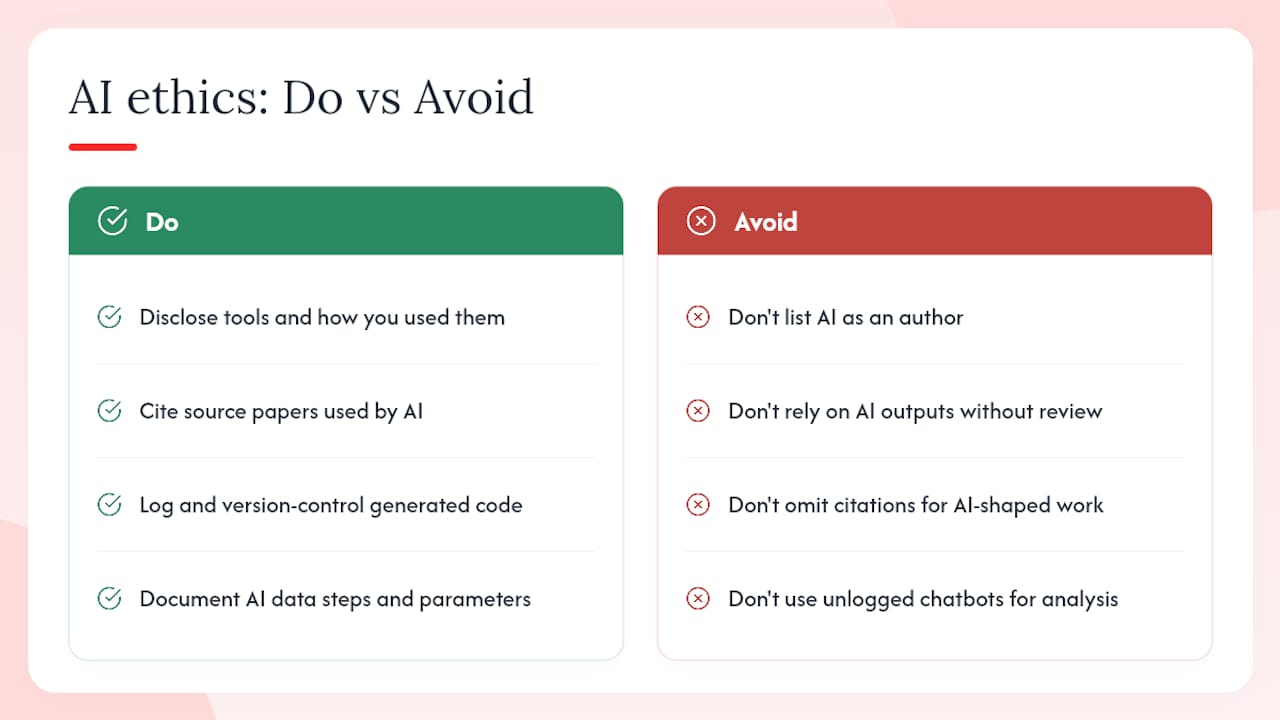
Authorship and credit. Most major journals now require disclosure of AI tool use in the methods section. The key principle across Nature, Science, and most society journals is that AI cannot be listed as an author because authorship carries accountability that a tool cannot bear. What is less settled is how much AI-assisted drafting requires disclosure. The safest position: disclose the tools you used and describe how you used them, even when the contribution felt minor.
Plagiarism and originality. AI-generated text trained on published literature can reproduce phrases or passages from source material without flagging them. Paperpal’s AI-detection and plagiarism checks address this at the manuscript level, but the deeper issue is that AI-assisted paraphrasing can obscure the intellectual lineage of an idea. If a synthesis paragraph is substantially shaped by a chatbot working from a source paper, that source paper deserves a citation whether or not the prose is technically original.
Data manipulation and integrity. Using AI to clean, transform, or analyze data introduces a reproducibility obligation: you need to document exactly what the AI did, with what parameters, on what version of the data. This is where general-purpose chatbots are genuinely risky for quantitative work. A code-generation session in ChatGPT that produces a data transformation script needs to be logged, version-controlled, and reviewed the same way any other analysis code would be. The output is not self-evidently correct just because it ran without errors.
A broader concern: AI tools that are trained on existing literature can encode and amplify existing biases in the research record. This is particularly relevant in fields where certain populations, methodologies, or geographic regions are underrepresented in the published literature. Treat AI-generated literature summaries as a starting point for your own critical reading, not a neutral representation of the field.
This article provides general information about AI tools for research purposes. Researchers should verify current data-handling terms, institutional policies, and journal-specific AI disclosure requirements directly with the relevant sources before adopting any tool in their workflow.
Key Takeaways
The most effective research toolkit in 2026 combines anchored-citation discovery tools, specialist QDA software for rigorous analysis, and a reference manager, with general AI assistants reserved for drafting and brainstorming tasks where hallucination risk is manageable.
| Point | Details |
|---|---|
| Use anchored citations for synthesis | Tools like Elicit and Scite link claims to specific source sentences, reducing hallucination risk in literature reviews. |
| Keep specialist tools for rigorous analysis | NVivo and ATLAS.ti maintain full audit trails that general chatbots cannot replicate for qualitative work. |
| Verify data-handling terms before uploading | Check whether a tool trains on submitted content before uploading unpublished manuscripts or sensitive datasets. |
| Integrate Zotero from the start | Zotero connects to Semantic Scholar, OpenAlex, and most writing environments, keeping your reference pipeline consistent. |
| Add Baitless for video and audio triage | Use Baitless alongside discovery and citation tools to process YouTube and video sources before committing time to full viewing. |
The part most researchers skip
Most AI-in-research conversations focus on the headline tools: which chatbot writes the best abstract, which platform has the biggest paper index. What gets less attention is the handoff problem. The gap between where one tool ends and the next begins is where research workflows actually break down.
A researcher who uses Semantic Scholar for discovery, Elicit for extraction, and then pastes outputs into a general chatbot for synthesis has introduced an uncontrolled step. The chatbot does not know which papers were included or excluded, does not have access to the extraction table, and will generate prose that sounds like a synthesis but is not grounded in the structured work that preceded it. The workflow looks hybrid on the surface but behaves like a single-tool approach at the critical moment.
The fix is not complicated: use the AI at the step where it has access to the verified, structured data you have already produced. Draft from your extraction table, not from the original papers. Summarize your coded memos, not from the raw transcripts. The AI becomes genuinely useful when it is working downstream of your analytic judgment, not upstream of it.
Ethical disclosure and authorship questions will keep evolving as journals update their policies. But the reproducibility principle is stable: if you cannot describe exactly what the AI did and why, in enough detail that another researcher could replicate it, the AI has not helped your research. It has just made it harder to defend.
Baitless handles the video sources your toolkit ignores
Most research toolkits handle PDFs, datasets, and transcripts. They do not handle the growing volume of video evidence: conference talks, documentary footage, expert interviews on YouTube, and recorded lectures that contain findings you cannot access through a database search.

Baitless is a Chrome extension that generates concise AI-powered summaries of YouTube videos, showing you which moments are worth watching and which you can skip. For researchers, that means you can triage a two-hour conference keynote in minutes, decide whether a documentary source contains the specific segment you need, or scan a lecture series for relevant content before committing time to full viewing. It fits into the multimedia triage slot of the hybrid toolkit described throughout this article.
The free tier includes 25 summary credits, which is enough to evaluate whether the tool fits your workflow. A subscription unlocks higher credit volumes for researchers who process video sources regularly. Try Baitless and see how fast you can clear a video backlog.
Useful sources
The sources below are the primary references cited in this article. Each one is worth bookmarking for ongoing tool evaluation and workflow guidance.
- Best AI tools for academic research in 2026
- AI Tools for Research - Artificial Intelligence (Generative) Resources
- AI Tools for Academic Research & Writing - Library Guides
- Elicit: AI for scientific research
- AI for Research | Scite
- Accelerating scientific discovery with ChatGPT for Academic Researchers | OpenAI
- AI Academic Writing Tool - Comprehensive AI Research Assistant | Paperpal
- Semantic Scholar
- OpenAlex