
How to Automate YouTube Research and Skip the Watching
How to Automate YouTube Research and Skip the Watching

The fastest way to automate YouTube research is a transcript-first pipeline: fetch the transcript, extract timestamps, chunk the text, send it to an LLM with a structured prompt, then save the output as Markdown with YAML frontmatter. That sequence turns a 40-minute video into a scannable, research-ready file in under a minute.
The building blocks are simple and mostly free. yt-dlp pulls the video and metadata, youtube-transcript-api grabs existing captions, Whisper handles transcription when captions don’t exist, and OpenAI, Anthropic, or OpenRouter turn the raw text into a usable summary.
- Fetch:
youtube-transcript-apioryt-dlp --write-auto-sub - Summarize: OpenAI, Anthropic, or OpenRouter via a CLI wrapper
- Extension route: Baitless for instant, in-browser summaries with timestamped highlights
Pro Tip: Before running anything, check whether the video already has clean auto-captions. If it does, you skip Whisper entirely and cut your pipeline time in half.
Key Takeaways
Automating YouTube research works best as a transcript-first pipeline that pairs a reliable fetch method with an LLM prompt built for timestamps, not just prose.
| Point | Details |
|---|---|
| Fetch transcripts first | Use youtube-transcript-api for existing captions; fall back to yt-dlp plus Whisper when they’re missing. |
| Chunk before summarizing | Split long transcripts by topic shift to stay within model context limits and improve accuracy. |
| Pick providers by need | OpenAI for ecosystem breadth, Anthropic for prompt consistency, OpenRouter for testing multiple models fast. |
| Checkpoint every batch run | Track processed video IDs to avoid duplicate API calls and wasted spend. |
| Use Baitless for instant needs | Its Chrome extension delivers in-browser summaries and timestamped highlights, with 25 free credits to start. |
Table of Contents
- How Do You Automate YouTube Research Step by Step?
- Which Tools Handle Transcription, Fetching, and Summarizing Best?
- Setting Up Your First Automated Summary Pipeline
- Batching Videos Without Hitting Rate Limits or Duplicates
- What Limits Should You Expect From Automated Summaries?
- Why Transcript-First Beats One-Click Summarizing for Research
- Try Baitless Before You Build a Custom Pipeline
- Where to Go Next for Tools and Documentation
- Frequently Asked Questions
- Sources
How Do You Automate YouTube Research Step by Step?
The full pipeline runs in six steps, and once you script it, it repeats itself.
- Get the URL — paste it manually or pull it from a channel RSS feed.
- Fetch the transcript — try
youtube-transcript-apifirst; fall back toyt-dlpaudio plus Whisper if captions are missing. - Clean and chunk the text — strip filler, split into token-sized blocks for your model’s context window.
- Run LLM summarization — send each chunk (or the full transcript, if it fits) with a structured prompt.
- Attach timestamps and chapters — map key claims back to their moment in the video.
- Export — save as Markdown with YAML frontmatter into your notes folder, Obsidian vault, or Notion database.
Picture it as a funnel: raw video in one end, a two-page brief with clickable timestamps out the other. Insert a human review checkpoint after step 4, where you skim the summary against the source before it gets filed. That single check catches most hallucinated claims before they end up in your notes.
Pro Tip: Search the transcript for your actual question before asking the LLM anything. If you only need the part about “pricing tiers,” grep the transcript for that phrase and feed the model just that chunk. You’ll spend fewer tokens and get a sharper answer than summarizing the whole video.
Which Tools Handle Transcription, Fetching, and Summarizing Best?
Your tool choice depends on three variables: how clean you need the text, how many videos you’re processing, and how much control you want over the output.
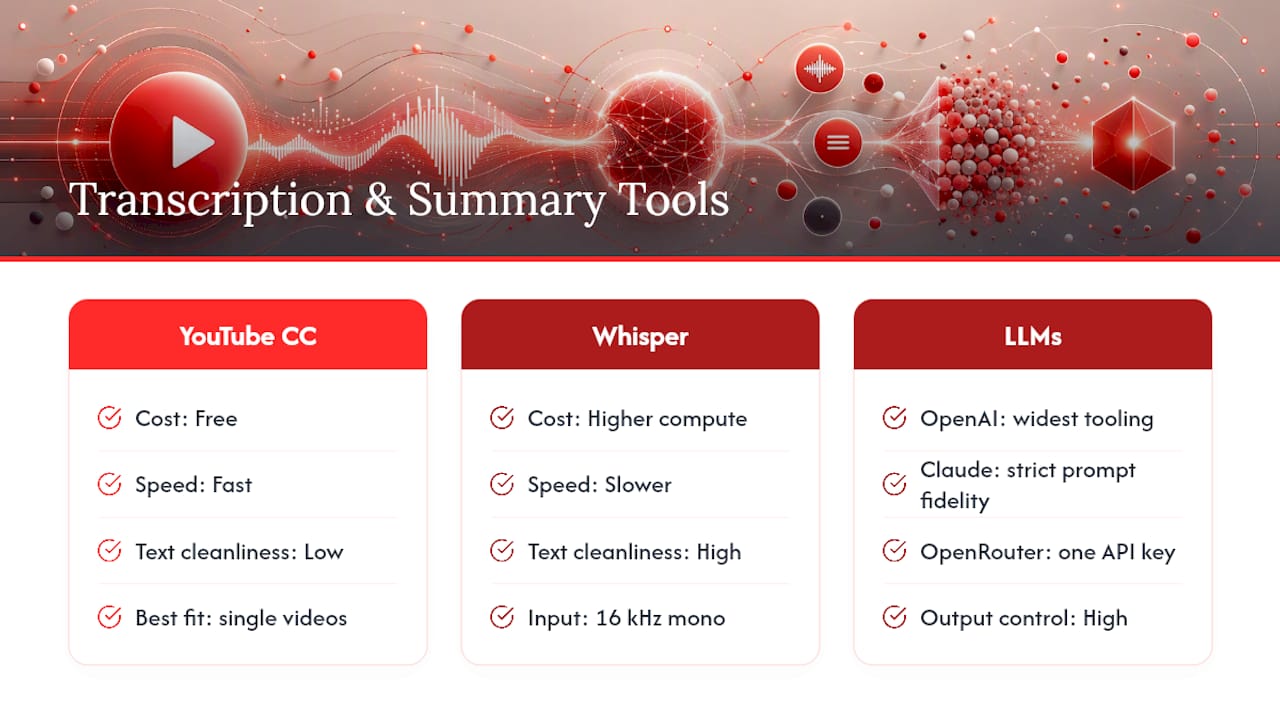
Transcription and ASR. YouTube’s auto-captions are free and fast but riddled with errors on technical vocabulary or accented speech. youtube-transcript-api pulls those same captions programmatically, which makes it the default for most single-video jobs. When captions don’t exist or are garbled, Whisper transcribes the audio directly and handles accents and jargon far better, at the cost of compute time.
Fetching and fallback. yt-dlp downloads video, audio, and metadata even when a transcript is unavailable. A common pattern extracts audio at 16kHz mono, the format Whisper expects, then runs it through transcription before summarization even starts.
LLM providers. OpenAI has the widest tooling ecosystem and fastest iteration cycle. Anthropic’s Claude models tend to follow structured prompts more literally, which matters for consistent summary formatting. OpenRouter gives you one API key across dozens of models, useful when you want to test which one handles your niche content best without juggling separate accounts.
CLI tools worth knowing: youtube-summariser handles single videos and channels with provider flags built in. bulk-summarize and summarize.sh-style scripts manage scan-summarize-combine workflows across dozens of videos. Baitless covers the opposite end: zero setup, instant summaries and key-moment highlights inside your browser.
Setting Up Your First Automated Summary Pipeline
Start with one video before scaling to a channel. The youtube-summariser CLI extracts the transcript and generates a structured, Obsidian-ready Markdown file in a single command:
youtube-summariser "https://youtube.com/watch?v=VIDEO_ID" --provider anthropic
That flag lets you swap providers without touching the rest of your setup: --provider openai, --provider anthropic, or --provider openrouter. If the video has no usable transcript, drop to audio extraction and Whisper manually:
yt-dlp -x --audio-format wav "URL"
whisper audio.wav --model medium
For bulk runs across a channel, tools like bulk-summarize follow a scan → summarize → combine sequence. A typical config file looks like this:
{
  "keywords": ["research", "tutorial"],
  "sources": ["https://youtube.com/@channelname"],
  "maxVideosPerSource": 20,
  "summaryPrompt": "TL;DR, 5 key takeaways, timestamped chapters"
}
bulk-summarize initto scaffold the configbulk-summarize scanto find matching videosbulk-summarize summarizeto process each onebulk-summarize combineto merge outputs into one report
Use a consistent prompt template across every run: TL;DR (2 sentences) + 5 bullet takeaways + timestamped chapter markers. For transcripts longer than your model’s context window, chunk by topic shifts rather than fixed character counts, then summarize each chunk before a final pass condenses those into one document.
Store API keys in a .env file, never in the script itself, and add that file to .gitignore before your first commit.
Pro Tip: Name your output files with the upload date and a slugified title, like 2026-01-15-pricing-strategy-webinar.md. Six months from now, you’ll thank yourself when searching your notes folder.
Batching Videos Without Hitting Rate Limits or Duplicates
Scaling from one video to an entire channel introduces two new problems: API throttling and reprocessing videos you’ve already summarized.
- Set a hard
--max-videoslimit per run, even during testing. - Add a delay between API calls (1 to 2 seconds is usually enough to avoid throttling on most providers).
- Keep a checkpoint file tracking
processed_videosby ID so reruns skip completed work. - Cap parallelism at 2 to 3 concurrent requests unless your provider’s plan explicitly allows more.
For scheduling, a self-hosted digest pipeline can scan channel RSS feeds daily, catch new long-form uploads, and email a summary digest without ever touching the YouTube Data API.
- Use
cronorlaunchdfor daily local runs. - Use GitHub Actions if you want the pipeline running in the cloud on a schedule.
- Prefer RSS feeds over the YouTube Data API for simple daily scans; RSS has no quota to manage.
A research pipeline running on a schedule beats one you remember to run manually.
What Limits Should You Expect From Automated Summaries?
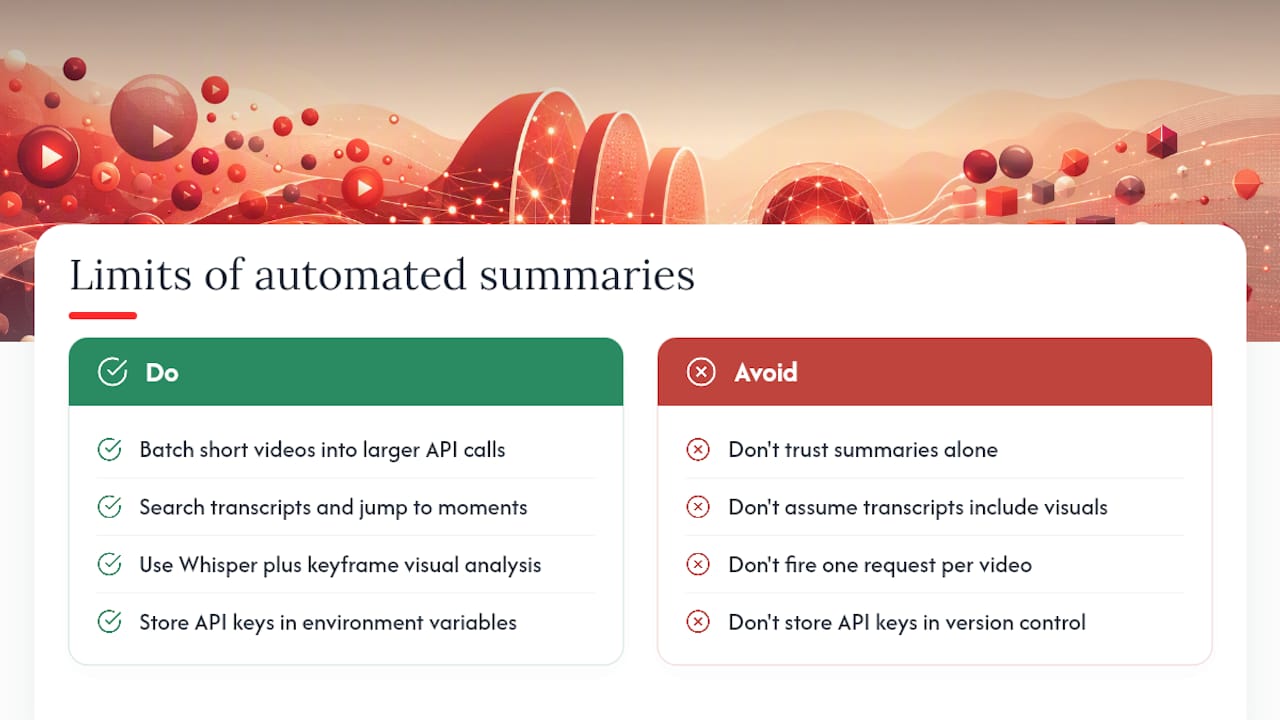
Auto-captions degrade fast on technical jargon, strong accents, and non-English audio, and Whisper, while better, still stumbles on niche vocabulary and overlapping speakers. Slides, on-screen code, and diagrams never make it into a transcript at all, so a lecture heavy on visuals loses real information no matter which tool you use.
Costs scale with both video length and model choice. Longer transcripts mean more input tokens, and a full-context model call on a 90-minute video costs meaningfully more than one on a 10-minute clip. Batching multiple short summaries into fewer, larger API calls usually controls spend better than firing one request per video.
AI-generated summaries flatten a video’s structure and strip out timestamps, so the reader loses the path back to the source. Verification depends on being able to search the transcript and jump straight to the exact moment, not just trusting the summary at face value.
When no transcript exists, fall back to yt-dlp audio extraction plus Whisper. For anything genuinely critical to a decision, a multimodal pipeline pairing Whisper with visual keyframe analysis catches on-screen content a transcript alone would miss. Always store API keys in environment variables, never in version control.
Why Transcript-First Beats One-Click Summarizing for Research
Most one-click summarizers optimize for speed, not for giving you a way back to the source. That trade-off is fine for a casual video but risky when a summary is feeding a research decision. Baitless solves the browser-side half of that problem: it turns a lengthy YouTube video into a concise summary with highlighted key moments, so you can decide in seconds whether to watch, skip, or save it.
The Chrome extension surfaces what matters instantly, without you touching a terminal. For casual research, that’s the whole job done. Baitless’s free tier includes 25 summary credits, enough to test the workflow before committing to anything, and the subscription tier adds capacity for daily users who summarize videos as part of their actual workflow.
Reach for Baitless when you need a fast answer inside the browser. Reach for a CLI pipeline like youtube-summariser or bulk-summarize when you’re exporting dozens of summaries into a research archive.
- Instant summaries with key-moment highlights, no setup required
- Free tier: 25 credits for casual, occasional use
- Subscription tier: expanded credits for daily research workflows
A Quick Note From the Field
I’ve built enough of these pipelines to trust one rule above all others: never take a summary’s claim at face value. Jump to the timestamp, read the actual line. It takes ten seconds and catches the errors that matter most.,.
Try Baitless Before You Build a Custom Pipeline
Not every research task justifies writing scripts and managing API keys. If you just need to know whether a 45-minute interview is worth your time, Baitless gets you there in one click, right inside the browser tab you already have open.

The free tier gives you 25 summary credits, and each credit covers one video summary with its key-moment breakdown. That’s enough to test the extension against a week’s worth of videos before deciding if you need more. Install it from the Baitless Chrome Web Store listing, summarize your first video, and see how much time it saves against your usual habit of skimming through the timeline manually.
If you’re summarizing daily, whether for a newsletter, a research beat, or a content review process, the subscription tier unlocks more credits and keeps the workflow simple without asking you to touch a config file. Start with the free credits and upgrade only once you actually run out.
Where to Go Next for Tools and Documentation
- yt-dlp on GitHub for downloader flags, format options, and audio extraction settings.
- youtube-summariser on PyPI for single-video and channel-level CLI commands.
- bulk-summarize on GitHub for config structure and scan-summarize-combine workflows.
- Self-hosted YouTube digest pipeline for RSS-based scheduling without a YouTube API key.
- Check each LLM provider’s own documentation for current rate limits and per-token pricing before committing to a bulk run.
Frequently Asked Questions
Can you fully automate YouTube research without any manual review? You can automate the fetch and summarize steps completely, but skipping human review on final outputs risks passing along an inaccurate summary as fact. A quick timestamp check after generation catches most errors in under a minute.
Do I need a YouTube Data API key to automate this?
No. youtube-transcript-api and yt-dlp don’t require one, and RSS feeds handle channel monitoring without hitting API quotas at all.
What happens when a video has no transcript?
Fall back to yt-dlp for audio extraction, then run that audio through Whisper for transcription before summarizing.
Is Baitless enough for research, or do I need a CLI pipeline too? Baitless handles quick, individual video decisions well through its browser extension. A CLI pipeline makes more sense when you’re processing dozens of videos and need exportable files for a larger research archive.