
How to Automate Video Research and Get Answers in Minutes
How to Automate Video Research and Get Answers in Minutes
Automated video research works by converting footage into timestamped, searchable metadata, then running retrieval-augmented queries against that index instead of watching hours of raw playback. You get an answer with a clickable timestamp instead of a scrubbed timeline.
Three names anchor how this works in practice. Video‑DeepResearch proposes a decoupled perception-then-exploration pipeline that forces a model to look at the video before it searches the web. Azure Content Understanding splits the job into content extraction and field extraction, so transcripts and key frames come first, custom fields second. And Google Cloud’s Video Intelligence API can recognize over 20,000 objects, places, and actions, with 1,000 free minutes a month to test the waters.
The pipeline involves multiple essential pieces:
- Ingest: pull video by URL or upload, handle both files and live streams.
- Keyframe/shot detection: break the video into meaningful visual chunks.
- Transcription and OCR: capture spoken words and on-screen text.
- Visual detection: identify objects, logos, actions, and scenes.
- Segmentation and indexing: map everything to timestamps and embed it for search.
- RAG/QA: let a language model answer questions using that indexed evidence, not memory.
Pro Tip: Before you let any research agent touch a web search tool, force it to select keyframes and crop the entities it’s asked about. Skipping this step is the single most common reason automated video answers hallucinate details that were never on screen.
Key Takeaways
Automating video research works best when perception runs before retrieval, keeping every answer tied to a verifiable timestamp instead of a model’s guess.
| Point | Details |
|---|---|
| Ground perception first | Force keyframe selection and object detection before any text-based web search to avoid parametric leakage. |
| Match labels to accuracy | Trust automated results on concrete objects and actions far more than on abstract categories like emotion or genre. |
| Plan for real constraints | Budget around ~1 FPS frame sampling, 512×512 resolution limits, and vendor free-minute quotas like Google’s 1,000 minutes. |
| Build for custom, buy for speed | Build a pipeline for proprietary footage and enterprise needs; use a product when you need fast YouTube-first results. |
| Start with Baitless for YouTube | Install the Baitless Chrome extension for free, timestamped YouTube summaries without building any infrastructure. |
Table of Contents
- What Automated Video Research Actually Means
- Core Components of a Video-Research Pipeline
- How Do You Actually Build This Pipeline?
- Why Do Automated Video Answers Sometimes Get It Wrong?
- What Are the Real Limits, Costs, and Timelines?
- What Privacy and Copyright Rules Apply?
- Should You Build a Pipeline or Use an Existing Product?
- Why the Decoupled Approach Actually Works
- Get YouTube Summaries Without Building Anything
- Frequently Asked Questions
- Sources
What Automated Video Research Actually Means
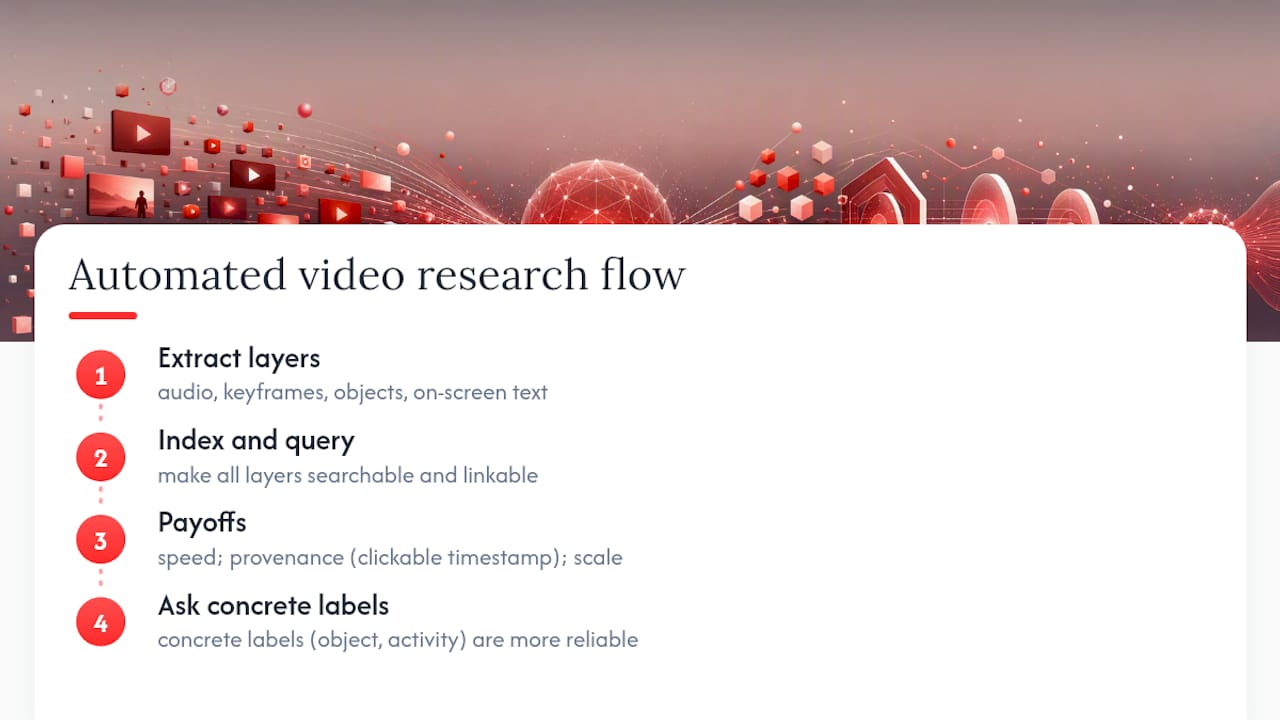
Treat a video the way you’d treat a database. Every clip contains an audio transcript, a sequence of key frames, a set of detected objects, and whatever text appears on the screen. Automating video research means extracting all four layers and making them queryable, instead of relying on a human to remember what happened at minute 47.
The payoff shows up in three places. Speed is the obvious one: a search that used to mean scrubbing through two hours of footage now takes under a minute. Provenance matters more than people expect. Instead of a vague summary, you get a clickable timestamp and keyframe that let you verify the claim yourself. And scale changes what’s even possible. A single researcher can’t watch 3,000 hours of conference footage, but an indexed pipeline can search all of it in the time it takes to type a question.
The 2024 LLM-assisted video analysis study found something worth internalizing here: concrete labels like “object” and “activity” get annotated far more reliably than abstract ones like “emotion” or “genre.” That distinction should shape what you ask your pipeline to do. Ask it “does this frame show a red car,” and it usually nails it. Ask it “does this scene feel tense,” and you’re rolling dice.
Common use cases cluster around a few patterns: academic and journalistic research across large archives, content repurposing for creators who need to find the best 30 seconds in a three-hour stream, compliance review of recorded calls or broadcasts, and competitive intelligence teams tracking what rival brands show in their own video content.
Core Components of a Video-Research Pipeline
Building this yourself means assembling (or buying) six layers that stack on top of each other.
Ingest and storage comes first. Decide whether you’re handling uploaded files, pre-signed URLs pointing at cloud storage, or live streams that need real-time processing. Most teams start with a media asset management bucket or plain cloud storage and add streaming later if they need it.
Content extraction is where transcription, shot detection, and key-frame extraction happen. Azure Content Understanding handles this with a two-stage flow, and it’s worth knowing its limits going in: frame sampling runs at roughly 1 frame per second, and sampled frames get resized to 512×512 resolution. A fast cut or a sign that flashes for half a second can slip through that gap.
Perception layers object, place, and action detection on top of those key frames, along with logo and brand recognition and any custom fields your project needs. This is where Video‑DeepResearch’s approach becomes relevant, because the perception layer should run before any text-based web search.
Indexing converts everything into multimodal embeddings, stores them in a vector database, and maps each entry back to a timestamp. Research is the query layer, where retrieval-augmented generation lets you ask natural questions. Outputs close the loop: summaries, timestamped clips, structured QA pairs, and a persistent knowledge store you can query again later.
| Pipeline Layer | Primary Job | Example Constraint |
|---|---|---|
| Content extraction | Transcription, shot/keyframe detection | ~1 FPS sampling, 512×512 frame resolution |
| Perception | Object, logo, action detection | Stronger on concrete objects than abstract labels |
| Indexing | Embeddings, vector storage, timestamp mapping | Storage and retrieval costs scale with video volume |
| Research (RAG) | Query answering with grounded evidence | Requires forced visual grounding to avoid leakage |
How Do You Actually Build This Pipeline?
Start small. A minimal viable pipeline can run on managed APIs without a single custom model, and it looks like this:
- Collect your video sources. Gather URLs or upload files into cloud storage.
- Run transcription and shot/keyframe extraction. Use a managed service to generate a transcript and pull representative frames from each scene change.
- Run object and OCR detection on those keyframes. This is where you find the 20,000-plus recognizable objects and on-screen text.
- Generate multimodal embeddings and upsert them to a vector database, tagging each entry with its source timestamp.
- Connect an LLM RAG chain that queries the index and returns answers with linked evidence, not free-floating prose.
Once that MVP works, production hardening adds batching for large video libraries, retry logic for failed extraction jobs, pre-signed URL ingestion so you’re not manually uploading files, and parallel analysis passes that generate a summary, a compliance check, and a highlight reel in one run. Projects like video-research-mcp show how an orchestration layer can bundle video analysis, web research, and knowledge-store connectors into a single server that agents call through simple commands.
Wire the output into whatever your team already uses. That might mean a search UI where analysts type a question and get back a ranked list of timestamped clips, or an LLM chain embedded in a Slack bot that returns evidence and a verdict.
Pro Tip: Require a perception-first step in every research chain, and run periodic tool-free rollouts as a check. If an agent can still answer questions accurately without ever calling the visual tools, something in your pipeline is leaking web-trained assumptions instead of looking at the actual footage.
Why Do Automated Video Answers Sometimes Get It Wrong?
The two failure modes worth knowing by name are modality bias and parametric knowledge leakage. Modality bias means a model defaults to text and transcript search because that’s what it was trained on most, even when the answer lives in a visual detail no transcript captures. Parametric leakage is worse: the model answers from what it already “knows” about a topic, rather than what’s actually shown in the frame in front of it.
Video‑DeepResearch’s own diagnosis is blunt: unless you force tool use in a specific order, agents will default to guessing from prior knowledge instead of grounding claims in what’s on screen. The fix is architectural, not a prompting trick. Lock the perception tools (Select_Keyframe, Crop_Search) ahead of text-based Search and Visit, so the model has to look before it can leverage outside knowledge.
Beyond pipeline order, a few controls make outputs trustworthy enough to act on:
- Keep every answer attached to clickable evidence: a keyframe thumbnail, a timestamp, and the exact transcript snippet it came from.
- Grade evidence in tiers, like Confirmed, Strong, and Inference, so users know how much weight to give a claim.
- Run periodic tool-free rollouts as a diagnostic filter, comparing answers with and without visual grounding enabled.
- Spot-check a sample of QA pairs by hand, especially on abstract categories where automated accuracy tends to drop.
Researchers studying AI’s interpretability gap make a related point that applies directly here: summary-only outputs without a way to trace the underlying evidence are functionally a black box, no matter how confident the prose sounds.
What Are the Real Limits, Costs, and Timelines?
Set expectations before you build anything. Accuracy holds up well for concrete objects and physical actions, and it degrades on abstract calls like emotional tone or genre classification, a pattern the 2024 ACM study documented directly across 203 keyframes from 25 videos. Don’t ask your pipeline to tell you if a scene is “sad.” Ask it whether a specific object appears, or whether a specific action happens, and trust the answer far more.
Technical constraints compound the accuracy question. Azure’s documented frame sampling runs at roughly 1 FPS, and frames get resized to 512×512, which means anything that happens between sampled frames, or any small detail lost to resizing, simply doesn’t make it into the index.
Cost drivers break down into four buckets: analysis minutes against vendor quotas (Google Cloud’s Video Intelligence API gives you 1,000 free minutes a month before billing kicks in), GPU inference if you’re running your own vision models at scale, vector database storage and retrieval, and LLM token consumption for every RAG query you run.
Timeline-wise, an MVP built on managed APIs is realistic in one to two weeks. A production system with robust ingestion, quality gates, and full indexing typically takes two to three months, mostly because retry logic and edge-case handling eat more time than the core pipeline itself.
What Privacy and Copyright Rules Apply?
Automating research over video you don’t own carries real legal exposure, and the rules shift by platform, jurisdiction, and use case. A few practical habits reduce risk regardless of where you operate:
- Check platform terms of service before ingesting or redistributing content, and favor indexing or pointer-based approaches over mass copying whenever a use case allows it.
- Redact personally identifiable information from transcripts and diarization data when you don’t have a legitimate reason to keep it.
- Lock down your vector database and evidence links behind access controls, and audit who queries what.
- Log the provenance of every automated answer so you can trace a claim back to its source video if someone questions it.
- Build in consent checks for private footage, offer opt-out paths where relevant, and route sensitive topics through human review before publishing conclusions.
This is general guidance, not legal advice. Confirm current rules for your specific content and jurisdiction with a qualified professional before deploying anything at scale.
Should You Build a Pipeline or Use an Existing Product?
The decision usually comes down to five factors: how much video you’re processing, how much customization you actually need, where your data has to live, how much engineering time you can spare, and how fast you need results.
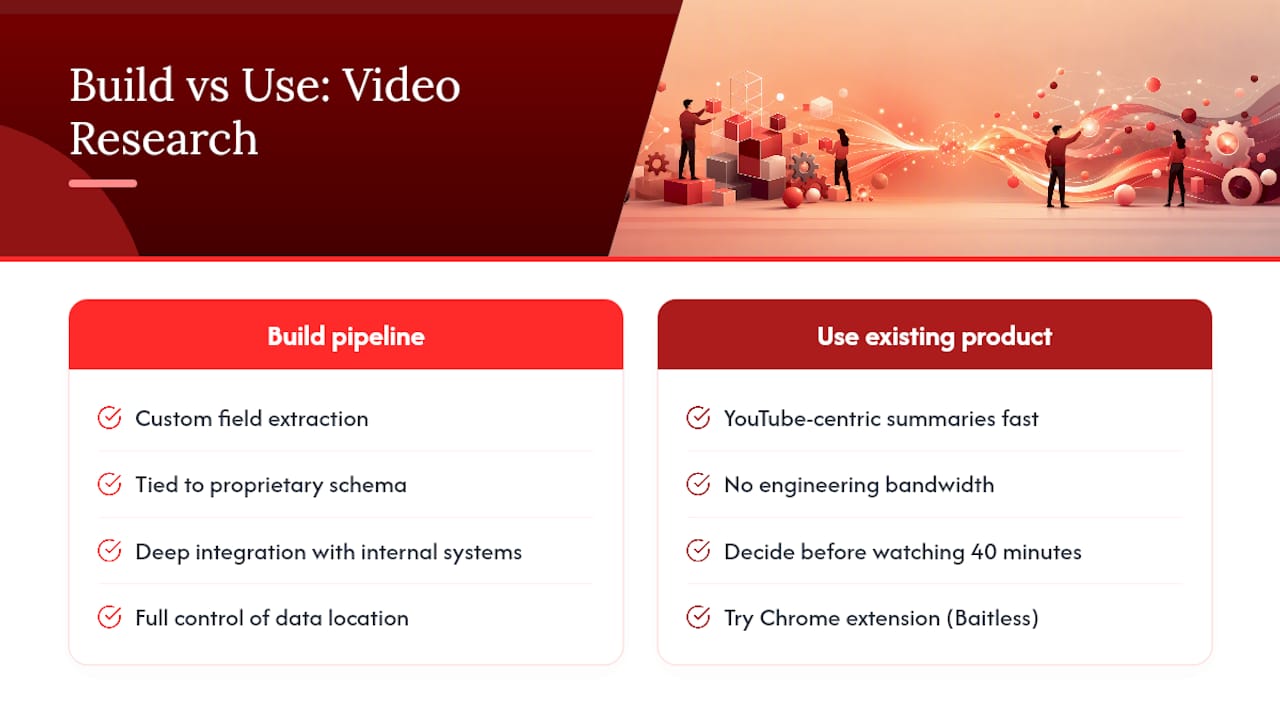
Build your own pipeline when you need custom field extraction tied to a proprietary schema, deep integration with internal systems, or full control over where your data sits. Use an existing product when you need YouTube-centric summaries fast and don’t have engineering bandwidth to spare on infrastructure.
If your entire use case is “I need to know what’s in this YouTube video before I invest 40 minutes watching it,” building a custom RAG pipeline is solving a problem you don’t have. Reach for a purpose-built tool first, and only build when the tool’s limits actually block you.
For readers who mainly consume YouTube and need fast decisions, not enterprise infrastructure, a dedicated Chrome extension like Baitless is the practical next step, more on that shortly. For teams running research across proprietary footage, security camera archives, or multi-platform video libraries, a custom build stays the right call. Either way, start with a short checklist: define your query types first, test the tool against 10 real videos before rolling out further, and confirm evidence is clickable and traceable before you trust a single automated answer.
Why the Decoupled Approach Actually Works
The instinct to let a research agent search the web first and check the video second feels efficient, but it’s backwards, and Video‑DeepResearch’s benchmarking makes the case well. Forcing visual grounding before web retrieval isn’t a compliance formality. It changes what the model is capable of answering correctly in the first place.
Staged tool unlocking, where an agent literally cannot call a text search tool until it has selected and examined relevant keyframes, is one of the lowest-risk engineering patterns available for this problem. It doesn’t require a bigger model or more training data. It requires ordering the tools correctly and refusing to let the agent skip the step.
The maintainability question gets overlooked too often. Schema-driven custom fields, the kind Azure Content Understanding’s field extraction stage produces, make pipeline outputs consumable across teams that didn’t build the pipeline. A marketing team and a compliance team can query the same indexed video library without either one needing to understand embeddings or vector search. That’s the difference between a clever prototype and a system people actually keep using.
Get YouTube Summaries Without Building Anything
If your actual problem is “I have a backlog of YouTube videos and not enough time,” none of the pipeline architecture above needs to be your problem to solve. Baitless is a Chrome extension that turns long YouTube videos into concise, timestamped summaries the moment you land on a video page, so you can decide to watch, skip, or save in seconds instead of minutes.

It shows you exactly what to focus on and what to skip, with highlight moments pulled out automatically. The free tier gives you 25 summary credits to test it against your own viewing habits, and a low-cost subscription unlocks more credits for daily use once you’re hooked. Building the pipeline described above makes sense for proprietary video libraries and enterprise compliance work. For YouTube specifically, installing Baitless gets you the same core benefit today, no infrastructure required. Add the extension and run your next long video through it before you commit to watching the whole thing.
Frequently Asked Questions
What does it mean to automate video research? It means converting video into searchable, timestamped metadata (transcripts, key frames, detected objects) and querying that index with retrieval-augmented generation instead of manually watching footage.
How do you avoid inaccurate AI video summaries? Force the pipeline to select and examine keyframes before it runs any text-based web search, and keep every answer tied to a clickable timestamp so you can verify the claim yourself.
Is automated video research accurate? It’s reliable for concrete details like objects, brands, and actions, and noticeably weaker on abstract judgments like emotional tone or genre, based on 2024 research comparing both label types.
Do I need to build a custom pipeline, or can I use an existing tool? Build custom only if you need proprietary field extraction or handle large volumes of non-YouTube footage. For fast YouTube summaries, a tool like Baitless gets you there without any engineering work.
Sources
Readers who want to go deeper than this walkthrough should start with the sources that shaped the approach here.
- Video Intelligence API features (Google Cloud docs)
- LLM-assisted video analysis (ACM paper, 2024)
- Video‑DeepResearch: Towards the Next-Generation Multimodal Deepresearch Agent (arXiv)
- Content Understanding — video overview (Microsoft Learn)